I have been using SiliconDust HDHomerun devices on my Plex server for years. It seems that they recently got new IP addresses, which I added to my DVR config. However, the “old” devices still show up to be added, with the old IP addresses. Is there a database or something somewhere where I can remove the “phantom” tuners that no longer exist? I don’t see a way to delete them in the UI anywhere, even though they don’t respond to pings, and I KNOW the addresses shown are not correct or responding.
Thanks!
There is an option to delete them. They are in different placed depending on the number of tuners you have. A single tuner it has it in the upper right hand corner of the DVR settings, if you have more than one you will see an X on the right side when you hover over the tuner.
The issue is more that Plex “finds” these devices, but they’re not actually there. These are very old IP’s from time long past and my HDHomerun’s now have different IP’s from my DHCP server. I want to remove these from the list of devices to add, as it was rather confusing which to pick when I had to migrate my DVR in December, and I have no idea why Plex would have history of these, unless they’re in a database somewhere, in which case I would like to remove them, somehow.
The others, shown below, are the right devices, with their current IP’s.
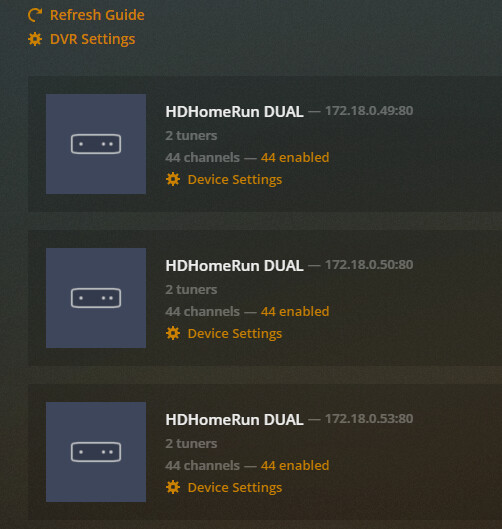
In your second screen shot, you should get a red X when you hover over the device to delete them.
The devices are maintained in a database. In your Plex Data folder you should see a Plug-in Support folder, inside that folder is a Databases folder. Inside the database folder you will see several .db files. Obviously to continue Plex Media Server needs to be shutdown to ensure the database does not get corrupted. I also like to make a backup copy of the database myself in case something goes wrong.
You will need an application to open the SQLite database, I use DB Browser for SQLite. The database you are looking for is “com.plexapp.plugins.library.db”. Open this database file in the DB Browser for SQLite . Click the Browse Data tab and select the media_provider_resources table. You should see entries for all of the tuners that Plex sees. Select a tuner you want to delete and then click the Delete Record button. Repeat for the other two tuners you want to delete.
I will add that I find it odd that you have the same tuners duplicated. I have never seen Plex duplicate the same tuners. If the tuner matches with the uuid I have typically seen the uri get updated with the new IP Address of the tuner. Curious if these are actual tuners or virtual ones being emulated by some other software.
The ones in the second screenshot are, in fact, the actual “good” tuners. The others in the first screenshot (i.e. those with *.14? IP addresses) are the bogus ones. At one point those WERE IP addresses for tuners, but they’re no longer valid, but still being picked up by Plex. It’ll let me add them all day long, even though they don’t exist. Removing the working ones would likely be counter productive, and apparently there’s no “nullify the database of all tuners and rescan” functionality.
Thank you! I’ll dive into this shortly and see what I can mess up. I too found it somewhat odd, but I’ve been using these tuners for a very long time. I believe, but can not swear to it, that I had to manually enter the IP addresses of them at some point for discovery to work. I’m not sure if that precipitated my current problems. I’ll venture forth with the tools you suggested and see if I can clean things up. I appreciate the detailed steps, so I don’t thoroughly muck things up.
And no, I’ve only ever had the 3 dual tuner devices, and to my knowledge, there’s no emulation going on anywhere. If so, you’d think that the IP’s would need to reply, which they do not, and there are no entries in my DHCP server for those IP’s (the entire .0.XXX range is DHCP managed only).
Just followed the steps outlined, and the phantoms are gone. Providing a snipped of the database from before changes. It seems to show that the UUID is, in fact, slightly different. Not sure when/where/why it changed, but at some point it must have and thus not the same unique UUID that it’d update. Appreciate the help to resolve!
Glad you got it resolved.


