Server Version#: 1.42.2 (QNAP)
Player Version#: 10.26.0.2578 and 2025.28
I have been having playback issues on Plex on my pixel 10 for a couple of weeks now. I have tried with the latest software as well as an older version. My wife has a pixel 8 and does not have any of the same issues, while logged into my account.
The issue is that when I am playing back something that was recorded on my TV antenna using HD home run, playback doesn’t start unless I set the transcoding to 8 Mbps (or other). So playing back in the original quality is not working on my pixel 10, but is working on my wife’s pixel 8. It is only happening for some recordings but not others. There is no playback issue on the computer or on the Roku TV. This is all on the same network, and I have disabled VPN as well.
I’m running Plex media server on a qnap ts-351, and have deleted the Codec folder to see if that was part of the issue. I have stopped and restarted Plex on the qnap, cleared the cache on the phone, as well as reinstalling it on the phone, along with reinstalling different versions. Nothing has helped.
There is a spike in server activity and when trying to load a video, but then nothing else.
So I dove deeper into this issue and came up with a workaround.
First, I tried downloading the video through Plex, which didn’t help.
Next, I downloaded three different files from my NAS to my phone and tried playing them back with VLC. The same ones that didn’t work with Plex weren’t playing back video, but I could hear the audio in the playhead would actually move (whereas it never budged in Plex and did not play either audio or video).
I looked up a solution for how to get the files working in VLC and found that if I turned off hardware acceleration that it might resolve the issue. It did.
In the Plex mobile app, I was able to play back the video by selecting VLC as my player (settings-advanced-player-use external player), but this is not an ideal solution, so I kept searching.
I then looked up how to turn off hardware acceleration in Plex, and the answer was not so straightforward. Plex actually doesn’t have this sort of enable/disable option for hardware acceleration.
In the same settings area, I ended up trying to change the h.264 maximum level in device support to a lower level. It was originally set to 6.0 as recommended, and then going through setting by setting lower and lower. I finally arrived at 3.2 which is working.
Pretty hilarious that on a brand new Pixel 10 Pro, I was forced to make this change to lower the video quality when it worked without issue before on my Pixel 7 and remains working on my wife’s Pixel 8.
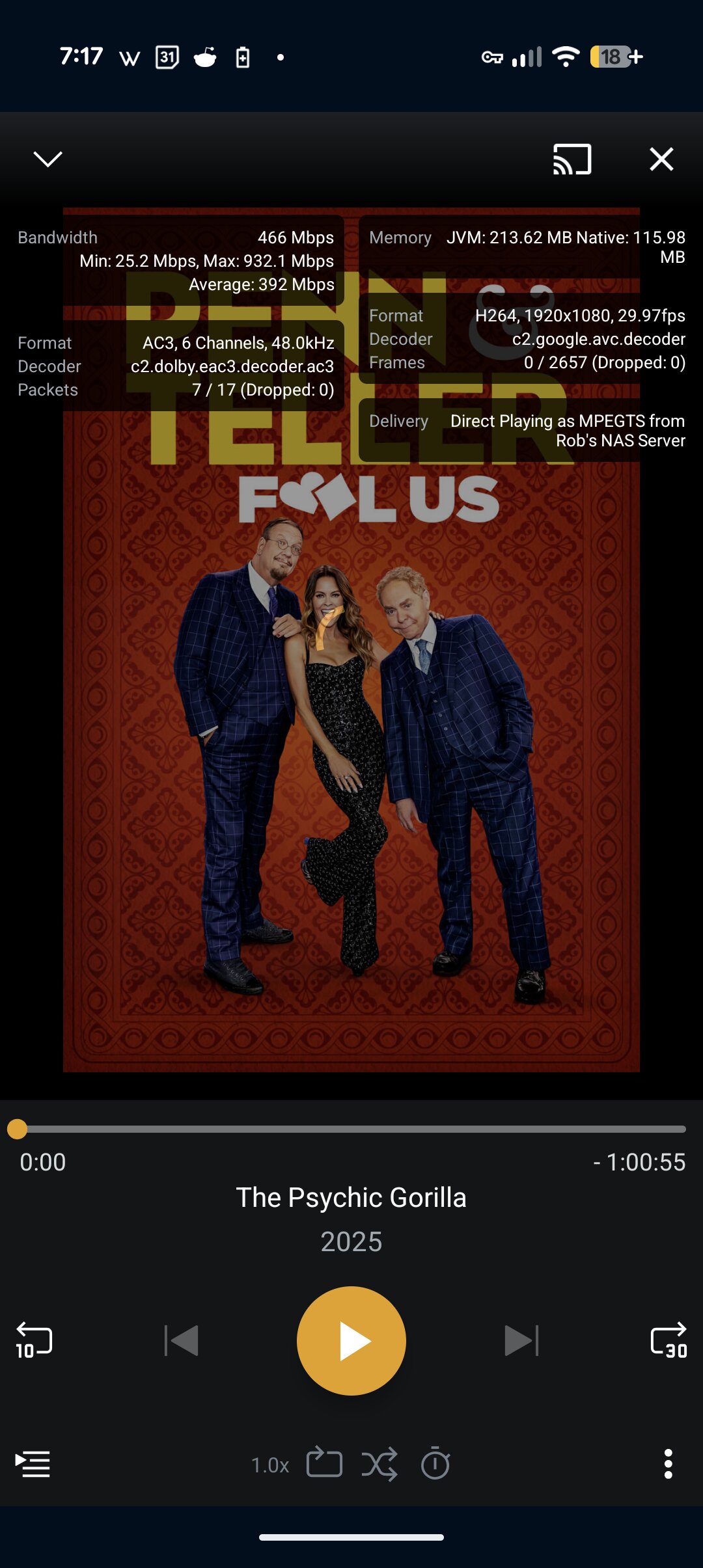
To give a sample of the stats I’d see when trying to play back a file that wouldn’t play before changing the setting to 3.2 (mentioned in my previous post).
I am having the same issue, same phone. Can you clarify where/how you changed the h.264 settings? Was that in the mobile app itself or the ones server settings. If you could provide the exact menu medication path I would much appreciate it.
Would you be able to grab the logs from the new app and I will take a look. It’s a bit odd it works if you lower the H264 level. I would think the Pixel 10 Pro would support H264 level 6.0 if thats what we detect as the maximum.
Hey Bryan, the solution was in there but in two separate parts, so maybe a little hard to follow.
”settings-advanced-player”
then
”In the same settings area, I ended up trying to change the h.264 maximum level in device support to a lower level. It was originally set to 6.0 as recommended, and then going through setting by setting lower and lower. I finally arrived at 3.2 which is working.”
Thanks for the reply, but now I am even more confused. I went all through the settings BEFORE replying to you, but didn’t see anything like what you mentioned. After your reply, I went to settings→advanced, but ‘Reset Cache’ is the only option I have I there. Are there multiple versions of the app, or something that unlocks the additional advanced options? Attaching a screen shot of what I see.
Ahh, yes of course. I didn’t realize they nuked this setting in the newer version. I’m running 10.26.0.2578 on my phone, as it has a lot of features that the new experience is lacking - I guess also this crucial one!
You can download it on APK mirror and install it with the apkmirror Android app. It’s a bit of an annoying process and there are a lot of ads, but you’ll get there. You can look up YouTube videos of how to manually download and install an app. Really it should only take 5 minutes of your time.
Hi sixones, how would I go about doing that? In settings - advanced, there’s only the clear cache option. I looked it up a little bit and it said that’s where the network logging option is supposed to be. So I’m not quite sure how else to give you the proper logs.
Before changing anything, recreate the problem and grab the mobile app logs so @sixones can take a look at them.
Before changing the Max H.264 Level, first try disabling Direct Play (mobile app settings → video & audio). If that does not help, then also disable Direct Stream.
Disabling Direct Play forces Plex Media Server to Direct Stream (remux) the media. It will place the selected video/audio/subtitle tracks into a new mp4/mkv container before sending them to the client. Also disabling Direct Stream forces Plex Media Server to transcode the video & audio before sending it to the client..
To change the Max H.264 level in Plex for Mobile (2025.x.y):
Plex mobile app settings → Video & Audio → Maximum H.264 Level
You can monitor playback via Plex Dashboard → Now Viewing + Expanded View from a web browser on your desktop/laptop. It will show if the video/audio/subtitles are direct playing, direct streaming, or transcoding.
Disabling Direct Play forces Plex Media Server to Direct Stream (remux) the media. It will place the selected video/audio/subtitle tracks into a new mp4/mkv container before sending them to the client.
Alright, so in the newest version of the app, I disabled Allow Direct Play and the videos are working fine now. I was worried that this would be resource intensive on my NAS, but as you describe it, it shouldn’t be, right?
To change the Max H.264 level in Plex for Mobile (2025.x.y):
Plex mobile app settings → Video & Audio → Maximum H.264 Level
I don’t see this. Are you maybe using developer-only version, or have some additional settings unlocked? I’ve written what I see (as I’m responding on my PC)
Local Quality: Maximum
Wi-Fi Quality: Maximum
Cellular Quality: 720p HD
Allow Direct Play: Disabled
Allow Direct Stream: Enabled
As for the logs, in the same newest version, and with Direct Play enabled, I’ve tried playing back a handful of antenna recordings without success. I also removed a bunch of the unnecessary stuff from the txt file from before the test.
Tagging @sixones for some assistance (please and thank you )
Could you go back to the old app, play the same recording that failed and send me the logs from that? There’s nothing in the logs that show it’s failing, the logs seem to suggest it’s working correctly. Hoping with a set of logs that show it’s working, I can see the missing piece.
The maximum H264 level is only visible to employee’s and ninja’s, as it’s not actual connected, so it won’t do anything.
Hey sixones, after rolling back to version 10.26.0.2578 on my Pixel 10, I’m not seeing the option in “settings - about - download logs” (there’s no about section in settings). Do I need to export the server’s logs or is there a simpler way?
First, I tried playing back everything on the 6.0 setting, and no recordings worked. I then switched to 3.2 and they all worked fine. Not sure if you’ll see any difference in the log. When monitoring on my server, there are tiny spikes when I try to start a video on 6.0, as seen in my earlier post, but on the phone the loading circle just kept spinning and on the server, no indication of playback.
For future reference, and to assist anyone else who might be searching for how to get logs in the older version, it’s located in settings - help and support with the options for network logging or to share debugging data; not in the advanced menu as AI in Google will try to tell you.


 )
)

