Server Version#: Version 1.18.6.2368
Player Version#: Version 4.20.2
i noticed after the update that there’s a new pinned entry on my home screen. Movies & TV on PLEX. i clicked on it and tried to watch one of the shows and got the playback error.
"An error occurred trying to play this item. Please enable DRM support in your browser then try again.
Error code: D200"
i made sure DRM playback was enabled in firefox and tried again, no joy. i tried google chrome, same issue. got the playback error. couldn’t find the DRM settings in chrome. same issues using MS edge.
i tried the plex app for windows and it doesn’t even give me the choice to watch shows on plex as the web app does…
experiencing same issue, no plex movie are playing DRM error d200 turn it off and back on nothing, updated browser, plex, extensions, OS and still nothing cleared cache, and preferences, still nothing.
Same, I just installed Plex because I wanted to convert my old pc into a Media Center.
I didn’t know that these free movies were actually a new feature, maybe it’s a bug? (I’m also 100% sure I can reproduce DRM content because the Winevine plugin is installed and active in Firefox)
it only appears to be an issue on windows 10, i tried it on my 4k firestick and it plays back just fine. found out a lil bit ago and thought i would let y’all know…
4.20 would be the most recent version of Plex Web to be bundled with PMS. Browsers typically impose additional restrictions on DRM playback which aren’t met when running the bundled Plex Web.
We’ll show D200 when you try to play DRM protected content and Plex Web is loaded over HTTPS or accessed over localhost or 127.0.0.1.
If so please do double check that your browser enables DRM/protected content.
You can play DRM protected content in the Plex Web bundled with PMS. Although browsers require the app is loaded from http://localhost or http://127.0.0.1. Accessing the bundled app via HTTP from a different IP or hostname will not work.
Do you all fall into either situation above? If so please do indicate
Was having the same issue. Updated PMS, SSH’ed in, cleared caches, pulled hair out, finally checked FF and realized it was a Brave/Chrome issue. I was on: Version 1.2.43 Chromium: 79.0.3945.130 (Official Build) (64-bit)
and just updated to: Version 1.3.115 Chromium: 80.0.3987.87 (Official Build) (64-bit)
I did nothing else and I am working as normal again.
Only being able to access content using https://localhost or https://127.0.0.1 is not useful at all if you run a home Plex Server and access it directly. I imagine this is a common use case.
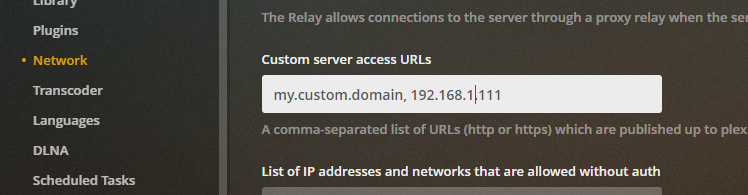
This feature really needs to take into account any custom domains you have configured:
can anybody tell me why i can’t see these movies played through my tv. movies and tv option doesn’t even show up on my tv plex screen. option doesn’t even exist. am i only allowed to watch these movies on a browser verses a tv.
lg, plex latest version, i guess, i just updated app a few months back. same with browser app everything is update including OS, are we suppose to be able to see movies and tv from plex on our tv’s? or just a computer browser. little frustrating to give an option but only usable through a browser.
i am having same problem after latest update- using Version 80.0.3987.106 (Official Build) (64-bit) chrome- win 10 latest- browser drm content is enabled- I reset browser, cleared cache, etc- still can not play- can play the content using the shortcut on app.plex.tv but have to launch it every time.