
As i was going through each folder i realised an issue, 3 series seems to have merged even thou they are in different folders!
Which folder is added to the TV Show library?
You cannot have any folders between the one added to the library and the show folder.
If you added the TV Shows folder to the library, then you cannot have an “English Shows” folder.
Move the tv show up one level.
/TV Shows  <-- folder added to tv show library
  /Game of Thrones (2011)
    /Season 01
      /Game of Thrones (2011) s01e01 Winter Is Coming.mkv
In Windows File Explorer, configure it to show the file extension. View Tab → check the box for “File Name Extension.”
It looks like you have a “double extension” on the subtitle files, .srt.srt.
Also, you must add a language code to the subtitle file. Otherwise, Plex will consider it an “unknown” language.
Ok will adjust it later when i get home.
Currently i link tv shows library to tv shows folder.
Subtitle i need to check default i think there isnt but after renaming with TMM it adds 2 additional file. Yes for movies ive rename it to en .srt may have over look when TMM automatically added it
Ok I remove the middle folder and now all my Tvshows appears in plex ! Thank you !
Q1. As for the changing of hardisk to upgrade to bigger capacity, what should my procedure be especially when i want to change from basic to SHR1.
Q2. After i install the manual update for plex server on my NAS i no longer see launch icon on my diskmanager desktop. in order to open it i need to reopen the package centre and search for plex which is already installed then click open. cant find a way to add it as a shortcut
There are many ways to expand storage and move to SHR1.
Suggest you talk to Synology Tech Support. They can guide you through the steps.
Consider creating a browser shortcut pointing to https://app.plex.tv/desktop or to the IP address of the NAS, https://nas.ip.address:32400/web. Then you do not need to login to DSM to access Plex Web.
The ability to display/hide the PMS icon in DSM was recently added and confused many people when the icon disappeared. Plex will back out the change in a future PMS update (exact release unknown).
In the meantime: FAQ 34: Control Plex Media Server desktop icon visibility
Happy new year guys!
Thanks for your help thus far. Everything seems to be running fine and populated correctly. however to fine tune my collection i started grouping them in the “Collections” folder and have a couple of clarifications
Q1. after grouping them i realised they use a montage of 4 covers to be the collection album art, I replaced it with a photo 1, however i would like to delete that photo 1 and change to photo2, i still see photo 1 in the list of photo. how do i delete it away ?
Q2. for collection if i arrange the movies in order, would they auto play the net movie in the given order ?
Plex Docs → Working with Your Media → Collections
Edit the collection (pencil icon) → Poster
On my server, I see choices representing each movie in the collection plus one which is a montage.
No.
To auto-play movies, add them to a playlist.
In Plex Web, select the desired movies, then, at the top of the page, select the “Add to” icon (to left of pencil).
You can pin Playlists to the home page the same as you pin libraries. Choose More, and you should see Playlists listed among the libraries.
In a collection, you can arrange the movies alphabetically, by release date, or with a custom order. Edit the collection → Advanced. See the documentation linked above for additional info.
ok noted, currently i manually arrange the collection in the sequence of the movie i should watch them in.
Q1. currently I’ve installed plex software into the hardisk 1 on my nas, should i wanna to upgrade the storage to a larger Hardisk, can i just copy the software files into the new hardisk ? or must i reinstall? if i reinstall which files must i bring over. ( Consideration i have group them into the respective collection and so on)
Q2. Wake on Lan function is will this wearout the NAs over time ? meaning if i shut it off i still see light flashing at the lanport. was wondering if this would wearout the NAS components over time.
You can move the PlexMediaServer shared folder to another volume if desired.
- Stop Plex
- Synology Control Panel → Shared Folder.
- Edit the folder → General tab.
- Change the location to the desired volume.
- Wait for Synology to move things to the new location.
- Start Plex
For the Plex application itself, uninstall with the first (keep) option. Then re-install, selecting the desired volume.
I don’t use WoL. I leave my NAS running 7x24. There are maintenance tasks Plex needs to perform (Settings → Scheduled Tasks). Also, spinning hard drives up and down is not good for them. It can shorten their life.
Q1. For the source of where the videos are kept i know how to re select them. but for the ple application itself you are saying i need to unininstall and select a keep option ? meaning it will keep the settings and collection ive previously arranged ? how do i reinstate these settings and collections later ?
Q2 For my usage i dont use the NAS 24/7 because its just a form of archive of family photos and when i want to watch movies on the TV at night, so was thinking if its best to just turn it off for like good 18 hours of no usage. WOL is just incase i may wanna access files on the go (very unlikely) but if this affect the life of the power supply or hardware i rather not use it.
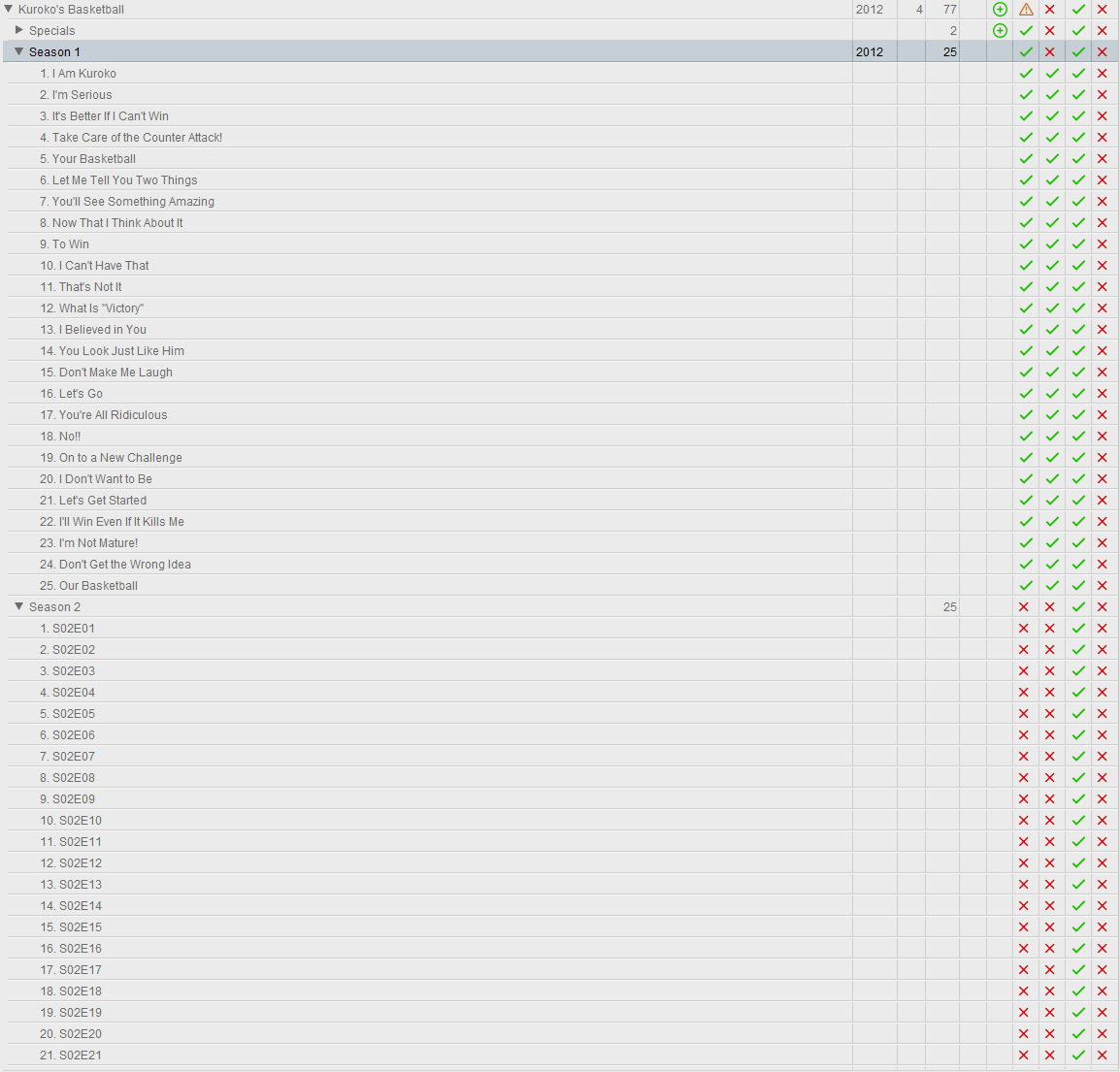
Q3. with regards to the naming of TV shows, i face a wierd issue, where TMM renames the episode for season 1 but not season 2. it doesnt physically rename the file in explorer but its just in the program. also there are alot of red crosses on the right not sure why.
This is where you need to talk to Synology about the process for upgrading your hard drives, especially if you want to move from individual volumes to SHR-1 or RAID.
Unless something has changed, you have four individual drives, with four individual volumes.
Drive 1 / Volume 1 is probably where the Synology OS, any applications, and some data is installed (it is the default location).
If you want to upgrade that volume, you will need to move the apps and any data to another volume.
An earlier post discussed how to move the /PlexMediaServer shared volume.
The Plex Media Server application (and any other installed apps) are installed in a location not visible via Contol Panel → Shared Folders or File Station. To move them, you must uninstall them, then re-install to the new location.
To move the Plex Media Server application to a new location:
Preparation
- Launch Package Center.
- Choose Settings.
- On the General Tab, set Default Volume = Always Ask Me.
Relocation
- In Package Center, uninstall Plex Media Server.
After “Are You Sure” you will be presented with three choices.
Choose the first option, Uninstall Only. This preserves all your settings… - In Package Center, re-install the same version of Plex Media Server.
During the installation process you will be asked on which volume you wish to install the application.
Pick the desired volume and proceed with the installation.
You will then be asked about an Installation Type.
Choose the “Normal Installation” option.
Once the installation is complete, you can then sign in to Plex Media Server, check settings, etc.
You will now have both the Plex application and the /PlexMediaServer shared folder on a different volume. You can proceed with upgrading the old volume.
Again, run all this by Synology. Moving the Plex application and /PlexMediaServer folder is straightforward. They can assist with moving any other apps you have installed on the system.
My NAS runs 24/7. I’ve zero experience with WOL. I’ve no idea how well it does or does not work.
This is a personal choice. Some people shut down their NAS. Others do not. Discuss with Synology regarding any impact on the server hardware.
Spinning drives up/down shortens their lifecycle. From a lifecycle point of view, it is better to leave them running 7x24.
From a Plex point of view, it is better if the system runs 7x24. Plex performs maintenance functions during the Scheduled Tasks window.
It is OK to miss a Scheduled Task window occasionally. However, they do need to run, especially if you’ve added new media to the system.
If you do shut down the NAS on a regular basis, move the Schedule Tasks start/stop times to run when the NAS is running (in PMS settings).
Not sure.
Make sure you’ve selected “Kuroko’s Basketball” (not “Season 1”) when you tell TMM to search and scrape.
Thanks Ford,
Will be shopping for 2 new hardisk before i try the reinstall of ple in the new hardisk. I find it abit wasted that installing only application in 1 hardisk wasting the space, on the other hand afraid by mistake i delete the whole files.
Q1.With regards with storing family pictures on NAS, what is the application people use for organising and view in synology?
Q2. After i am done with photos i will be moving on to music, any application i can use ? or can ple also play my music ?
Not sure. Plex can hold photos. There is also Synology Photos and probably a lot of other applications. I don’t use them and I’ve no idea how they compare.
You can use Plex for music. You can play it using any Plex client. Plex also has the PlexAmp dedicated music client. See the Your Media section of the docs for naming and organization info.
This topic was automatically closed 90 days after the last reply. New replies are no longer allowed.
