Audio
ID : 2
Format : AAC LC
Format/Info : Advanced Audio Codec Low Complexity
Codec ID : A_AAC-2
Duration : 24 min 2 s
Channel(s) : 2 channels
Channel layout : L R
Sampling rate : 44.1 kHz
Frame rate : 43.066 FPS (1024 SPF)
Compression mode : Lossy
Language : Japanese
Default : Yes
Forced : No
Statistics Tags Issue : no_variable_data 1970-01-01 00:00:00 / no_variable_data 2010-02-22 21:41:29
FromStats_BitRate : 128000
FromStats_Duration : 00:23:55.086000000
FromStats_FrameCount : 61804
FromStats_StreamSize : 22961378
Text
ID : 3
Format : ASS
Codec ID : S_TEXT/ASS
Codec ID/Info : Advanced Sub Station Alpha
Compression mode : Lossless
Title : English subs
Language : English
Default : Yes
Forced : No
Statistics Tags Issue : no_variable_data 1970-01-01 00:00:00 / no_variable_data 2010-02-22 21:41:29
FromStats_BitRate : 84
FromStats_Duration : 00:23:59.570000000
FromStats_FrameCount : 231
FromStats_StreamSize : 15136
It failed to play (playback error). Then the day after it worked and nothing changed, no TV app updated and didn’t update the server either. Just trying 1 day and wait the second day after made it work. I saw this often with theses type of video with ASS subtitle.
The big question is , why wont it work when the file is new and after a try and waiting a day or 2, the same video will start to work ??
For the last 6 months I constantly have this issue with my Samsung QLED Q6F QN49Q6FAMFXZA. It seems to always happen when I watch a bunch of episodes of the same show in a row. Then, after a long time of continuous watching, I randomly will get the “Playback Error An unexpected playback problem occurred” error. No matter how many times I exit the app, sign out then back in, power off, restart the plex server, power cycle routers/switches, nothing allows me to play that show again. All software and apps are running the latest versions.
While it stops working on the Samsung TV, I can play the non-working shows fine on my PC’s and mobile apps so I don’t think it has anything to do with the Plex server or network. The TV is hardwired to an ethernet cable so no possible wifi issues.
I literally have to wait a few days before I can continue watching that particular TV series (all episodes fail to load) I have no idea why it starts working again. Oddly enough, I usually can play another TV series while the original one I was watching still doesn’t work. And this doesn’t just happen with one TV Series, it happens to many. Like I said, it happens when watching hours of the same TV series non-stop then once that error pops up, I know it will be at least a few days before I can continue watching that particular show.
I am a computer programmer so I know my way around technology very well but nothing I try fixes the issue when it happens, nor have I been able to pinpoint why it happens.
Is there anyway to see a debug log from Samsung TV Plex App?
Samsung TV Plex App Client Version: 5.33.1 Platform version 4
Samsung TV Software Version: T-KTM2AKUC-1320.4 , BT - S
Plex media server Version 1.25.6.5577
Own a Samsung Q60, found this thread based on the “Something went wrong. An unexpected error occured” error.
For some reason my “Remote Streaming Quality setting” changed (i dont know how because it’s always been set to ‘Original’.)
So i simple set it back and this seemingly fixed it for me. Its stupid but if it might help 1 other person.
I am receiving the following error when trying to play content from a remote server on my TV “An unexpected playback problem occurred.” I am able to play content from my local server on my TV. I am able to play remote content on Plex from my browser on the same network. Yes, I set both Allow and Prefer Insecure Connections to “Always”. Any help in trouble shooting this issue would be appreciated. Is anyone else experiencing this issue that started about one to two weeks ago?
App Name: Plex for Samsung
Client Version: 5.35.1
Platform Version 2.4
Samsung TV Version: 1250
I deleted the app and added it. I logged in and off again. I even factory reset the TV with no avail.
When I disable Direct Play I see the error “Multimedia Format not supported” Does this mean that the TV is not transcoding when it is enabled?
For the last few days the vast majority of my video content has been unplayable - spinning until a playback error is reported. This content streams fine on our phones, tablets, etc.
I’m seeing CERT: incomplete TLS handshake from xxx tlsv1 alert unknown ca
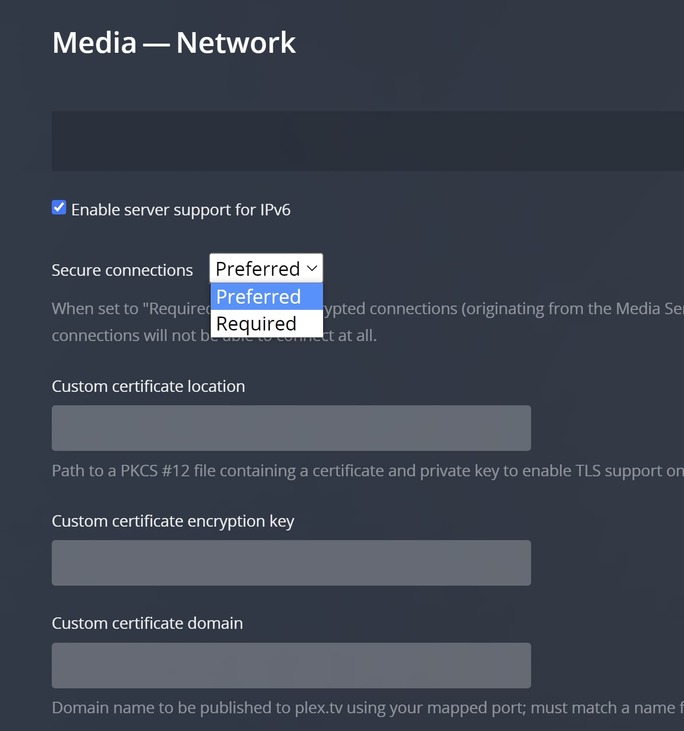
Have you tried going to Settings → Advanced and changing the Use insecure and Prefer insecure settings to Always? And also changing Secure connections on your PMS settings to Preferred (or disabled) instead of Required?
The app container on the store got updated, which uses a new version of the Tizen SDK. This upgrade may have fixed some things, but I don’t know if it did or not since they don’t give changelogs for their Tizen SDK. As long as it works I guess?
I still can’t play anime on my Samsung when the subtitle is in ASS format. Disabling the subtile make the anime work.
Look at my previous post for more details.
I’m about to switch to something else because this is becoming retarded. 6+ months of issues with Samsung tv’s.
I created a topic in 2020 about playback issue on my UN55NU7100. I posted logs and a movie sample to @sLumpy to help him investigat playback stutter issue I have.
Now I have 2 Samsung TV:
UN55NU7100 (plex 5.38.1, Platform Version 4)
QN75Q80T (plex 5.38.1, Platform Version 5.5)
I having the same playback stutter issue on both TV. Movie playback works perfectly on every client plex or not plex I tried.
Add me to the list of Samsung TV owners that Plex will NOT transcode DTS Audio on the fly… Period… You can Pre-Transcode these files with the Plex Optimize option.
I’ve tried rolling back PMS to 1.24 as many have suggested and it does not fix the issue where PMS cannot live transcode DTS Audio when paired with a Samsung TV. Does this happen with non Samsung TV’s?
Current Server Version#: 1.27.1.5916
Player Version#:5.32.1 (April 7/2022) though inside app reads 5.38.1…
TV is a Samsung 2018 QN65Q8FN8.
Receiver is a Dennon AVR-X2400H.
@sLumpy, you didn’t comment to our messages since 6 months ago. These issues with Tizen, I cannot use plex on any of my Samsung TV. Wathching a movie recorded with the DVR is impossible. Could you tell us what you need to investigate the issue or the reason it is still not fixed.