Server Version#: 1.40.0.7998
Player Version#: 1.87.1.75-e23570d9
Ove the past week Plex has started throwing Payback Error messages. There is often several of these that are thrown while watching a single TV episode. It’s imposable to get through a show without restarting because of it, often multiple times.
I have updated Plex, & my server in an effort to try to fix it. Even though the files were direct playing, I have disabled hardware support but with no change.
I downloaded the logs immediately after a crash so it would be easier to find what is happening.
I am having a similar problem, but I am shocked that it not many people are as well. This is the link to the post I made about 8 hours after yours.
What are you playing the media on? I am using Google Chromecast with Google TV
In my case, I believe the issue deals with audio as in suddenly I can’t play any AC3 or DTS files. However, I can play AAC files, which is what I have been mostly using Plex for the past couple of months. So I didn’t notice the issue until 2 days ago. I hadn’t updated the server software before I noticed, but I have now, but still no change. So not sure if the culprit is one of the server updates or the Google TV app. I haven’t changed any settings or hardware for a long time so it has to be software related. All I know is this is a mess and nobody else seems to be complaining about it.
Same problem here, started after I updated my PMS on Linux (Ubuntu). I tried to downgrade PMS but with no success.
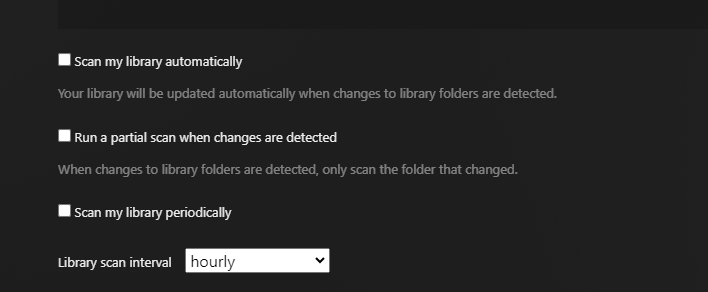
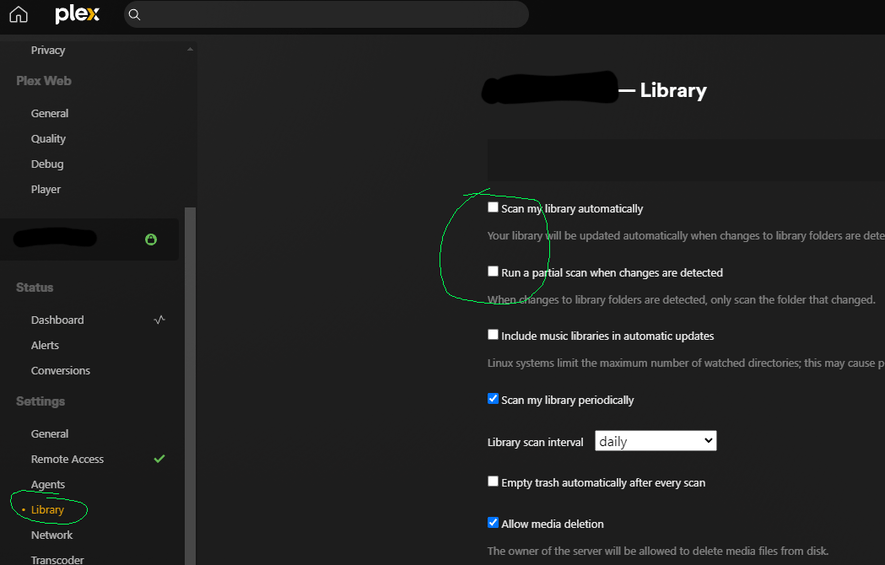
However I managed to suppress this by disabling the automatic scan and the partial scan when changes are detected.
Are you talking about what is pictured in this image? They were already unchecked for me. Not even sure why they would cause the playback problem though.
Just tried disabling those two options. My video just threw that error again,. so apparently not related.
In my case, I can still play all my videos, at least all the ones I have tried. They just throw these errors during playback. The video quits, I restart and repeat.
I am using the OSX app to play the videos. It has also been difficult playing videos from the web interface through chrome and edge.
Ok, I tried playing through the web interface on Safari. Same issue.
I tried local streaming. Same issue.
I tried remote streaming Same issue.
I tried downloading the files. the files download fine, but when playing get the same issue.
I checked, and there is always lots of buffer when this happens, so it’s not triggered by an insufficient buffer.
I will continue to change things to try to find something that can change the behaviour. It’s time consuming though because the videos quit unexpectedly and often play for 10 minutes or so before throwing the error, so each change takes time to test.
I have confirmed the issue is present with both transcoded and direct played video.
Also interesting is that this issue will happen both while playing a video, and while that video is left on pause, so it’s not playback that triggers it specifically.
ya, that seemed to do the trick. It disabled the additional option of “Scan my library periodically” and have not had a crash now. It had it set to every 15 minutes, so no wonder it was crashing after about 2-13 minutes of play. It just depended on when the video was started in relation to the beginning of the 15 minute cycle.
I had originally disabled the option but it still crashed. I restarted the Plex Server and afterwards, the changes seem to have taken effect and no more crashes, at least as of yet. So it seems that the issue is narrowed down to a problem triggered by scanning the library, while causing an issue in playback.
The workaround is to disable any options that may trigger a directory to be scanned during playback, save the preferences and then restart the server.
Having the same issue here since the last update, fwiw I use the plex app on Windows and the plex.tv URL for playback on a different device, and it happens on both. Turning off the library scan is useful for now but I hope the issue will be repaired.
Glad to see that I am not the only one having the issues as well. My set up is Windows boxes for both. My Plex Server is a Windows 10 box, and I am doing playback on a Windows 11 box. Both units are up to date both on Plex builds and OS builds.
I will try turning off Library Scan to see what effect it has on my environment, but like so many of us, I’d like to see it fixed…
I tried some workarounds and I noticed when I access the PMS using my IP address:port number, the refresh problem stops. I’m using a DDNS service to make it easy, and it’s working fine so far.