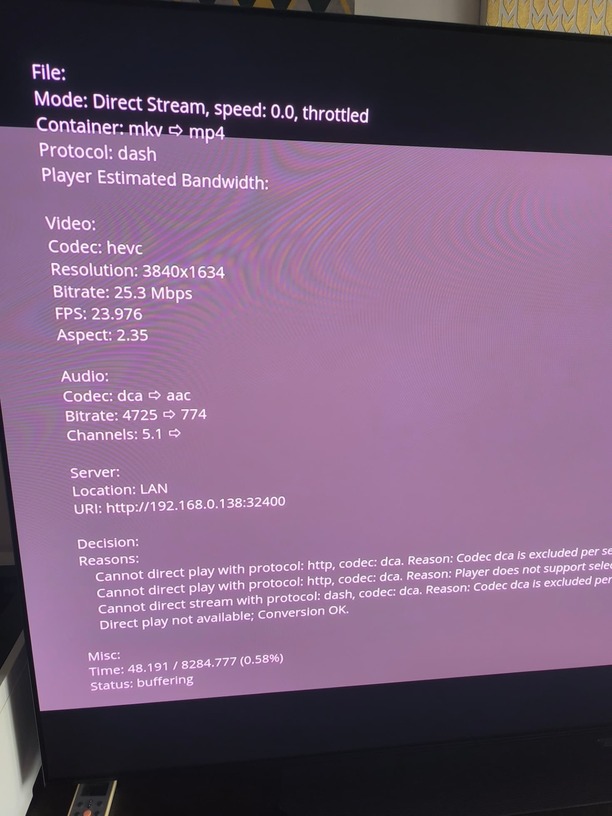
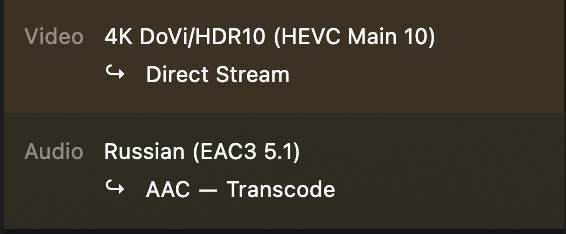
I can reproduce this only on TVs when the audio is EAC3 or DTS, which Samsung decided to ignore.
I’ve spent 10k EUR on my home cinema and can’t use that. Can I have a reply from Plex at least? I’m not even asking for an ETA. Can I report this as a bug anywhere so it is not just silently closed again? I’m spending time describing the problem here no one cares about.
Happens on some but not all audio transcodes while direct streaming video (there seems to be a correlation with bitrates over 30mbps, all my files over 30mbps have the issue but under dont).
Yeah I’ve had it work when forcing direct play too, however it appears to be extracting the compatability audio, e.g. a truehd+Atmos track shows up as DD+ on my receiver when forcing direct play
Another issue is the Tizen app won’t direct play a audio track other than the default so if I select the eac5.1 track it will still try and transcode which fails
Overzealous client asked for end range of 2611241884, content size is 427085; we’ll clip.
when playing DTS content and plex client on TV is doing the audio transcode
without audio transcode (direct play) the movie plays fine but no sound
after about 60s of buffering error message “playback error”
PMS is on QNAP
any solution how to play DTS movies on a samsung TV?
here a working DTS file
I also have this problem with my Samsung S90C but not on my slightly older Samsung Q80A
The S90C is running client version 5.85.0 - Platform Version 7
The Q80A is running client version 5.85.0 - Platform Version 6
Both TVs can direct stream the Video and have to transcode the Audio, within a minute the S90C will freeze and the media server log will be flooded with “Overzealous client” messages. The PMS transcodes the Audio without issue for the Q80A.
It is interesting if enabling the video transcoder prevents the audio transcoder from crashing!
I’ll have a test tomorrow when I return home just for curiosity.
In the meantime, I’ve duplicated all the incompatible files in my library and made a second copy just for my S90C, which has removed all the extra audio streams so that only a single audio stream remains with either AAC, AC3 or EAC3 format. I’m fortunate that I have an abundance of storage available as this added just over 20Tb.
Due to the quirks of the Samsung player even if the MKV contains a compatible audio stream (AAC, EAC3) it will still transcode the audio if that audio is not the primary stream. Plex prioritises audio channel count over compatibility, so the default will usually be the DTS or TrueHD tracks, which are usually 7.1. If you select the second compatible audio track it will transcode even though it is supported which is a bit of an annoyance.