sorry, but blindfolded here, since no WD box avail 
But does this path exists?
/shares/Volume_1/Nas_Prog/plexmediaserver
sorry, but blindfolded here, since no WD box avail
But does this path exists?
/shares/Volume_1/Nas_Prog/plexmediaserver
Looks like for Western Digital NASs the only way to access that folder is via SSH.
there are instructions here My Cloud: Enable SSH (Secure Shell) on a PR4100
and a video using an SSH app ( the video is describing a back up but the main point is to get access to the folder the presenter is showing how to backup.

Thank you BigWheel - I think that the video has cracked it, and I’m finally into the files of the NAS. I’ve now downloaded all of the files that I found in this location:
/mnt/HD/HD_a2/Nas_Prog/plex_conf/Plex Media Server/
I have zipped them up, and hopefully these will upload and be accessible?
As a note - even the WD guide to accessing the NAS, and logging on using WinSCP is utterly woeful, and misses out key steps - like logging in (and showing you how to do that!) for christ’s sake! Only the video in your link was effective. Thanks for your help and patience to help me resolve accessing the crucial files.
Plex Logs.zip (5.0 MB)
According to your logs, you have timeouts reaching the internet
Mar 23, 2022 21:27:54.149 [0x7f0b17732700] ERROR - Error issuing curl_easy_perform(handle): 28
Mar 23, 2022 21:27:54.149 [0x7f0b17732700] DEBUG - HTTP simulating 408 after curl timeout
So check your WD default gateway and DNS settings
Ref: https://documents.westerndigital.com/content/dam/doc-library/en_us/assets/public/wd/product/nas/my_cloud/pro_pr_2100/user-manual-my-cloud-pro-series-pr2100.pdf
Hello Dane
Thanks for this. It seems to be completely inexplicable.
Overnight, the PR4100 updated itself with new firmware, and presumably then rebooted itself to complete the install. Everything is now working again, and the glitches have gone.
I’m guessing that all it really needed was a reboot of the NAS? I haven’t done anything else at all since we were swapping messages last night!
Thank you for your help with getting access to the Log files. Unbelievable what a trauma that is/was to get access to WD system files on a NAS.
Can I just ask one final question?
Now that the glitches have cleared, I’m now able to add the extra Library that I was trying to do originally - I’ve moved some media files, that were in other existing Libraries within PLEX, into the new category.
However, when I ask the new Library to scan for new files, it doesn’t do it properly. The “heartbeat” icon in the top right corner scans for about a second, and then appears to “complete”, and no new media files are shown in the new library.
I’d already re-scanned the old Library where they used be, and they’ve been removed, and the media file count for that old Library reduced accordingly - so I’m a little bit bemused why they won’t show in the new Library where I’ve just moved them to?
Many thanks
Show a screen capture from the file system, so we can see the exact naming of the files and directories
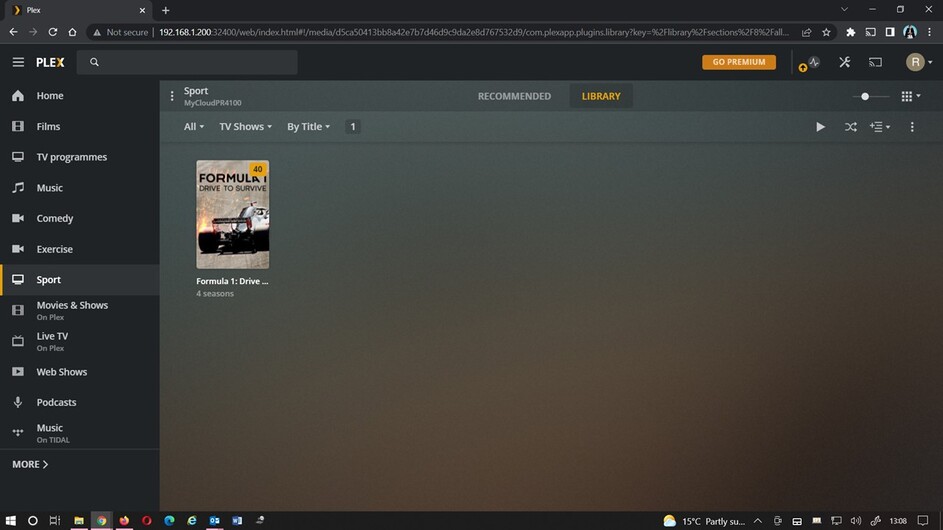
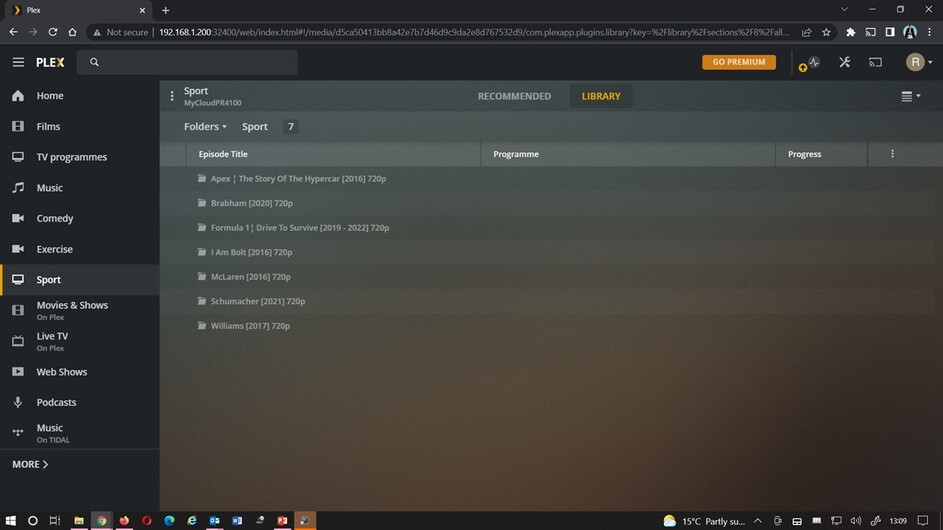
Thanks. I’ll upload two screenshots below.
The first shows a single TV series. I’ve just added it, and it shows 40 programmes. However, the screen isn’t showing any of the other folders that are also there (Is this because I’ve selected “TV programmes” as the Library type? My goal here is for the SPORT folder to display each individual programme or series [the others are one-off documentaries] so that you see one thumbnail per series, or one-off programme, in the Library view).
However, if you then select “Folder” view, it shows that PLEX can see that the other files are there, but for some reason, it isn’t displaying the thumbnails for them in “Library” view - I can’t see how to fix this?
For Drive to survive, name as follows:
Formula 1 Drive to Survive (2019) {tmdb-87083} <= Show folder
Season 01 <= Season folder
Formula.1.Drive.to.Survive.S01E01.mkv <= Episode, and important here is S01E01
Regarding like Schumacher then it’s a movie, and not a show, so needs to be moved to a movie library!
Should be named as:
Schumacher (2021) {imdb-tt10322274}
Ref:
For naming medias, look here:
Hello Dane
Thanks for the reply - but the naming of the files and folders is not the issue here. All six “movies” as you call them (they’re actually documentaries - but doesn’t matter), previously appeared as entries with their thumbnails, absolutely perfectly, when I previously had them all in the MOVIES folder and library.
However, I now want all of the Sports documentary media in one place - because they’re all sports documentaries.
Are you saying that I can’t have a one-off documentary (which you are calling a movie - like Schumacher), and a documentary series (Like Drive to Survive) in the same PLEX Library?
If I can - how do I do it please?
Plex SW has build in logic, that tells it how to identify medias, and the TOP rule is either Show or Movie, and then follows correct naming.
And it is not Plex that thinks it’s a movie, but the online databases that Plex use to lookup and fetch metadata from
Correct, unless you create a library of the type Other Videos but that would mean no online metadata is fetched
Thanks for the reply.
Ok - I tried setting it up as “Other Videos” first of all, then imported the “Drive to Survive” series. Annoyingly, the folder then displayed all 40 episodes separately as 40 individual files, which is no good at all.
I’m quite happy to use “Other Videos” as the Library type, but how can I ensure that a series with multiple episodes, is displayed as only one item, with all of the episodes hidden behind it, in the Library view?
Many thanks
AFAIK, only by selecting folder view
Note that this type of library is limited
Thanks Dane
Ok - so just to be clear, you are saying that it is not possible for a PLEX user, to create a new Library, and for single “movies” and multiple programme “TV series” to appear side by side within the same Library, with just a single thumbnail for each item, in Library view?
That is correct
Ok - thanks.
That does kind of suck a fair bit. Something to improve on for a future release?
That would req. major changes, and giving the benefits of the use case, I personally would not get my hopes up
Would it though?
The simplest solution appears to be add a brand new additional Library type to the selection already available to minimise the development workload. You could call the new category “Mixed” or “Documentary” or whatever else. No auto-fetching of IMDB information, but the customer would still have the facility to manually match metadata if the customer wanted to, so that you can still have the thumbnails for single programmes/multiple episode series, but that they still appear as individual entries in Library view.
It’s clear that you can already determine as developers whether a specific category auto-fetches IMDB metadata or not.
The point is continually improving the functionality / customer experience. Nothing stands still.