Playlist question for multiple tv shows

Hello,

I have a question about playlists and whether it is possible to create one for multiple tv shows where the playlists alternates episodes from those shows - but keeps them in order as they were released.

Why I would like to do this is because I want to have some tv shows in a similar genre (Cartoons, Crime, Drama, DC/Marvel, Comedy) and make playlists for those genres. So I just select a playlist and it gives me one of the episodes from one of the shows in that genre/playlist to watch. And another random one after that.

Example for Show A, B and C:

Playlist order: A-Ep1, B-Ep1, C-Ep1, A-Ep2, B-Ep2, C-Ep2, A-Ep3, etc.

Alternatively, it can be completely random as long as it plays the next unwatched episode in order of one of the selected tv shows.

I know I can manually do this by dragging but that would take hours for 2 or 3 shows and would be impossible if you want to add like 10 different shows.

Is there any way to do this without manually doing it?

(sorry for any errors in my english, it isn’t my main language.)
Unfortunately not possible.

Damn, that’s unfortunate. Thanks for the quick response though!

Sure you can.

you can do so with filters > auto playlists.

optionally you can use collections where applicable

the general instructions are listed here, including if you want episodes in a random order, see also @ [TIP] --- how to create an autoplaylist with random sort

as to what filters you need to use, that is entirely dependant on the specifics of what you are trying to accomplish.

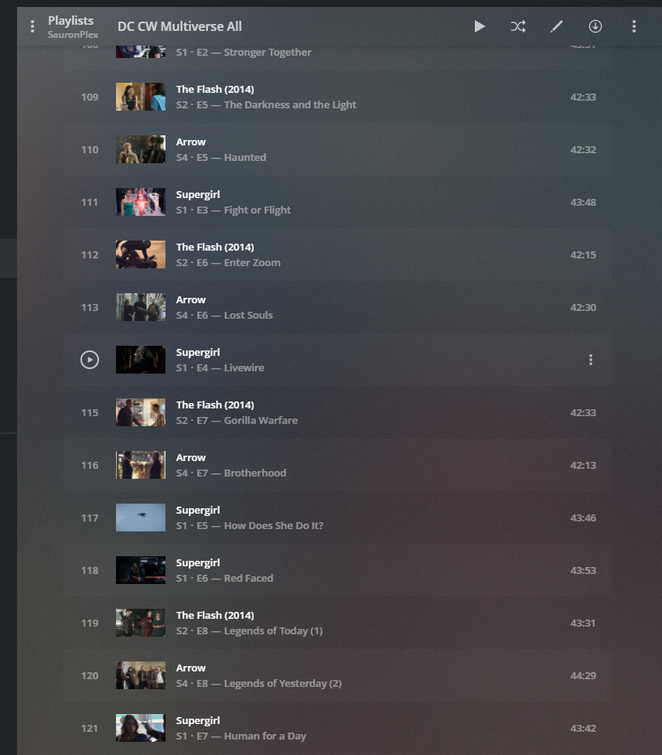
for dc/cw multiverse;

  • plex web
  • tv library > library view
  • custom filter > episodes > by air date (desc, may have to click air date twice)
  • show title is > whatever + wahtever + another (be sure to add all of the shows you want on the same line)
  • alternatively you can use ‘show collection’ (if you have put all the shows in a collection or multiple collections)

if you want unwatched episodes only, add another filter (click the little filter to the right of the filter)

  • episode played is untrue

finally, once you have the filter exactly as you want it,

  • save the current url to your browser bookmark (so you can go back to it easily)
  • save the filter to a playlist > click the plus with the lines and name the playlist

image

1 Like

Nope. That only applies to tv shows of which the episodes were originally released at the same time, interleaved. But it doesn’t work for tv shows which originate from different “eras”.

1 Like

ah well true, but I don’t see anything about different era’s in the OP question ?

these types of questions I see reoccuring for cw/dc, starwars, marvel, etc.

all of which can use above, and can be sorted by whatever available criteria plex makes available for that content.

even if something is ‘out of era’, someone could use a custom ‘sort order’ to put them in whatever order they want.

here is a star wars collection with custom sort order

a playlist would simply use sort by title (which should use the title sort order I would expect)

whether or not that sort of effort is acceptable, I guess depends on the amount of content that would need a custom sort order to be manually edited and how much the user desires it.

1 Like

I am not aware, how one could achieve a custom sort oder in a smart playlist.

Thanks for the suggestions. It’s not exactly what I was looking for but it certainly helps. I might do that with some shows like you have it with the DC CW Universe, love that. If some shows ran in the same years it might still be possible to achieve it with your method. Thanks!

well, if you provided more details/specifics, maybe someone else has already ran into the same thing and found their own solution they might share.

the hard part is keeping them in ‘release order’ or some other specific order.

if you just want random unwatched tv from certain shows, that is easy, using the info and link I provided above about random playlists.

1 Like

Not completely random, I’d like to watch them chronologically. But more similar to watching a couple of episodes of different shows on TV.

It’s just a convenience thing I guess, I hate choosing what to watch so just letting a randomized playlist decide it for me would be great.

I guess making the episodes completely random for some shows could be fine, shows that you’ve seen before or sitcoms for example.

essentially what you want is to move horizontally across ‘on deck’, instead of sequentially down each series.

this can’t be done with playlists or collections, but it has been discussed/requested before in regards to ‘on deck’, I do not know if there is a ‘feature request’ thread for it though.

2 Likes

Exactly. That is a much better explanation.

The one thing I would add if it does become a feature at some point is to split it up into multiple groups that you can categorize yourself like I mentioned above. Like crime, comedy or kids etc.

the more I think about the on deck, the more it comes clear this is actually part of the ‘auto play’ behavior.

auto play could have 2 options;

  • current behavior > play next episode in current tv series
  • new behavior > play next episode in next/adjacent tv series (looping back around depending on how many series on deck)

as far as being able to split up into multiple groups or categories, I don’t see any way to implement on a simple/easy manner.

one way I could see it implemented is being able to link auto playlist to OTHER auto playlists.

for example

base auto playlists (from filters)

  • show 1 - unwatched episodes > sorted by air date > limit ONE
  • show 2 - unwatched episodes > sorted by air date > limit ONE
  • show 3 - unwatched episodes > sorted by air date > limit ONE

main auto playlist

  • links to show 1 + 2 + 3 etc > sort random

this would result in a list of single unwatched episodes by air date, grouped in a random sort

1 Like

I know it is not the same thing, but FYI, the roku interface does show the ON DECK below on the POST PLAY screen (ie the next playing count down)

it is obviously not automatic, but is convenient to quickly choose the next episode of a different series instead of the current series.

1 Like

This topic was automatically closed 90 days after the last reply. New replies are no longer allowed.
