Yttv. Amazon prime. And Plex all display this chrome issue. Netflix is the only one I have found that doesn’t. But those are all the streaming services I have access to.
I’m sorry, what is the issue? When you cast from 1 device, the controls show up for every instance of the Chrome browser? If so, I think that’s a Chromecast issue. We don’t control what other device can see an active Chromecast connection.
I see, must be Google. I didn’t hear anything back from the forums, I may contact their support directly.
Did they update the Android TV SDK recently?
If so, it may be that you’re (correctly) using the newer SDK which then integrates the issues and the only reason other services (Netflix, Jellyfin etc.) don’t is because they haven’t updated to this new SDK for their published app. I say this because I noticed that Twitch has started doing this after I factory reset, even though as I stated in the original post it wasn’t before.
Anyway thanks for your time, I’m happy to close the issue if you don’t think there is anything to do and I’ll have to figure something out on the Google side of things.
No. No one is casting. When you watch anything on Plex it default gives any chrome browser the ability to control the playback of that content if the user is on the same lan with no option for the person watching something on Plex to disallow that. The same is true for some other streaming apps but others don’t display this behavior. This has nothing to do with “casting” other than the fact that chrome should only be able to control the media playback if someone was in fact casting whereas that is not the behavior we are talking about here.
This seems like it will be a Google or player issue but the apps such as Plex coding to that player should also let their reps no their users are complaining about this issue.
I can’t reproduce this. When I play anything in the Plex app on my NVidia Shield, it shows up in my dashboard but not in the cast menu in Chrome. I’m using that same version of Chrome you have too.
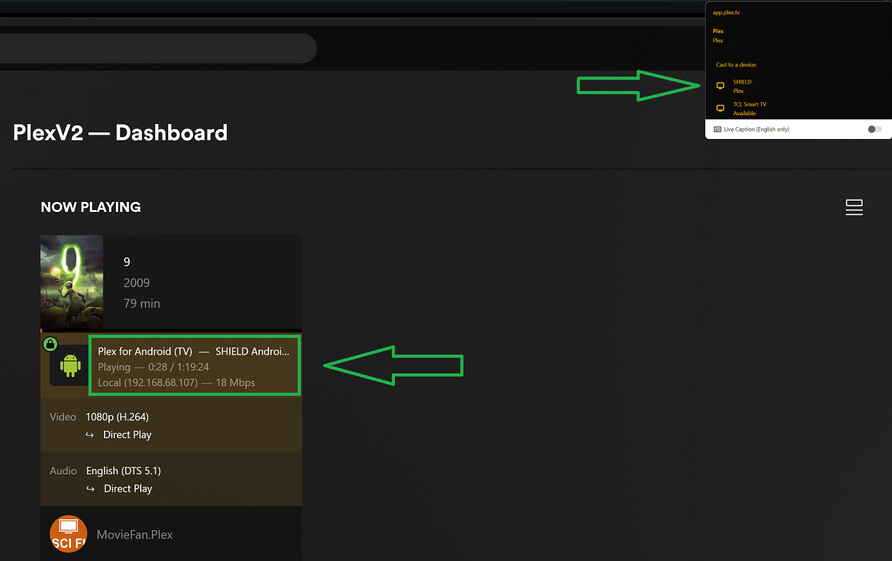
I am able to reproduce this, playing directly from the Plex app on my Nvidia Shield (not casting).
I have set Shield settings > Chromecast built-in > Let other control your cast media > Never.

Chrome Version 109.0.5414.120 (Official Build) (64-bit)
Plex for Android TV 9.16.0.38294 (efda1540)
This is not unique to Plex. Chrome’s global media controls also show up for other apps that I tested (YouTube, Disney+, Amazon Prime Video, and Twitch).
I’m not sure there is anything the individual apps can do about this. It can be disabled in the Chrome browser (chrome://flags > #global-media-controls-modern-ui or just hide it by right-clicking the icon > uncheck “Show other cast sessions”).
to summarize quickly where we are:
- This behavior is confirmed to occur on CCGTV and shield (no other streaming devices have been tested, at least in this thread that i’ve seen).
- It occurs at a minimum on youtube, yttv, disney+, Amazon Prime and Plex. It appears it is now occurring on Twitch but when the OP originally posted it was not occurring on twitch. app update seems to have caused it.
- it is not currently occurring on netflix.
- the typical solution of disabling media controls when casting does not work either (1) from google home app by clicking on the devices or (2) within the media streaming devices setting.
- while each individual can disable this in chrome as swiftpanda noted above, the person playing the content has no control to disable; thus, allowing anyone sharing their internet (on same lan) to see and have control of what they are watching.
the speculation is that this is has to do with a common player used by the streaming apps or some other backend google issue with “casting.”
It is really strange this works for me (on Shield and GTV) but not y’all (I have to restart device after setting to “never” ). But only from our app it seems. When I use Youtube it still does it.
When I tested yesterday, I did reboot my shield after setting Shield settings > Chromecast built-in > Let other control your cast media > Never. I double checked the setting again again, rebooted my shield again, and no change. The playback in the Plex app is still shown in the Chrome global media controls.
i forgot to check the making sure it sticks and reboot stuff on sunday but i just check on my gtv. changed setting. rebooted. made sure setting change stuck. it did remain on “never.” play something from plex. it showed up in chrome media controls. stopped and checked the settings again and it was still set to “never.”
chrome: Version 109.0.5414.120 (Official Build) (64-bit)
plex version: 9.15.0.38159
OK. thanks for checking
just checked it on the shield as well following the same steps with the same result. still appears in chrome.
same plex and chrome versions.
so is this something that plex cannot help with and we need to take up somewhere else? If so, do you have a suggestion of where? or do we just have to wait on the slow wheels of google to eventually fix this because they won’t listen to the peons complaining about it?
I was told Chrome controls is a feature of Android not the underlying player [Exoplayer in our case and many others) the devices knows what is being played via media session which we have to implement else not be approved for store.
As far as I can see the “let other control…” on the device level just doesn’t work.
The Android team is looking into it but can’t make any promises. I can’t say how Netflix may have gotten around it. I figured it might be one of the perks of being a huge company like Netflix but it seems affect Disney+ as well.
Thanks for looking into this. I was trying to figure out where I could submit a bug report to Google and see if they would actually do anything about it, I guess the “Google Cast” bug tracker would be the best place for it
primo. knowing the android team is looking into it is good enough. probably just a waiting game now. hopefully won’t take long given it is affecting so many apps. and once people with families who kids are constantly screwing with playback start to complain it’ll get fixed faster. assuming they are tech savvy enough to know they should be complaining…
This topic was automatically closed 90 days after the last reply. New replies are no longer allowed.
