Server Version#: 1.19.4.2935
Player Version#: 7.2.1
FYI - this used to work perfectly. I have all my home short videos as mp4 files. They are on average 20MB big. My upload connection speeds are 16MBps. With previous versions and remotely playing (direct-stream enabled) the video the app would download the file and play it direct. No transcoding. Worked perfectly.
Now, when I play the video it staters and I get the message “Your connection is not fast enough to the server to stream the video”. This is interesting since when I play a FLAC music file of comparable size it has no problem, upload the file and does direct-play. This direct-plau has worked for many months until this release has broken it completly.
With direct playback it’s not so much about downloading your file but about streaming it – hence the critical factor won’t be so much the total size of your file but its average/maximum bitrate.
That being said…
Could you share some technical details of your files? e.g. copying the technical information from Get Info > View XML (looking at the content between <Media> and </Media>)
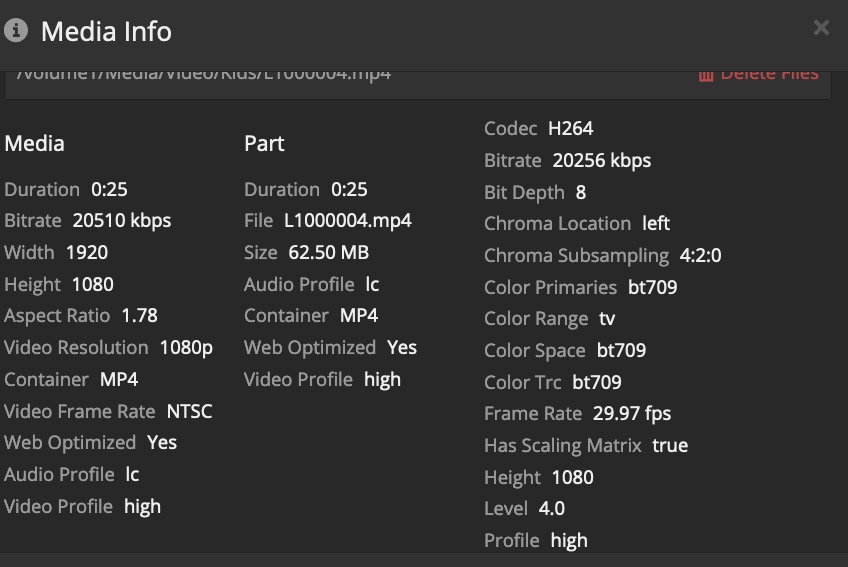
Would love to provide it however, this functionality (View XML) is only available on Chrome browsers. I tried Safari and Firefox. I include a screenshot for the file.
Here you go… your file has an average bitrate of 20.5 Mbps. Usually, videos are encoded with a variable bitrate (simple scenes might require a lower bitrate to achieve a certain image quality, complex scenes with e.g. a lot of fast changes will require a higher bitrate to achieve the same image quality).
From what I remember, the rule of thumb is to assume the maximum bitrate is 50% above the average bitrate… in any way that’s above the upload bandwidth you got.
Admittedly… for a 25 second video that won’t make much of a difference… but at its core that’s the root cause for the error message you get.
As it worked before…
Did you maybe disable some settings for Plex to automatically adjust the video quality if needed?
Setting are the same and I tried everything on PMS and client without success.
I have to add that previously when I would test remote video (same file) the PMS would show Direct play. However, now it goes through transcoder. I also noticed changes in performance on local network. Few versions back this video on local network would play instantaneously.
Not anymore. Its buffering few seconds before it starts playing. I re-insinstalled PMS (Synology), rebooted my router. No success.
After spending a lot of time diagnosing the issue it turns out that my iPhone SIM card has been the problem. Over time these cards degrade the LTE performance. I feel little embarrassed about the whole thing. The broken SIM card when testing with speedtest.net would max out at 4 Mbps. The new SIM I can hit 100Mbps. I should have mentioned that in the original post that I was using LTE. Anyway, for anyone that has streaming issues over LTE check you SIM by running speedtest.net.