Server Version#: 1.19.3.2852
Player Version#:
So I have not had this issue before until now… So on all my devices i can easily watch plex and be fine. But on my playstation i noticed when its playing a movie, my library starts getting filled with media clips… For example… “Media 01987, Media 01988” and so on. Ive checked the file system and those are not part of the file system. They are about 1 second long. Im not sure whats going on but any ideas?

do a get info on one of them and look at the path

This never happens with any other devices. It only happened as soon as my playstation started playing movies from my server
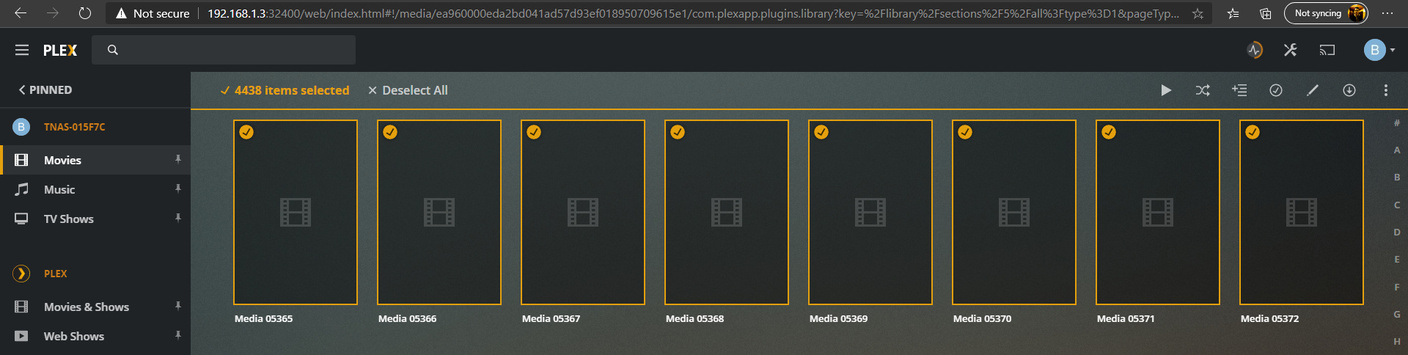
Which folder is set for the library itself? The PlayStation app can’t change the folder(s) the library is set to look at.
The Library is set to /mnt/md0/Plex/Movies for the movies and /mnt/md0/Plex/TvShows for TV Shows. But this issue is only presenting itself in the movies folder. But only through plex. The actual file system doesnt see these files in the movies directory
can you please grab your server logs and attach. You can get them from the troubleshooting section of server settings.
[logs removed]
Those files are transcode chunks which would be created whenever the server transcodes for playback to whatever device. 3rd party apps on a Playstation can’t play much natively so that is likely why the server is transcoding for it. After playback finishes the chucks are deleted that is why you should not be able to find the files afterwards.
Your scanner log shows your Movies library is set to various folders in your the PMS data folder like /home/plex/Library/Application Support/Plex Media Server/Cache/Transcode/Sessions and
/home/plex/Library/Application Support/Plex Media Server/Cache/PhotoTranscoder/46
Nov 04, 2020 15:17:32.618 [0x7fe1dc37f740] DEBUG - Scanning Movies using en(Plex Movie Scanner) with 1061 current media items and 1 section locations in the database...
Nov 04, 2020 15:17:32.621 [0x7fe1d1650700] DEBUG - HTTP 200 response from GET http://127.0.0.1:32400/:/metadata/notify/cullTimeline?librarySectionID=5&sinceTime=1604527052
Nov 04, 2020 15:17:32.749 [0x7fe1dc37f740] DEBUG - Performing a scan with 'Plex Movie Scanner' (language: en virtual: 0).
Nov 04, 2020 15:17:32.749 [0x7fe1dc37f740] DEBUG -   * Scanning /home/plex/Library/Application Support/Plex Media Server/Cache/Transcode/Sessions
I would double check the folder set for the Movies library. and maybe resave what is there if still only showing that /mnt/md0/Plex/Movies path.
are all of your regular movies that were in the library still there.
Your server version v1.19.3.2852 is pretty old so there would have been no changes to it. I think terramaster recently had an update to it’s OS. did you update that recently? I can’t think of how it could have affected the severs library setting but ya never know.
So all the Movies are still in the library. It just adds those files as part of the library. It didn’t used to do it. It just started happening when we played a movie on our playstation. I only noticed it because i left the library page open.
I understand that. If your other clients you used previously didn’t need the server to transcode then those would not have been created for them. But regardless of that your movie library should not be pointing to those folders.
I am asking you to double check what is listed on the add folder tab when editing the movie library. I can’t think of any way it would have been changed somewhere which the PlayStation app has no ability to do
So Pretty well everytime i watch a movie on all the other platforms plex supports, they all usually transcode. but ive never seen it add the transcoded files to the library. There was no set folder for it to use to transcode so it should of been using whatever its default option was. I just barely changed that to its own folder while we have been talking.

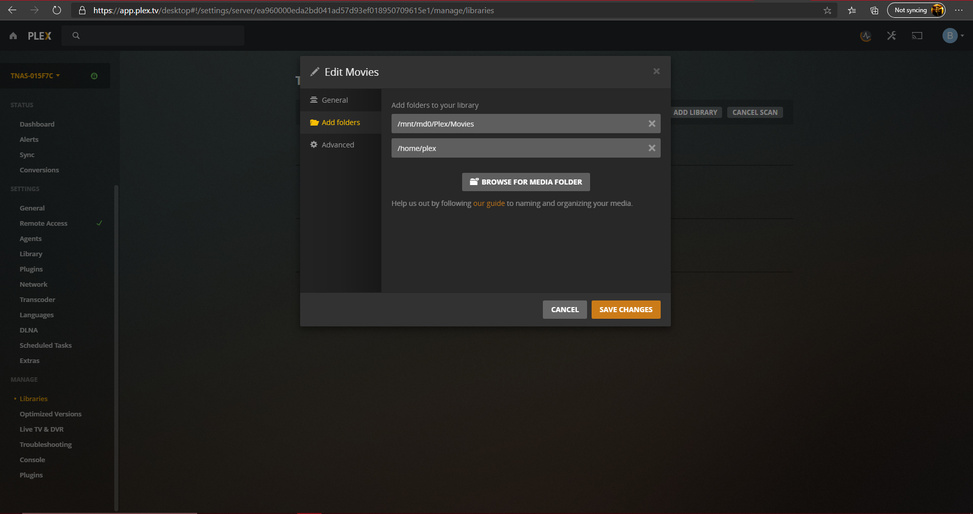
You have /home/plex there which is the cause of your issue.
click the X my arrow is pointing at to remove that path then save

