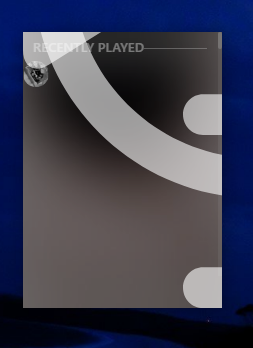
I wanted to report a bug of plex amp, While the program is running should it be closed suddely for any reason the program will open the next time in blank state like seen here:
i dunno if the auth token goes missing or something but deleting all plex amp and reinstalling and re authoring the app seems the only way to get it back to work.
After extensive use some days it’s fine, and others it’s blank. Sometimes I just get the recently played list showing. It doesn’t seem to have anything to do with the screen going to sleep (mine rarely does at work and it fails to display anything on program launch).
Reboots sometimes fix it.
I am having the same issue. Discovery is not showing anything from time to time, and I really like the radio options, and use them extensively. This works at random…
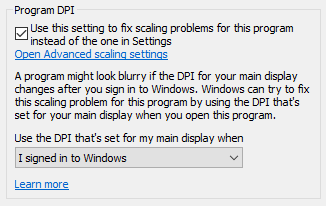
Select ‘Change high DPI settings’
I chose to checked “Use this setting to fix scaling problems for this program instead of the one in Settings” with the option Use the DPI that’s set for my main display when I signed into windows.
Plex amp is now rendering consistently across my displays, and windows scaling is not breaking the electron app.
@elan Idk if you want to add scaling workarounds to an FAQ somewhere, electron apps are rather notorious for having issues with windows scaling, but the issues always manifest in weird ways and make it hard for users to get a solution unless they are a developer.
Wow that’s super useful, thank you very much! I’m very much not a windows dev, do you have any idea as to whether this can be done programmatically or via app properties?
Last I checked its an open issue that manifests in lots of ways.
There are workarounds , but they are complicated, and force you to build UI elements in nonstandard ways (And may break once electron fixes its open issues)
I’m very much not a windows dev
Same boat over here, I’m mostly working on software as a service and web based UI’s. Native windows issues are a little outside my wheelhouse.
Unfortunately that didn’t fix it for me.
I just have a blank window with no menu just a search icon that changes to ‘discovery’ but won’t return anything
@borochris ~ sounds like your issue is something different, likely a problem connecting with server, possibly related to proxy or something in the middle?
It did work when I first installed (a while ago) and nothing has changed in the network environment since.
Both the client (laptop) and the Plex server (windows PC) are on the same LAN segment so nothing in the middle unless there are external calls in the client
My setup:
Windows 10
main screen: 3840 x 2160
Scaling 100%
add on screen 2056x1440
Scaling ?
When I am using plexamp on my main screen I set my options to:
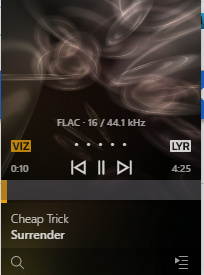
Plex looks like this on opening:
When I am using the external screen I change this to:
My (possibly incorrect) understanding, is once this issue in electron is fixed, a rebuild of plexamp will scale properly without these fixes.
@treasureChest I think it’s “normal” for plexamp to start like this:
If it can’t connect to your server right away, sometimes I have to click the discovery bar at the bottom:
Then hit esc to get the screen to populate the last played item like this:
I am not sure of a work around if the the info does not display after you select the item or hit esc from the discovery page though. Have you tried selecting a second server, and then switching back to the one you want to use?
My screen is identical to that of @treasureChest and I have tried most of the DPI options with no effect.
With no menu showing it is impossible to do anything with the application.
Interestingly whenever I start the application I get a dozen attempts to get into my system from ip 196.52.84.55 on port 22030 which appears to be connected to an Amazon chrome extension (not installed). This is not a response connection but something in this app is triggering it