OKay I will admit that I know very little about networking and stuff. Therefore, I’m a newbie. Got a new motherboard install and she’s powerful (I7-14700k) running on a asus z790-f motherboard. Problem is that she runs hot, and I had to install “Throttlestop”, had to clam the bear down. Got it running just the way I like it, and then found out that plex doesn’t work. Can not even get into the splash screen. So can anyone help me over this?
Let’s initially focus on what you did with regards to Plex.
Did your server previously run successfully on that machine and only started having issues after you installed “Throttlestop” – or did you only install PMS afterwards and it’s never been working?
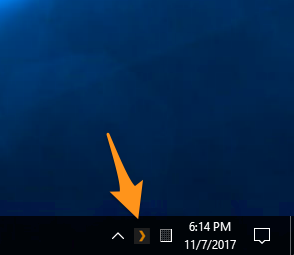
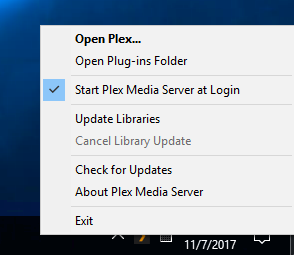
What do you do when you expect to see a splash screen? Plex doesn’t have a native UI… once you run the server, it’ll show an icon in the system tray and you can access it via the web app (e.g. by clicking Open Plex... from that system tray icon’s context menu).
Edit: Just trying to establish where in the process of installing / running your PMS you are…
OKay, plex was working okay on my machine. Then I added throtlestop to the mix to lower my turbo and temps. Then one night the wife said “no plex, fix it!”. Since then I’ve been in the dog house, and praise the Lord I have 2 PC’s, and got the other up and running before “Chicago Night” starts. I sure hope you can help me have both running and loving being with each other on the same PC.
If you would like any pictures or things of what I have TS settings please ask and I will obey.
Is the server on the new machine running (icon in system tray)? PMS server logs should be more telling… not sure if you’re going to find someone experienced with the other app here.
Yea, I was thinking the same thing, but I figure I would give it a try. I actually have 5 PC’s (3 Windows and 2 Linux (Raspberry Pi’s (love my little PC’s)). But I’m trying to bring everything over to the new machine, so that I don’t have so many PC’s running at one time. But both programs are on the new machine, and the new machine is hurting. Maybe someone will come walking through in knowing both programs and help me out.
Plex server is performing house cleaning by default during the night. This can lead to significant system load, particularly if it’s a newly set up server where all the media need deep analysis, creating preview thumbnails etc. This load can be higher than what you’re used to from regular computer use. So the overall case and cooling concepts might need to be adapted, from what you’re used to for regular PC devices.
If this machine is getting too loud, these are your options:
redesign the cooling, particularly the CPU’s, so fans don’t need to spin up so high and thus don’t make so much noise when unter full load. Basic rule: the smaller the machine is, the harder it is to cool it sufficiently and silently at the same time. So pick a case which allows for a large CPU cooler and fans with big diameters. Throttling the CPU’s abilities is definitely not the way to go.
move the server machine into a location where it is sufficiently cooled (even during summer!) and where it can’t disturb your slumber with its fan noise. If it’s a dedicated server machine (i.e. it’s not doubling as a media player), there is no reason for it to be physically close to the screen or speakers.
Thanks Otto - but that is NOT the problem here. As I mentioned before, if I have throttlestop running, plex will not start PERIOD. Any suggestions on how to get these two to co-exists?
What are you hoping to gain from running throttlestop?
It won’t help you to run Plex more smoothly. All it may be doing is to cause your CPU to overheat early and often – quite likely leading to a premature death of the CPU (and potentially other components as well).
Let me be perfectly blunt: it is extremely unlikely that a Plex developer will spend time investigating this.
I’m trying to undervolt my PC not overclock it. I’m running a i7-14700k chip on a ASUS Z-790-F motherboard.
But as far as your statement goes “Let me be perfectly blunt: it is extremely unlikely that a Plex developer will spend time investigating this.”, Maybe or maybe not, unless your a mind reader of all developer’s in the world.
Have a good day.