basically you need to turn on network logging in the app.
on the bottom of settings will list an URL
go to that URL on your computers browser
copy and paste the results into a text file save and upload here
Sorry Bigwheel, I copied the log data into Mac’s text editor but none of the save as options meet Plex’s extentions allowed. I’m not sure where to save it.
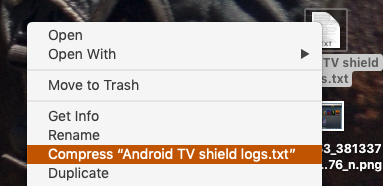
right click on the .rtf or .txt file and choose compress [filename] that will archive it in a .zip file you should be able to upload. Unfortunately a PDF is a bit too awkward to search through.
Can you try something. In the app on TV go to settings, and on the Advanced row, select “Allow Insecure Connections” and choose On the Same Network. Then try the Reset customizations thing again.

I did what you ask and still nothing under my server name
ok. I am looking through you logs and see some errors i thought had to do with the secure connections. am still looking through it though
Hey BigWheel, I am also having this exact same issue. Checked a host of things and reset customization did not work. I go to the more+ and see my server name but none of the folders in there for my movies or tv. I had it working originally the first time I set my Tv up and had to hard reset it for different reasons and then after this instal I cannot get to My content. When I search for a specific movie though My Content shows up along with the content on other servers I’m sharing with. Help please! Thanks!
What version number of app are you running?
My plex app is version 7.25.3.14365(1a8c550e). This is on a Sony XBR950G.
@frank23philly We’re working on some improvements that should help here, in the meantime can you please share application logs and I’ll take a look in case it’s something more specific to your setup?
How do I share the application logs? Are these from the TV app or from my computer through the website? Let me know how to find them and export them to you and I can send right away. Thanks!
Hi,
Making sure this thread gets some traction as I am seeing the same issues on Sony TV (firmware 7.25.3.14365 (1a8c550e)
Have tried the resetting all configs, allowing insecure networks, and other suggestions as offered in the thread. Still no option to view my own folders, only customizable options are the Plex offered “News, Podcasts, TV & Movie” options which I am not interested in. Home server shows library appropriately, as does iOS. So far, this is specifically an issue with Sony version of app. Please let me know if any other details are required, hope to see a fix soon. Is there any other place to bring this issue up to ensure Plex is aware of the issue?
link to get them is in the post above. just copy them to a .txt file ( you might have to zip the file up) and you can drag and drop them here
Hey BigWheel and ManuelPG, so I tried using the specific ip number from my TV to get to the logs and got a failure 404 not found notice. The log is turned on from the advanced settings so not sure the issue unless there is not a log to show. Also out of nowhere this evening my server in the more+ section suddenly showed my content and I immediately went to the three dots so I could pin the my movies and tv folders to the front page. Not sure what happened as there was no update I performed or special setting I used. Perhaps Plex had performed some kind of behind the scenes update. Anyone else who has had this problem get access to their content today all of the sudden? Thanks!
1 Like
I’m not aware of anything changing on back end but will ask Manuel later on when he is around. Wonder if things were just cached too aggressively
1 Like
I wondered that myself. My library is fairly large, nearly 7.5 tb worth of movies and tv shows. But online I can access al of it pretty much immediately as well as through the iPhone app. It all comes up pretty much instantly. I will try again to get into the logs. Let me know if there is anything else I can share and possibly how.
Thanks!
Hi, I have the same problem described in the thread on my Xiaomi MI box. What I can add as info is that if I connect a USB drive, set it up as internal storage and install PLEX on the USB then everything works fine and the libraries show up. I would appreciate anyway a solution that does not include using a USB drive, thanks!
Bigwheel, I am home from vacation and my two server folders are showing and working. I did nothing so maybe an update went out which fixed the issue. If your team fixed this; then thank you!
Hi there. I have a Phillips Android TV and the same problem (only free content showing.)
That said, it only happens on my main user. I have 2 other users and on those the libraries show up on the app. Nothing on the user with the full access.
This topic was automatically closed 90 days after the last reply. New replies are no longer allowed.
