OK will raise with them just seems funny how it still works on older versions of Plex server but not on your newer stuff. Seems more like something has been altered to prevent third party clients accessing it over internet.
Third party clients can use remote access just like first party ones, as long as the clients use the apis correctly there shouldn’t be any issues.
I’ve been having this same issue recently for users who access my Plex from the WAN. It’s been since I switched over to AT&T Fiber (Gigabit up/down) which is odd since I now have almost 25x the upload speed that I used to have. This could have also corresponded with a firmware upgrade though as well so it’s hard to say which is the issue. Speed tests show I don’t have an internet issue though.
The issue that is being reported to me from a remote family member is it buffers, plays, then buffers, plays, then buffers and errors. I can see this happen on the bandwidth graph in real time too. No CPU spikes at the same time. I even killed a VM that was running on my Synology NAS thinking that was related. I did get the error one time on my local LAN while streaming a movie to my Roku which was really strange but that was prior to killing the VM so who knows there. Here’s the graph:
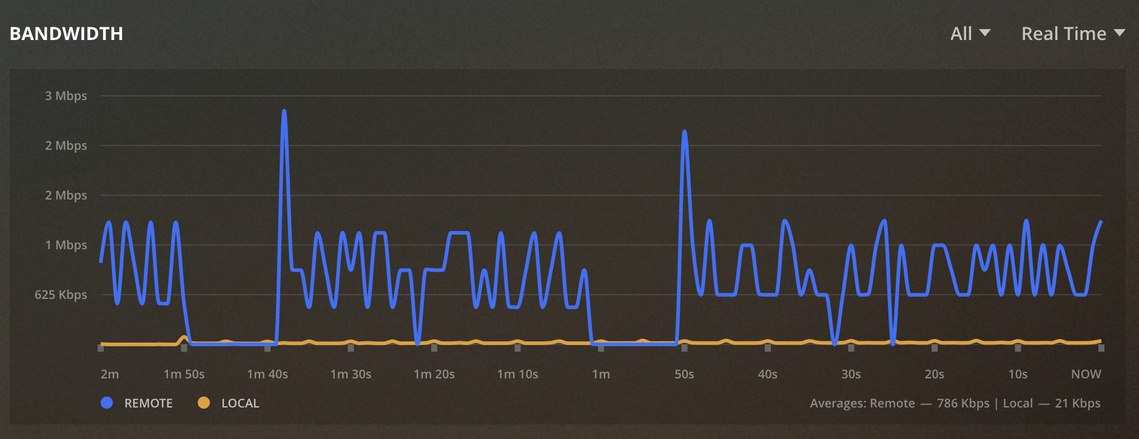
My home network is full gigabit and all media players are wired in so nothing is using wireless. Something weird is going on for sure and it wasn’t happening on my previous cable internet with only 40Mbps upload.
Plex Version 1.19.3.2764 (previous version had the same issue and recently upgraded hoping for a fix randomly). Debug logs attached as well.
Does anyone know how to downgrade Plex on Synology? Just tried uploading the .spk from 3 versions ago when I think this wasn’t an issue and I get an error saying it can’t be downgraded… This issue is super frustrating!
Uninstall before installing the old.
Ok thanks. I just found some other posts saying this but I just wanted to make sure before I did that in case something bad happens.
Ok so I downgraded to several versions of Plex and no change which is really weird. That got me digging deeper and I just noticed something strange in my Plex settings and I’m not sure if it’s related or if this is how it’s supposed to be and I’ve just never noticed. In the “Remote Access” tab, it shows an IP address that is technically incorrect for the local private server.

My private subnet is a 10.x.x.x not 172.17.0.1. Interestingly enough, the 172.17.0.1 IP address is the default gateway IP for my Docker containers. So unless Plex is backdooring itself through Docker somehow, I’m not sure why this would be accurate.
I even tried to manually set the network interface which has the correct IP and it doesn’t change what shows up on the remote access page.
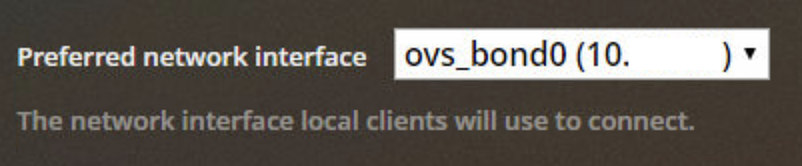
This just seems very odd and I don’t remember it doing this before. I access my Plex server locally via the 10.x.x.x network and local playback is fine. Maybe something is being weird between Plex and the Synology networking?
Does anyone else see a different IP under remote access page compared to how they access internally?
You might need to double check that docker setup of yours (assuming you are running Plex in a docket container)
Since you are running in a docker container and not the Synology package, I’d suggest you run that container with the network set as “host” (–net=host) rather than opening individual ports. That will likely help your NAT traversal efforts.


Updated to 1.19.3.2831 on my Synology and now the problem is fixed and my family is no longer getting the error when they watch things remotely. I see that 1.19.3.2843 is now available so I’ll install and make sure all is still good and report back.
Hi brotherhood, 5 juny and still “bandwidth limit exceeded”.
