Plex Cannot Find Media

Server Version#: DSM 6.2.2-24922 Update 2 - DS918+
Player Version#: PlexMediaServer-1.18.0.1944-f2cae8d6b-x86_64

After a recent update to the newest Plex version, Plex cannot find my media.

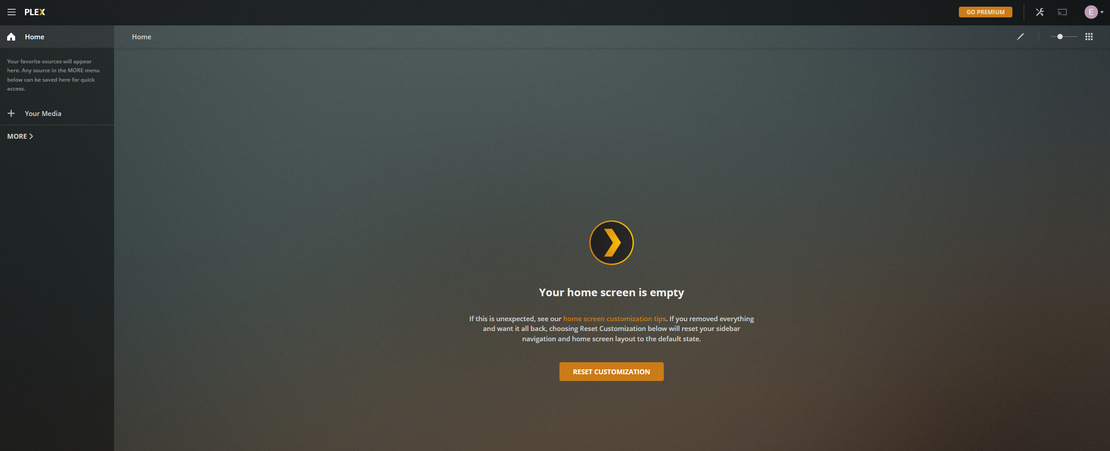
Launching Plex from the DSM menu lands me at the login screen (normal). After logging in, I cannot see any of my media. The screen blinks for a moment (every 30s or so) and there is a spinning icon, then nothing populates on the screen.

I’ve checked permissions following that article.

Here is what I see. image

This is VERY strange. I guess I’ll attempt a manual update to 3 and report back.

I have been working through the FAQ items; you’ve recommended that to many others people having similar issues. I’ll do a manual update first then start working through the rest of the terminal work.

image

I got the download after following the link you provided and searching for my model…

How can I find the correct CPU information for the download?

Here is what I’ve encountered so far.

#cd volume1/
#ls -la
total 5928
drwxr-xr-x   1 root  root      172 Oct 18 09:43 .
drwxr-xr-x  23 root  root     4096 Oct 18 09:42 ..
drwxrwxrwx+  1 root  root       52 May 28 10:42 Apartment
drwxr-xr-x   1 root  root       84 Oct 18 07:55 @appstore
drwxr-xr-x   1 admin users      76 May 23 15:08 @database
drwxrwxrwx+  1 root  root       56 Jun 10 14:59 @eaDir
drwxrwxrwx+  1 root  root      100 Oct 18 08:41 Plex
-rw-------   1 root  root  6064149 May 24 08:08 @Plex.core.gz
drwxr-xr-x   1 root  root       24 May 23 15:09 @S2S
drwxr-xr-x   1 root  root        0 May 24 09:00 @sharesnap
drwxr-xr-x   1 root  root       84 May 24 07:43 @SynoFinder-log
drwxrwxrwt   1 root  root       34 Oct 18 09:43 @tmp
drwxrwxrwx+  1 root  root       52 Jun 10 14:59 web

#cd Plex
#ls -la

total 0
drwxrwxrwx+ 1 root   root   100 Oct 18 08:41 .
drwxr-xr-x  1 root   root   172 Oct 18 09:43 ..
drwxrwxrwx+ 1 plex   users    8 Oct 18 09:43 @eaDir
drwxrwxrwx+ 1 plex   users   38 May 24 08:51 Library
drwxrwxrwx+ 1 edward users  366 Aug 10 18:51 Movies
drwxrwxrwx+ 1 root   root  2448 Oct 18 08:41 #recycle
drwxrwxrwx+ 1 plex   users  320 Oct 18 09:45 tmp_transcoding
drwxrwxrwx+ 1 edward users  628 Jul 25 13:13 TV Shows

Is this really a permissions issue at this point? Due to the fact that I own the Movies folder and TV Shows?

Yea I just did a check on these. The plex user has R/W to the share and is a member of the ‘users’ group. The plex user is not a member of administrators also.

Just wanted to check all this.

Just caught something. I noted that the users and video groups did not have R/W access checked for the Plex directory in DSM. Should I allow that and perform a reboot to see if that fixes it?

Ah dang, Ok. I went ahead with the steps from Q18 and still no dice. After landing at the Plex web dashboard, it still won’t recognize anything.

What would you want a screenshot of specifically?

I have the admin account enabled on the NAS.

My username is enabled and is also a member of the administrators group.

I’ll work on pulling logs now.

Certainly, here is my home page: http://192.168.1.12:32400/web/index.html#

I cannot access the Plex Settings > Server > Troubleshooting and click on the Download Logs button.

However, I can look through the web debug logs; I noted the following:

{
    "type": "log:message",
    "level": 1,
    "message": "[Connections] [Loopback] is unavailable at http://127.0.0.1:32400/media/providers (Status 0)",
    "time": "2019-10-18T16:15:21.647Z"
  },
  {
    "type": "log:message",
    "level": 1,
    "message": "[Connections] [Loopback] is unavailable at http://127.0.0.1:32400/media/providers (Status 0)",
    "time": "2019-10-18T16:15:21.648Z"
  },
  {
    "type": "log:message",
    "level": 1,
    "message": "[Connections] All connections to [Loopback] failed",
    "time": "2019-10-18T16:15:21.654Z"
  },
  {
    "type": "log:message",
    "level": 4,
    "message": "[Servers] Found all servers = plex.tv",
    "time": "2019-10-18T16:15:21.655Z"
  },
  {
    "type": "log:message",
    "level": 4,
    "message": "[Primary Server] Waiting for any eligible server to connect",
    "time": "2019-10-18T16:15:21.656Z"
}

No, I have not done that.

Will do. Here are my logs as well. Logs.zip (611.6 KB)

Update: Plex still does not find any media server.

IPv6 is disabled in my network.

I noted in the DNS logs that the NAS was not having any issues reaching records for *.plex.tv. However, there was a stale IP address for a decommissioned DNS server. Correcting these issues in the VLAN has fixed the issue.

I noted that I was able to claim the server! Awesome. I have followed the instructions in Q5 and Q5a. The files are no longer stored in the Plex shared folder.

I will need to re-map the folders that Plex uses to find the libraries and such but that should be easy enough.

As of right now I believe this fixes my problems. Thank you very much for your help!

If I may add a friendly reminder to all who happen to read here in the future:

I place warnings, in 6 languages, to not place media in the Plex share with each update.

This topic was automatically closed 90 days after the last reply. New replies are no longer allowed.