Server Version#: 1.16.5.1554
Player Version#:
I’ve been working with Plex for several years now and have had server setups using Windows pc, Windows based NAS, IMAC, and most recently a MAC mini running with a thunderbolt ext drive. I just purchased a Terra Master F5-421 running with 4-12TB drives in a RAID 10 configuration and a SSD cache (5th drive) and for the past 24 hours I’ve been STOMPED! The new NAS runs on a Linux based OS which I know very little about! The problem is I can’t get Plex to see my library!
So I’ve been reading any and everything that I can find and I thought that the fact the the drives are formatted in BTRFS might be the issue, but I see some on this forum that have successful setups with that; I thought it may be a Linux security issue but I don’t think that’s it either. See I took the the external hard drive (MAC formatted) from my setup connected via usb 3.0 to the NAS and copied and pasted everything to the NAS. Once I enabled Plex that is built into the NAS and attempted to add the library none of the folders are available BUT the external drive connected to the NAS with the identical folders are available and I can play those files. So I’m not thinking its a security issue because I can play those through the NAS. I can directly access the new files on the NAS from a MAC or PC and play them just fine; I just can’t get Plex to see them. I’m stomped!
Sounds fun. Be sure you try the simplest of solutions, shutting the NAS off,
then starting it up a couple minutes later.
Check out these articles about Terra Master hardware.
Let us know what you try and what doesn’t work out.
It could be a simple answer that I don’t know, but at least you have
some things to read.
Problems can multiply if you get it partially running then make major changes to it.
You might have to completely uninstall PMS and go again. A description of how to
remove the Plex app and download it again was given here:
Success!!! So 12 hours later the issue appears to be solved. Thanks “nibbles” your suggestion sent me in the right direction. When reading the the articles suggested by “nibbles”; in one of the articles it showed the directory where plex media files are natively stored. So if I couldn’t make plex see my directory then I thought what if I move all of my files into the native. Using the file manager I hit the up arrow to go back to the plex root folder and went through the various directories in the article until arriving at the Plex Media Server folder and then dumped all of my files in there. I then went back to add the movie, shows, etc folder to the plex app and the files were then available. They are uploading now…Thank you for this product and this community!!!
YOU SHOULD NOT PUT YOUR MOVIE/MEDIA FILES IN THE THE PLEX MEDIA DIRECTORY as I did! This has been a huge learning curve; however after putting the files in the plex media directory I felt uncomfortable assuming that if the plex directory was erased or reset that you may lose your files as well. Another thread on this forum confirms that is what happened with another user. Then the hard drive that the files were transferred from became corrupt and had to be formatted then only leaving the files in the plex directory that could be subjected to erasure.
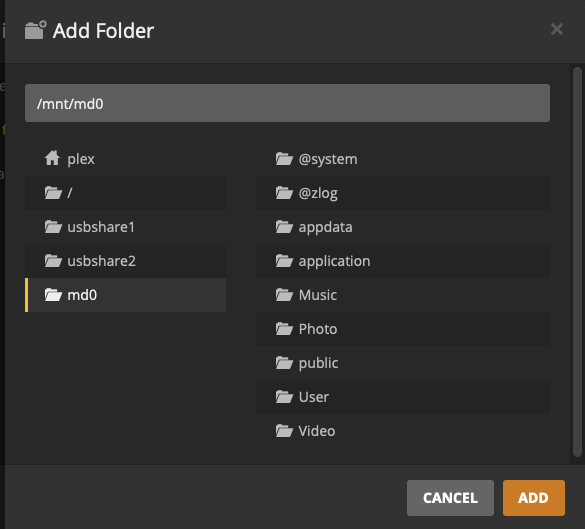
I continued looking through the directories that were available from plex when you browse folders to add a directory and I then found the pathway to the music, video folders that are established by default on the Terra Master NAS directory. See pictures
From the Plex directory choosing md0 leads you the music, photo, and video folders. I then cut the the directory and moved it to the video folder which took place instantly and then edit the folder location in plex by “X” ing out the current folder (not delete) and then browsed and added the new video folder. The scanning took more than 5 hours to complete but once done all information, files, metadata, etc was successfully moved and then it provided easier access of the files through direct access to the music, video, photo files. Now if we can get the thumbnail preview generation to complete (been running for 2 weeks+) but thankfully none of the existing progress was erased!!!