Hello,
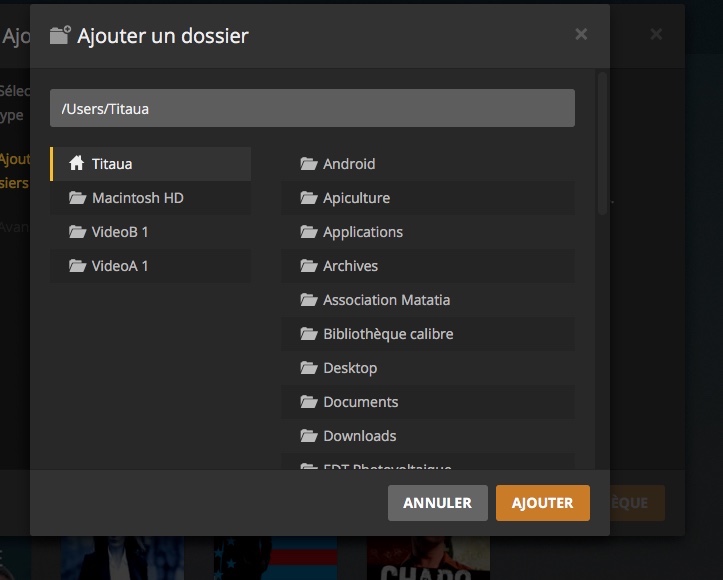
This is twice that PLEX changes alone the name of the hard drives on which are located my libraries, it adds after the initial name of the hard drive a blank and a 1. Because of this I no longer have access to my data and I I have to redo the paths of each library with the new name. Can you explain why and how to fix it.
Thank you in advance
Strely
Plex can’t change the name of your drives. It doesn’t have that level of access. Are these internal drives or external?
Thanks for the quick response, in fact PLEX changes the name of the hard drive in his system, see the attached file. My hard drives are external and they are not modified, I had not expressed myself. As a result I am forced to modify access for all existing libraries on PLEX by changing their path: initially VideoA and now VideoA 1
Are you saying that finder shows the drives as something else and the new name is only shown in Plex?
Plex does not have a feature to rename a drive. How do they appear in finder?
as mentioned plex does not have rights to change a volumes name. Likely they became unmounted incorrectly at some point. where this can happen https://www.cnet.com/news/drives-in-os-x-appearing-with-1-appended-to-their-names/
Yes, the finder shows the drives as “VideoA” and the new name “VideoA 1” is only shown in PLEX. And after i have renamed the path to PLEX to access to my library, it’s ok, PLEX is running normaly, WITHOUT change the name of my hard disk “VideoA”
Plex gets those names from your OS, so there is something odd going on with the way your Mac is mounting those drives.
There are a few suggestions in that article. Please read it and see if anything in there applies to you.
Ok, I’m going to read the article with some difficulties, because I’m French, I’ll tell you what’s next, it’s the evening for me in Polynesia
plex isnt changing the name of your drives (which you can verify via finder).
the “-1” is added usually when the drive is mounted multiple times via afp.
Try mounting is via samba, it should correct the issue.
Can you tell me how to do it?
Before we do that, let me make sure Im steering you in the right direction.
Are the drives VideoA and VideoB- are they network drives or external storage plugged directly into your computer that hosts PMS?
The drives VideoA and VideoB are external storage plugged into my computer that hosts PMS.
No answer ?
hey sorry, I have the worst time finding anything on the new forums
ok so these arent over the network, plugged directly into the PMS machine.
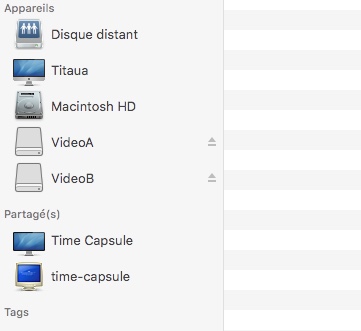
Can you take a screenshot the finder sidebar where you can see the drives are mounted? I’ll make to check back here regularly so we dont go another 6 days.
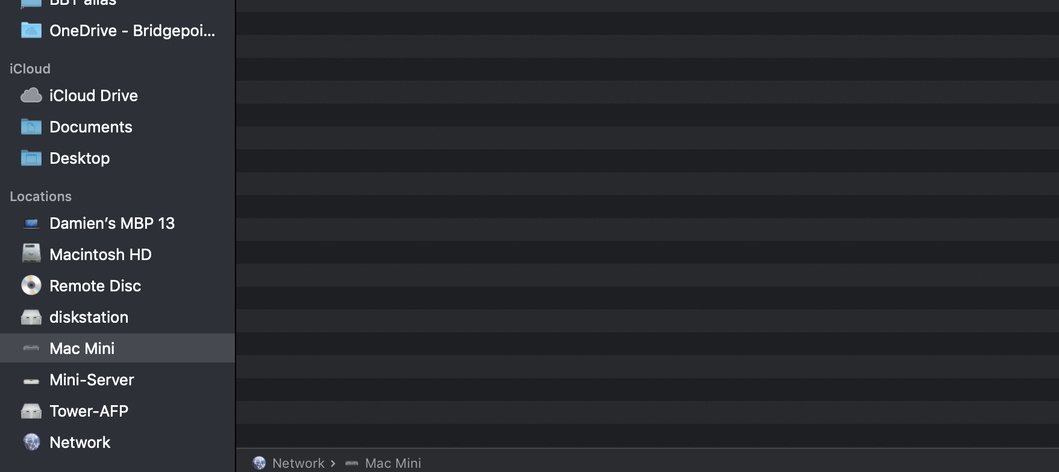
Thanks for the answer, I attach copy of the finder and copy of PMS where we can see the hard drives seen by PMS. I specify that I have access to my library by changing only the path with “VideoA 1” and “VideoB 2”
 Sans titre
interesting, that’s actually different than what I originally thought. network drives on mac will create “-1” after the mounted drive name because of something with Apple file protocol. This isnt a network drive or that issue. Let me see what I can come up with. Ill circle back by the morning.
hey what version of OSX are you on?
Edit- I mean MacOS
MacOs Sierra 10.13.6
There’s another variable to this we’re missing because the two drives have different names and this should really only occur if it’s being mounted from two different places or the drives have duplicate names.
That’s ok, let’s try this- rename one of the drives to something totally different. VideosA to “Videos” or whatever you want. Then tell me what it looks like when you select the path in plex.
YOu should be able to rt-click it in finder-info and there you can change the drive name.
