Server Version#: 1.27.2.5929
Player Version#: Android Xiaomi Device
Hello,
On my server, I refuse transcoding, normal because my machine is not powerful enough. When one of my users wants to watch a movie, and his device asks to transcode because his connection is not powerful enough for example, it does not work since I have disabled server transcoding. So he tries different content to see which one will work… ok except he crashes my server for some reason after a while! I attach the logs. I think there is a real problem.
Plex Media Server Logs_2022-07-20_14-10-14.zip (5.7 MB)
Looks like you have the setting to use hardware transcoding enabled. Turn all of these off. Even with transcoding disabled, we still check for this capability and the crash appears to happen due to this.

That second check mark. Turn it off.
Yes but I don’t want my server to transcode, I have a dedicated fiber to send the data to the user so no need for transcoding
I mean the second one that is enabled.

Oh ok ! Thanks.
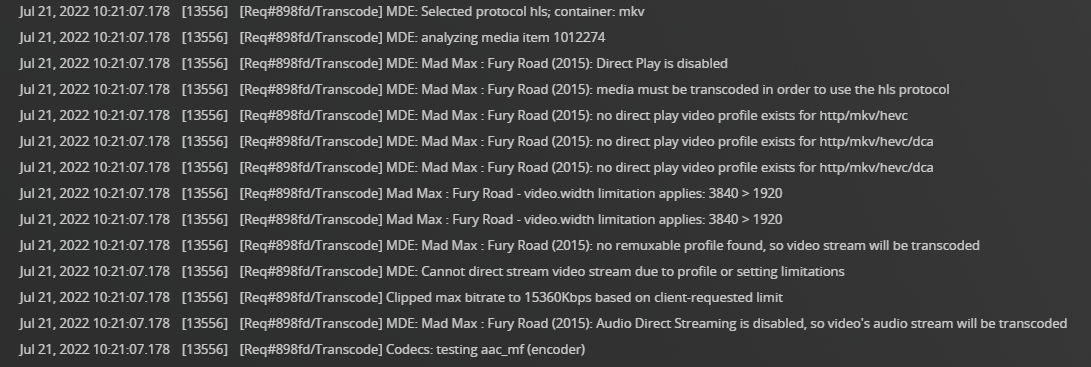
What client is in use? Is it 4K capable?
Notice the video.width limitation line.
Something is telling Plex Media Server the client has a limitation of 1920 x 1080 video.
Transcoding is disabled, so Plex cannot stream the video to the client.
On your server: Check Settings → Remote Access, Internet upload speed and Limit remote stream bitrate. Make sure they are not limiting bandwidth enough to require a transcode.
On the client: Check the remote streaming bandwidth setting. Make sure it is not limiting things unnecessarily.
Thanks for your help :
It’s a Samsung J3 phone. Able or not, if I send a stream it must be able to read it since I don’t activate transcoding?
The video is in the format
4K HDR10 (HEVC Main 10)
For connection limitation, no, I don’t have it activated, it’s open bar. On the client it is activated to the maximum.

To return to the server that crashed, here are the logs of the server that crashed just now!
Plex Media Server Logs_2022-07-21_14-55-45.zip (6.5 MB)
The phone cannot play 4K media using the Plex app.
The phone has a 1280 x 720 display according to GSM Arena.
The Plex app on the phone reports this to Plex Media Server.
Since transcoding is disabled, Plex Media Server cannot resize the 4K video to fit a 720p display.
As a result, playback fails.
This should not cause the Plex server to crash. However, it is normal that the phone cannot playback 4K HDR media if transcoding is disabled on the server.
Please turn off verbose logging on your Plex Media Server.
Debug level logs are sufficient. Verbose adds too much information, causing the log files to quickly wrap, possibly losing desirable information. It also makes the logs more difficult to read.
Settings → Server_Name → General (Show Advanced).

Ok its disabled for verbose, you want another logs file ?
After the next crash.
Restart Plex.
Wait two minutes for Plex to fully start and the logs to catch everything.
Then pull the logs.
crash just now I followed the procedure and here are the logs
Plex Media Server Logs_2022-07-22_16-41-12.zip (4.3 MB)
Have you see there @FordGuy61 ?
