Server Version#: 1.26.0.5715
Player Version#: 4.76.1
Not sure where to even start, Plex has been fine and even shown the particular show I am dealing with now, but then its decided to just drop a bunch after I added some new episodes.
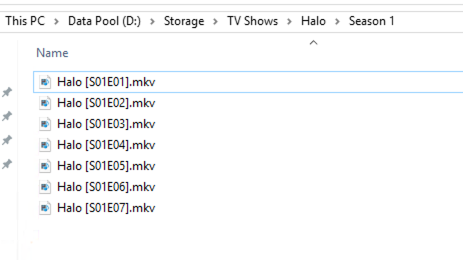
From the logs, it finds the shows, finds the files and then decides nothing has changed and doesnt doesn’t show anything, you can only see the empty folders in folder view.
Is there a way to get the thing to just show the god damned episodes like it is meant to, this has been driving me nuts all morning and I have tried everything I can on this site but nothing has worked nor does anything seems specifically tailored to this issue. Its like the db thinks files are there and showing but they arent.
I have tried the usual, scan, update meta, clear bin, all of which are set to happen auto anyway. I even deleted all these shows completely, did all the refreshes again, added them and nothing, still finds them, decides they exist and doesnt show anything.
Any help would be greatly appreciated, can upload full log as well but most isn’t related to this and I would need to remove some stuff.
From the logs:
May 09, 2022 11:36:11.267 [0x7facf457db38] DEBUG - Scanner: Processing directory /media/TV Shows/Halo (parent: yes)
May 09, 2022 11:36:11.275 [0x7facf457db38] DEBUG - Scanner: Processing directory /media/TV Shows/Halo/Season 1 (parent: yes)
May 09, 2022 11:36:11.283 [0x7facf457db38] DEBUG - Directory had 7 files, database had 0 files, can’t skip.
May 09, 2022 11:36:11.291 [0x7facf457db38] DEBUG - Activity: updated activity 0dbf92da-2d05-48c6-bd37-a598d4e74c3c - completed 50.0% - Scanning TV Shows
May 09, 2022 11:36:11.291 [0x7facf457db38] DEBUG - Scanner: Processing directory /media/TV Shows/The Simpsons (parent: yes)
Then later on:
May 09, 2022 11:36:20.561 [0x7facf457db38] DEBUG - Updating directory ‘’ (ID 2026) to time 2022-05-09 11:35:34.
May 09, 2022 11:36:20.570 [0x7facf457db38] DEBUG - Updating directory ‘Halo’ (ID 3679) to time 2022-05-09 10:06:32.
May 09, 2022 11:36:20.570 [0x7facf457db38] DEBUG - Updating directory ‘Halo/Season 1’ (ID 3680) to time 2022-05-09 09:48:45.
And finally:
May 09, 2022 11:36:50.015 [0x7facf446bb38] DEBUG - Content-Length of /var/lib/plexmediaserver/Library/Application Support/Plex Media Server/Cache/PhotoTranscoder/ee/ee4c1e851b3467a464085a062cf4befc8128793a.jpg is 25446 (of total: 25446).
May 09, 2022 11:36:50.017 [0x7facf2ddbb38] DEBUG - Scanner: Processing directory /media/TV Shows/Halo (parent: yes)
May 09, 2022 11:36:50.021 [0x7facf2ddbb38] DEBUG - Skipping over directory ‘Halo’, as nothing has changed; removing 0 media items from map.
May 09, 2022 11:36:50.023 [0x7facf2ddbb38] DEBUG - Scanner: Processing directory /media/TV Shows/Halo/Season 1 (parent: yes)
May 09, 2022 11:36:50.026 [0x7facf3115b38] DEBUG - Completed: [192.168.200.104:50096] 200 GET /photo/:/transcode?width=240&height=360&minSize=1&upscale=1&url=%2Flibrary%2Fmetadata%2F23752%2Fthumb%2F1652046993%3FX-Plex-Token%3Dxxxxxxxxxxxxxxxxxxxx (19 live) TLS GZIP 23ms 25446 bytes (pipelined: 6)
May 09, 2022 11:36:50.030 [0x7facf2ddbb38] DEBUG - Directory had 7 files, database had 0 files, can’t skip.
May 09, 2022 11:36:50.037 [0x7facf2ddbb38] DEBUG - Activity: updated activity 7fce3aa3-c3b5-4bd4-be8e-429ea74dccbd - completed 50.0% - Scanning TV Shows