PLEX doesn't do HW Transcoding on Fedora 30 (ver 5.6) running on Intel i9-9900 (SGC SonicTransporter)

Chuck:

Andrew states:

I have gone as far as I can with this.

  1. Plex support has verified that we have OS support for Quick Sync.
  2. I can’t test it because I don’t know how.

I can’t move forward until I have detailed directions on how to tell if Quick Sync is working in plex.

Andrew Gillis
Small Green Computer
603-488-0617

I have not verified they provide you QSV support.

Chuck:

Unfortunately, I have no answer for this as I am left with a device that barely runs PLEX.
As I said earlier, monkey-in-the-middle.

This is quickly getting out of scope for the level of support I can provide here as this is a Vendor - Customer issue.

If they wish to reach out to us as a partner, we can offer a different level of support in resolving the core problem.

I can tell you that I have:

NUC8 i7-HVK (i7-8809G CPU)
Fedora 30,

I load Plex and have immediate hardware transcoding.

I can also tell you that, due to Redhat changes,

you’re FAR better off with Debian / Ubuntu as the base OS.

I am able to provide much better processor and runtime library support native in the package.

Chuck:

I appreciate your help but please hang on. Andrew asks me, in response to my suggestion (and yours) to setup a unit in his lab:

I have a unit here in my lab. it plays with no issues. I need to know if it’s using Quick sync or not. How can I tell???

There must be an easy way to tell from the UI. I just don’t know where there are many menus.

I want a box that say “Quick sync found” or “Quick sync not found” Does something like that exist in plex? Why do you have to do all this stuff from command line?

I also don’t understand that post. What is tonemapping??

Also he says " It’s clearly not seeing the hardware." but then goes on to tell me the hardware is working perfectly farther down in the post.

Hopefully he can figure out how to get plex to see it and also tell me how to know if it’s working so I can test it!

-Andrew

But you are saying it works fine with Fedora 30. So why is it better to have Debian / Ubuntu? These OSes are usually quite a bit behind on correct drivers.

Can you give me a list of packages that are required for it to work? I agree maybe there is something missing.

The driver is clearly loaded Plex just does not seem to have a way to access it.

Also Are you running an Xwindows desktop on that NUC8 i7-HVK (i7-8809G CPU) box? Is that required? Will it work with a command line OS only?

Also is there a quick way in the Plex web GUI to tell if plex can access Quick Sync or not? That way I can try different packages and I will know as soon as it’s working. Something like a dialog box that say “Quick sync found” or “Quick sync not found” would be good.

This is why I say Ubuntu/Debian.

  1. 20.04.3 LTS is every bit as good and more stable than Fedora (I speak from experience)

  2. Intel development efforts are Debian centric

  3. HDR → SDR tone mapping (important for anyone with 4K) is Debian (which I support natively in the packaging.

If you can get those drivers in Fedora – you might have something

Thanks guys for carrying on … :pray:

So you need to load those driver on your Fedora 30 box to get Plex to work?

Plex will work without it.

Given the CPU is an i9-9xxx, it will work far better with them.

The Intel chipset family which gives tonemapping is 7000-8000 (native)

  • -9000 starts to break away
  • -10000 and above must have the above drivers for Tone Mapping.
1 Like

OK I don’t know what tonemapping is. And maybe I don’t need to ??

I just need to the know the best way to get this working on Fedora.

Also I need to know how to tell if it’s working in the GUI.

This is what I need.

  1. A list of packages required to get plex to work on Fedora 30
  2. How to know if Quick Sync is working in plex by looking at the web GUI.

Can you help me?

I just replaced the stock intel drive with the “Intel® Graphics Compute Runtime for oneAPI Level Zero and OpenCL” that you linked me to. It doesn’t seem to help. But I can’t really tell. I need a way to know if Quick Sync is working in plex by looking at the web GUI.

@agillis1970

This is where I MUST draw the line.

It’s your product.

Please contact our strategic partner manager so we can arrange PROPER support for this task.

Supporting your product in our forum is out of scope for the forum’s intent and is inappropriate to discuss the additional details

How do you verify Quick Sync is working in Plex?

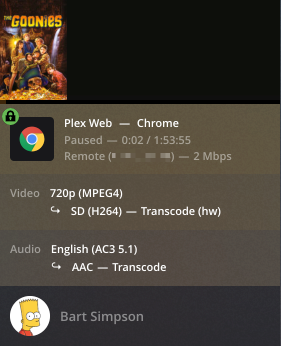
Chuck, I assume that the only way to check is to play a movie file, go to the Dashboard, and check to see if the (hw) symbol is visible. Is that right?

How can I tell when hardware acceleration is being used?

To check to see if hardware acceleration is being used during a video playback:

  1. Play a video on any Plex app.
  2. In the quality settings of the Plex player app, reduce the video quality to force Plex Media Server to convert the video (for example, select Convert to 480p ).
  3. Open the Plex Web App.
  4. In the Plex Web App, click on the Activity icon in the upper-right corner.
  5. Visit the Dashboard for the playing video
  6. Use the toggle at the top right of the Now Playing area to expose additional details of the playback
    Web dashboard displaying playback details
  7. When hardware acceleration is being used, you should see (hw) next to the Video format as shown above.

Or, is there a more efficient way that Andrew can check?

@herbg Wow thanks for such detailed instructions!!

OK @ChuckPa but please just tell me if you have X-windows loaded on your Fedora box and if it is required for plex.

I have contacted your strategic partner manager and they never respond to me. I just want this to work.

It’s always a good idea to check the support pages for info like this. There’s all kinds of stuff in there if you look:

Using Hardware-Accelerated Streaming | Plex Support

Yeah good info. Now if only there was a way to see this in the GUI so you don’t have to play something to know if it’s working.