Nowhere here do I see a way to Clean Bundles, and something is preventing Plex from seeing all my Anime show folders. I’ve done everything else listed in the instructions for “The Plex Dance”, but I can’t find any way to clean bundles.
There is no server name on the Plex page, no 3-dot menu next to Libraries in Settings; none of the instructions for locating the Clean Bundles function are accurate.
What is the "plex page"for you?`
Not in Settings. Right at the main page of Plex where you have the list of libraries at the left side.
Do you even have administrave access to your server?
Do you see any menu items below of “Player”, when you enter your Settings menu?
When on your Plex home page, click on MORE > at the bottom of the list of libraries. You should then see your server listed (as shown in the Plex Dance instructions). You can also choose which libraries to pin to your home page. When finished, click on < PINNED to return to your home page.
Optimize Database and Clean Bundles are also available via Settings → Troubleshooting.
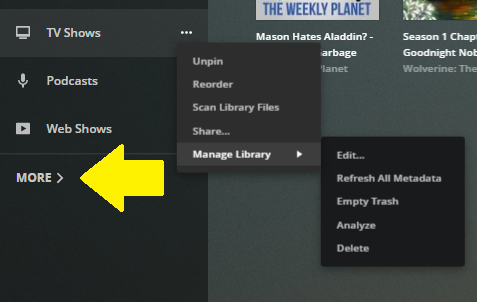
Yes, I do have admin access, and clicking where you say simply opens a drop-down with the name of my desktop in it — no other options; no 3-dot menu.
Please provide a screenshot.

