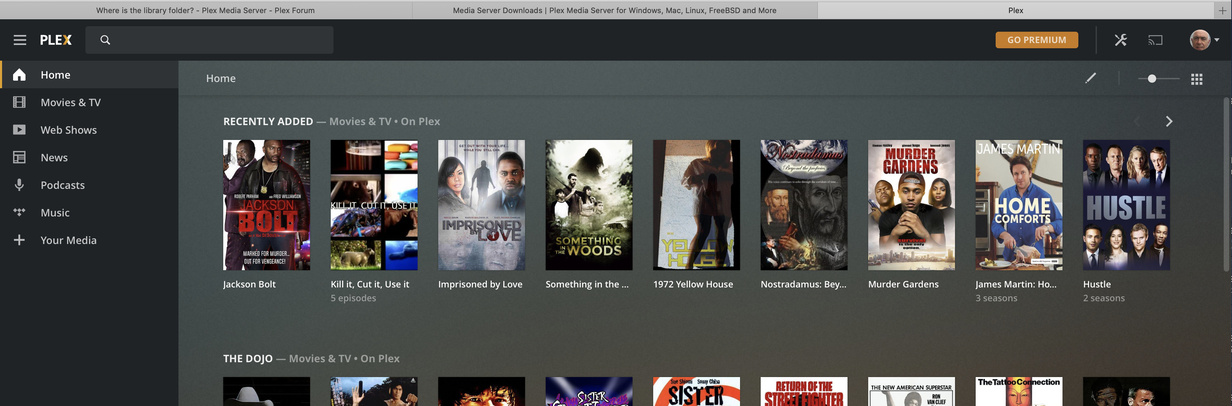
Server Version#:4.34.3
Player Version#:
Hi all I need to get to my Library but where in the hell is it>
Cheers
Server Version#:4.34.3
Player Version#:
Hi all I need to get to my Library but where in the hell is it>
Cheers
If you don’t have it pinned to your home screen then you can click More to see all the libraries from your server and other sources you have access to and pin whichever you wish to home screen


where is the More Button?
Those are all the free online media sources we provide. Do you have the Plex Media Server installed?
Hello again
I can’t see the More button
Can you please explain how to find it.
cheers
Hello BigWheel
still having issue with my server you said to clic the more button but the more button isn’t visible I’ve resorted to downloading a new copy of Plex but hasn’t fixed the problem was hope the more button would be visible but its not.
Are you able to help me with his or should I be asking for assistance in a different section.
Cheers
Colin
Have you already been able to access that server of yours successfully in the past?
If you only just set it up… make sure to do the initial run via the local IP address of the server – e.g. http://127.0.0.1:32400/web if you’re on the same machine, http://[local PMS IP address]:32400/web otherwise.
The situation you describe can happen if you have not yet linked the Plex Media Server to your Plex account and e.g. try to access it through http://app.plex.tv/desktop (while the online version of Plex does not yet know that local server belongs to you).
https://support.plex.tv/articles/200288586-installation/
If you had successfully used the server before, this kind of behavior could happen if your local Plex Media Server was previously linked to a different Plex account.
Hello tom80H
I have been using Plex for 2 years worked great but I what’d to create a seperate folder for my saved music on an external SSD drive is where all my movers are saved as well TV
I opened Plex started looking for where the library is and consent find it.
In my desperation I download a new copy of Plex but that didn’t help at all
I contacted Plex and was advised to clic the " More " button I don’t have it
I did read those earlier posts.
However, you’re not answering how you’re currently accessing the Plex Media Server or if any of the mentioned scenarios apply to your use case
Tom
Can you confirm that I have the Plex Media server (from Last image upload)
Not sure why I’m asked if I have it installed ?
Cheers
Colin
The 1st question asked by BigWheel was asked before you clarified that you had the Plex Media Server app installed. With Plex more recent development to support streaming of their own online videos, sometimes users who have so far only used http://app.plex.tv show up and ask how to add their own libraries without installing a server first – your question could have come from a direction like this.
We’re beyond that question for quite some posts.
The latest question was what address you use to open Plex in your browser. I’ve asked you to open the Plex Web version embedded within your Plex Media Server… based on your screenshot it’s hard to tell – usually the local/embedded version shows the name of your server in the tab title (e.g. `Plex: ). Therefore my money is on you’re still using the hosted/online version.
Hi Tom80H
I only use Plex for streaming my own movies that I have collected of the years and they are stored on and external SSD.
This is the address for opening Plex http://127.0.0.1:32400/web/index.html
If this is the wrong address please guide me to where I should find it.
Thank You
Colin
The address is right.
Looks like you locked yourself out of this server – this can happen if you had the server previously linked using a different Plex account (e.g. if you have more than one).
In one of the earlier posts I had linked a support article that will walk you through the process of regaining access to the content of your server. Make sure to perform all steps:
When we had the last major update a few week ago I had to setup a new account because I was unable to login to the old one, worked fine tile a few days ago. the old account was 2991 my new account is BA2991.
Is this the link: http://app.plex.tv/desktop?_ga=2.247371460.1354732909.1599260346-352286048.1599260346
Your server is still logged into your old account.
com.plexapp.plexmediaserver.plist file mentioned in the article mentioned aboveI contacted AppleCare due to an error with OSX Terminal
I didn’t need to use Terminal.
AppleCare fixed my Plex issue within 10 seconds.
Do you still recommend me deleting - com.plexapp.plexmediaserver.plist
Thanks again
Colin
if it is fixed and everything is working fine then no.