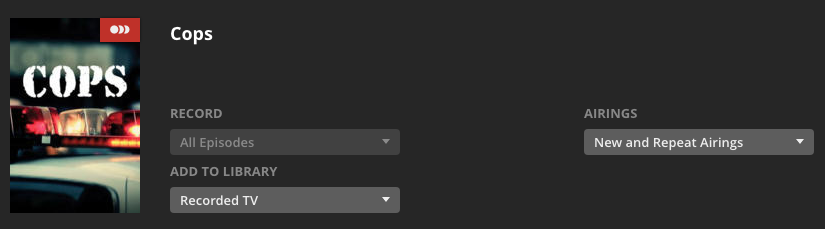
There is a 30 day policy set on the Show in the Library:
Mar 15, 2018 06:00:06.720 [12222] DEBUG - Garbage Collector: Deleting expired unwatched content for Flipper (policy: -30 before 2018-02-13)
Mar 15, 2018 06:00:06.727 [12222] DEBUG - Garbage Collector: Deleting episode 3 - S.O.S. Dolphin (beyond window of 30 days old)
Garbage Collection runs against the library when new content is added which uses the Original Air Date of the episode. To fix the recordings from being deleted you will need to edit the show settings in the library.
As @AmazingRando24 mentioned there are two locations for settings, one in DVR and the other in the Library. My screenshot is showing the library settings not the DVR. I wish these were linked better but they are separate settings.
Plex has a bug - where’s the best place to report it?
Back on the 15th I deleted the recording of Flipper.
Late in the day on the 19th, after many Program Guide updates (using it as a point of reference) I set up a new recording of the entire Flipper series - Set it to Record All Episodes, New & Repeat. Selected the Modify Recording button and verified it is set to Keep all episodes and never delete.
– In the main DVR settings there is no option to keep X episodes or delete after y days.
This morning Flipper recorded but within 20 seconds garbage collection kicked in -
Mar 20, 2018 05:30:18.313 [8714] DEBUG - Garbage Collector: Deleting episode 8 - Countdown for Flipper (beyond window of 30 days old)
This bug of theirs - it appears that the previous (original??) information for a series recording is not overwritten. Can I manually update the database? Is it MySQL, Postgres?
You need to double check your retention settings in two places… First, is the area you would think to look, when you set the DVR to record the show. Next, you’ll want to check the advanced settings for the show in your library. If you don’t have any existing episodes, create a fake tile and name it correctly so Plex picks it up.
You might be surprised to find that your settings in that area will explain why your show got wiped.
The most important thing to know, is that these settings apply to the show as a whole, no matter what library they reside in.
@AmazingRando24 said:
You need to double check your retention settings in two places… First, is the area you would think to look, when you set the DVR to record the show. Next, you’ll want to check the advanced settings for the show in your library. If you don’t have any existing episodes, create a fake tile and name it correctly so Plex picks it up.
You might be surprised to find that your settings in that area will explain why your show got wiped.
The most important thing to know, is that these settings apply to the show as a whole, no matter what library they reside in.
I’m struggling with the same issue that dzeff is seeing. It is only happening to one program. I know what you are referring to about editing the settings in the library (vs the DVR) the problem is I don’t have any more of this recording sitting in my library. And because I keep hitting the old settings I can’t get a new episode recorded into my library to go and change the settings. I do believe I probably did set this show incorrectly since the show is from the 90’s I think I did put it at ‘last x days’ at one point and since then I haven’t been able to record.
Is there a way to fix this in the library without resetting everything? What format is the library stored in? where?
Take a New recording of any file in the last few days. Copy the recording out to a different location and rename it to match the naming convention of the show you are having an issue with. Then move the renamed recording into the library and let Plex detect the library change. You should then be able to edit the show in the library and delete the renamed/copied file.
@johnm_ColaSC said:
Take a New recording of any file in the last few days. Copy the recording out to a different location and rename it to match the naming convention of the show you are having an issue with. Then move the renamed recording into the library and let Plex detect the library change. You should then be able to edit the show in the library and delete the renamed/copied file.
Thanks for the idea, I was able to get a library entry to show up and saw that I had a setting of ‘last 30 days’ so I changed it. Unfortunately I don’t believe the problem is fixed yet as I’m still not getting recordings but I haven’t been able to get back to look at the logs again.
I’ve just got an HDHomeRun Connect and enabled the Live Tv/DVR functionality but I can’t get it to record at all and I’m experiencing really weird behavior.
As a test I’ve been trying to record a soap that is shown every weekday. However if I search for it, none of the timings for episodes it finds seem to line up with what the guide shows and it misses episodes too (for example it doesn’t show episodes on Channel 5 at all, just 5 Star, etc).
If I select a show from the guide (at the correct time) and set to record the series, it seems to setup the recording, but when I switch to the “Recordings” view, although the show is shown in the right hand “Recording Priority” panel, it says no upcoming airings and shows nothing scheduled in the week view. Rechecking the guide however shows the show should be recorded.
I’ve tried deleting my DVR and re-adding it, etc but it hasn’t fixed the issue. Anyone any ideas?
More information on recording settings would probably be needed. My guess is that you selected “New Airings Only” and the episodes are not isentifi s as “New” in the EPG.
This exact same thing happened to me. Seems to be something I was recording, then stopped, then added back maybe a few weeks later. For example I used to record Wheel of Fortune for my friend. I stopped it because I needed space. Then about a month later I started it back and it would never record, just said no upcoming airings. The same thing just happened with COPS. Now no matter what I do I can’t get that show to record. I’ve deleted my tuner, I’ve updated the guide. Only thing left is to wipe out Plex and start over. Please help!
Deleting your tuner will do nothing in regards to recordings showing as no upcoming episodes. Would need more information about the settings for the recordings. Screenshot of both the basic and advanced setting screens would be helpful, or post the Plex logs providing the name of a show that is showing no upcoming airings. Hint: if you have “New Airings Only” selected and none of the episodes in the guide data are flagged as “New” you will not get any recordings. New is an episode that has never aired before, not one that doesn’t exist in your Plex environment and thus would be new to your library.
Seems Plex screwed somthing up. Now today only I can’t see any of Guide information for my basic tv channel SD or HD channels for my HD Home Run 3 tuner unit. Seems we fix one thing and break another again. Running Plex server and players locally on WIN 7 with even after the latest BETA update same problem. None of my major network stations are showing in the guide from cbs, nbc, fox, abc, wb/wpix channel 11 nyc area, wor/mytv channel 9 nyc area, pbs nyc etc.
I feel like the recording priority needs a reset. It was working as recently as 2 days ago. But a few months back is when the Wheel of Fortune recording started acting up. Now it’s COPS too…something is up, there is definitely a bug, I understand the difference between new airings and repeat. All COPS are repeat where as Wheel of Fortune may be both.
It’s important to note that even if I select 1 episode of COPS to record, it does exactly the same thing. The guide says it will record but the recording priority and recording schedule won’t show it. After the air date - it doesn’t record.
The guide shows the record inage on any show that has a recording setup. The guide is in not intended in any way as an indication that it will record. To see what will record you must use the Recording Schedule. The recording priority allows you to move items higher or lower in the priority to handle any conflicts, ie NCIS will not record because of a conflict but you have The Big Bang Theory scheduled to record at the same time, if you prefer NCIS over TBBT you can slide NCIS to the top of the Recording Priority to ensure it will be the top show recorded.
Sounds like you will need to review the Plex logs to determine why a show in the Recording Priority list is not recording.