Server Version#: Version 1.19.1.2589
Tuner Make/Model: HDHomeRun CONNECT QUATRO
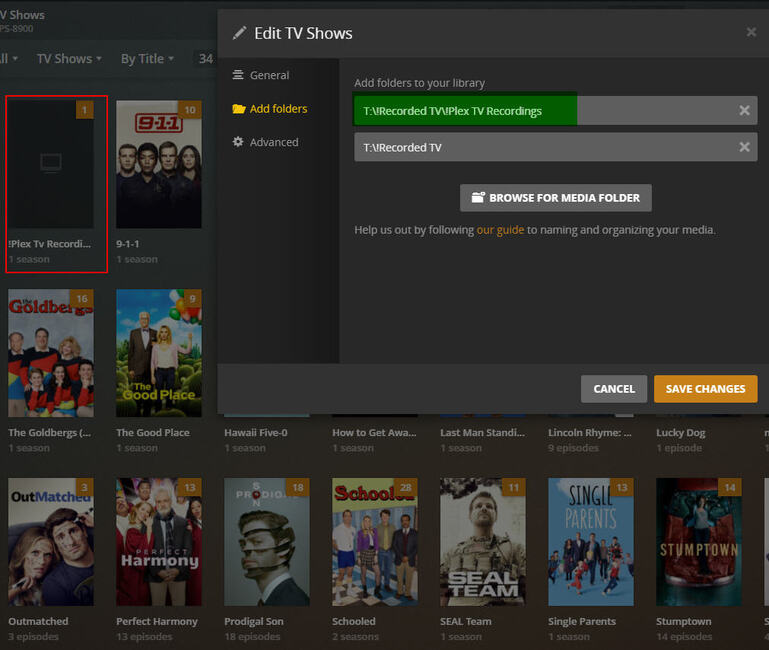
When I record TV shows to a library folder, such as T:!Recorded TV , after the recording is done, the show episode data, artwork, and other file data correctly shows up on my TV Show Library as you would expect as you can see in the image below in which show information is showing up. For other reasons, I was trying to record tv shows into another sub-directory, T:!Recorded TV!Plex TV Recordings. I was thinking the shows would still show up in my library as normal but as you can see in the image below with the red outline, there is a “show” that is called this same sub-directory and when you go into that show, there is no episode data shown. Is there a reason why plex is behaving like this and is there any setting I can change where tv shows saved inside this sub-directory would show the correct episode / artwork information?
“When recording to a sub-directory”
I don’t understand this statement. Plex doesn’t record to directories or folders, it records to a Library.
Sorry, I was not done with my post before it came live. Please see above original for updated question.
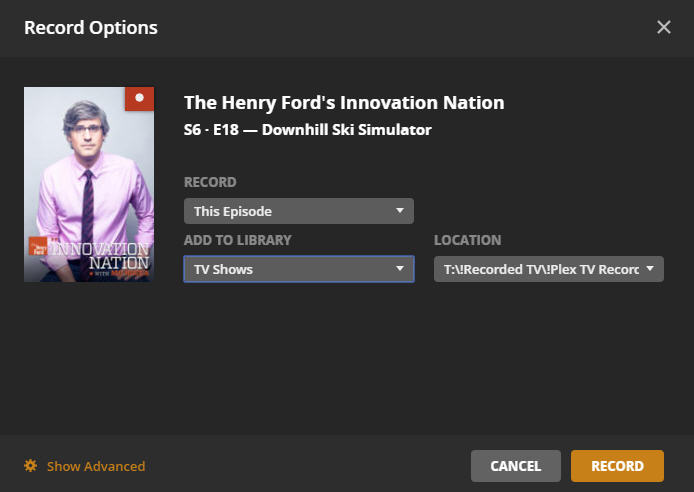
This is the DVR recording screen where I am recording what I called a sub-directory, but that may not be the right terminology.
This is a result of the way Plex handles TV show libraries; it expects a very fixed folder hierarchy:
T:\DVR TV Shows\  <--- Base folder, name does not matter
     Show Name\
          Season XX\
               Show Name - SXXEYY.ext
If you introduce an extra directory level between (for example) “TV Shows” and “Show Name,” it will treat that directory name as the name of a show. There is no way around this for a TV show library, recorded or non-recorded.
If you want to have separate folders for different recordings, they’ll all need to be at the same level in the directory structure:
T:\DVR TV Shows\  <--- Base folder, name does not matter
     Show Name\
          Season XX\
               Show Name - SXXEYY.ext

T:\Other DVR TV Shows\  <--- Base folder, name does not matter
     Show Name\
          Season XX\
               Show Name - SXXEYY.ext
And those base folders will need to be added to your TV show library.