If it was an SMB issue, then those files wouldn’t be accessible in other ways. And the problem isn’t that Plex can’t read them, they’re available, but only unplayable, it’s HOW Plex is reading and processing them. A reminder, Infuse plays everything Plex can’t on the same devices.
Thought it was something i did (large media changes for music), but noticed that my movies were no longer in their collections. Restored a database and all looked ok, but it wasn’t loading any artwork. Sporadic on only movies, and not all of them. forcing multiple scans seems to bring them back (but not artwork/posters).
MacOS: 15.0 (24A335)
Plex: Version 1.41.0.8994
media on synology NAS (and still there) connected via SMB and mounted to Mac (with connectmenow4 to keep mount active)
@Atomatth@drzoidberg33 just checking in on how the investigation is going? Have you been able to replicate this issue on your own? If you need any further details, logs, or testing done just let us know! Thank you again for looking into this.
“If it was an SMB issue, then those files wouldn’t be accessible in other ways. And the problem isn’t that Plex can’t read them, they’re available, but only unplayable, it’s HOW Plex is reading and processing them. A reminder, Infuse plays everything Plex can’t on the same devices.”
And, if it were an SMB issue, you wouldn’t be able to play The TMC (Trashcan Man Confluence) content directly on the host server (using the client app).
Those TMC-flagged items break only on clients elsewhere (Firestick, AppleTV, etc.) and when using the plex.tv site via login. [poorly constructed sentence but can’t find a better wording.]
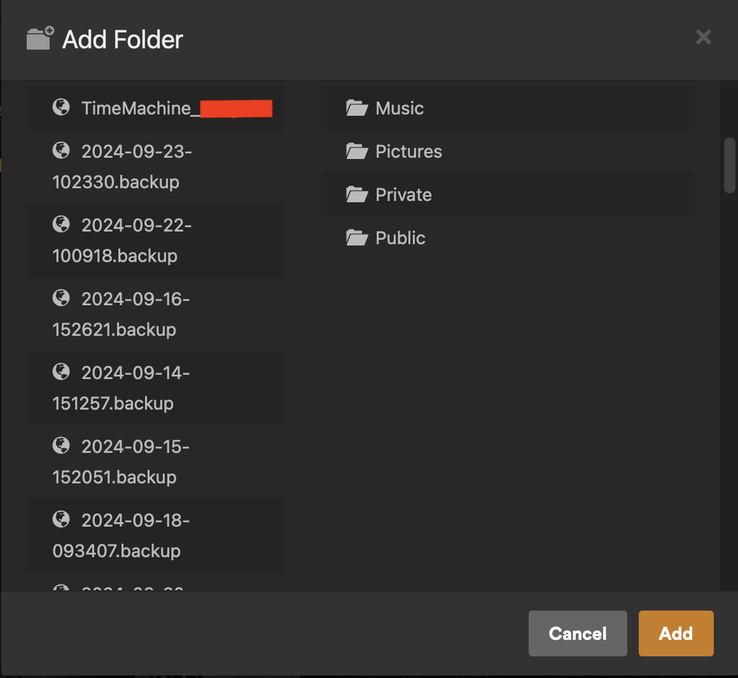
@Atomatth@drzoidberg33… not sure if this is related, and I know it’s not SMB related, but figured I’d report as a datapoint. I’m also not sure if this is normal, since I have not added a library in quite a long time so I haven’t seen this screen for a bit, until this issue popped up. But when I go to add the folder again for my affected movie libraries, Plex is seeing all my TimeMachine backups that reside on my TimeMachine USB drive.
Both my Macs that run TimeMachine now show the backups within the TimeMachine drive as volumes, instead of folders. Interestingly, Disk Utility does not. I do not remember this being the case pre-Sequoia. Just thought this might be interesting because maybe the issue isn’t exactly SMB related and instead how macOS might now perceive volumes differently. If Apple changed something in how it reads/displays volumes, it’s likely to affect SMB as well, and maybe Plex’s scanner just isn’t happy with these volume changes in regards to SMB specifically, and that’s why non-SMB users aren’t having the issue.
Just spitballing here. Been a long while since I’ve been on the dev side of things, so I’m a bit rusty.
I’m finding if I go to finder then my share and go into one of the “missing” files then manually start a library scan, it seems to pick them all up.
Almost as if plex is not having MacOS refresh the entire directory listing before scanning.
As newer files seem to always be available, but files older seem to go missing randomly.
Still doesn’t pull in custom posters which is annoying but at least the files become playable. (And why I keep all custom posters elsewhere for backup)
Just to add to this - i also noticed the same behaviour. Only the Movies folder in my case reduced from 1995 to 1165 films. Also on MacOS15 and using a synology DS920+ on latest software and SMB. I did not change the Synology settings for now as others have said that it made no difference and Synology gives you some dire warnings if you change them
I have scanned in a bunch of test movies from a SMB mount to my Macbook running MacOS 15.
I haven’t seen anything strange yet but will move stuff around and monitor over the next few days. Hoping @Atomatth can reproduce something on his end
The logs I’ve looked at also don’t seem to have anything helpful, it looks like it just stops scanning before the end but there are no errors in the logs as far as I can see.
I am seeing this apply to both my TV Series and Movie libraries, but only those which are larger.
i have TV series split up by animated vs regular for example and the smaller animated library does not seem to have this issue.
opening finder on the mac to the media locations, then triggering a scan, does allow Plex to find everything again (besides custom movie posters still result in emtpy black posters). I am attempting to leave the folders open on the Mac to see if that helps as Mac will refresh the directory automatically, which may keep it “alive” for plex.
This works for me in my wife’s “romance movies” library that has about 800 titles. in our main movie library that has 2000+ titles, it does not work.
@Atomatth@drzoidberg33 this is a very interesting detail. Sounds like the size of library and whether or not finder is opened to that library can affect the scan.
Edit: Actually looks like @Anqui3tas “fix” does work for my large library when I do a manual scan. Not sure what happened the first try, but two subsequent manual scans have worked. Looks like you don’t even need finder opened to the specific library, just the top level folder. For example, my movies are /Volumes/Media/Movies, but I only need finder opened to /Volumes/Media. I’m going to keep the finder window opened 24/7 and turn back on all the auto scanning and see what happens.
Edit 2: Nope, the auto scan will still break it. But this does seem to allow a successful manual scan.
With my smaller libraries under 900 movies or TV shows, there isnt a problem with Movies & TV Shows over 900 i.e. TV Shows 1146 and movies 4496 the auto scans reduce these libraries to approx 960ish, then. I restore an older backup, reset the folder locations and then it scans the new additions. I have turned off periodic scans and will see if I lose the movies/tv shows again.
@Atomatth@drzoidberg33 Very interesting development! I’ve confirmed as others have in this thread that if I keep a Finder window open on the ‘Movies’ network share I can perform a standard library scan without issue and it does not mark the movies are missing. If I close the Finder window and perform a scan after a few minutes, it will mark them as missing.
1999 movies - 995 remaining when others are marked as missing. I wouldn’t be surprised if ‘1000’ is the magic number.
Perhaps some new setting in MacOS 15.0 that is timing out / caching of large shares? Having the Finder window open to it keeps it alive? Very odd that this doesn’t seem to impact in any other apps running on the same system (e.g. I have both Radarr and Sonarr also running on this same Mac and they never lose connection or visibility into the same network shares for Movies or TV).
Do you actually have the folder with movies open or the one above movies. The reason being I always have the folder containing movies & tv shows open (not the actual folders) and still get the problem.
@hbrennan… at first I thought I only needed the top level open, but now I’m finding I need the actual movies library open. so basically /volumes/media/movies, NOT just /volumes/media.
For now I added that path to open at login, so if the server reboots a finder window will open to that folder. That what every time I need/want to run a scan, I don’t have to check the server. To do that, just drag and drop the folder into Settings → General → Login Items
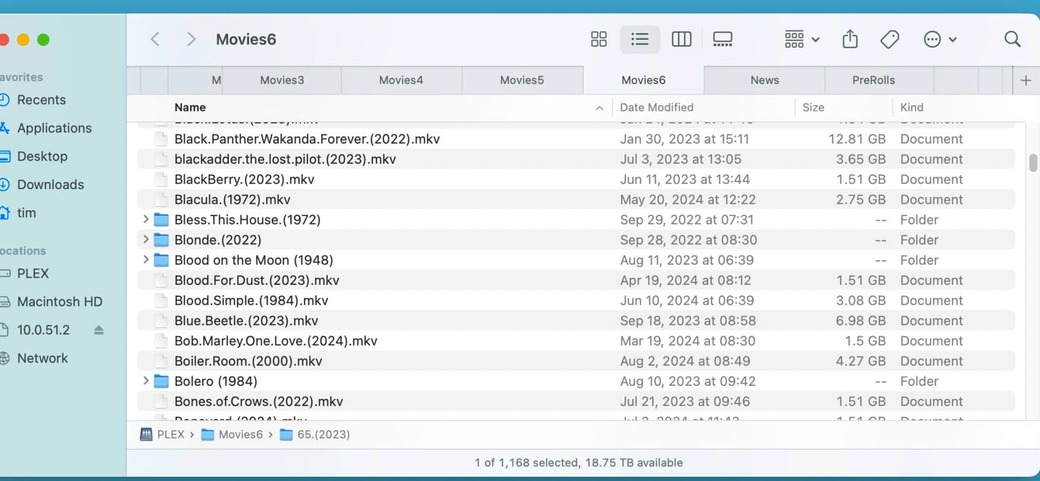
I keep on my media on one volume on the Synology, I have many Sub directories of media, Movie1 … movies6 I try to keep less than 1000 per folder, but most are at around 1200 movies per folder.
I selected the movie folders in the finder and right clicked the option “open in new tabs”. I then quit and reopened Plex. I have auto scan turned off so I did a manual scan, it then found all my missing media.
Yeah, all my media is mounted via /Volumes/Media (Media share on Synology NAS) with subfolders within for TV, Movies, etc. TV directory has about 300 sub-directories, where the Movies directory as ~2000 sub-directories.
The current issue is that the default library scan / automatic library scan will identify about half of my movies as missing (leaving me with 996 accessible). I confirmed earlier that opening a Finder window to the Movies directory and then performing a default Plex library scan will be successful (restores missing movies, doesn’t flag movies as missing); however, after leaving the Finder window open overnight another library scan goes back to the old behavior (marked as missing).
I suspect this is why re-adding the folder path in the Library Settings works, as doing this refreshes the connection to the network share.
It would appear that in MacOS 15.0 there is some sort of SMB share time-out where after a set period of time it limits SMB share queries down to about 1000 returned items possibly, but manually refreshing / navigating to the location will allow it to return all results?
Perhaps Plex needs to update it’s scan process to somehow refresh the share path first in order to ‘initiate it’ before performing the scan?