Server Version#: 1.24.3.5033
Player Version#: Plex-1.35.1.2632-c6783c78-x86_64

Server Version#: 1.24.3.5033
Player Version#: Plex-1.35.1.2632-c6783c78-x86_64
Do you know what kinds of files you are trying to play? mp3 .wma etc?
There’s not a lot of information to work with. Windows and Plex is fairly robust in it’s playout of different formats.
Have you tried the Convert Automatically in the playback settings?

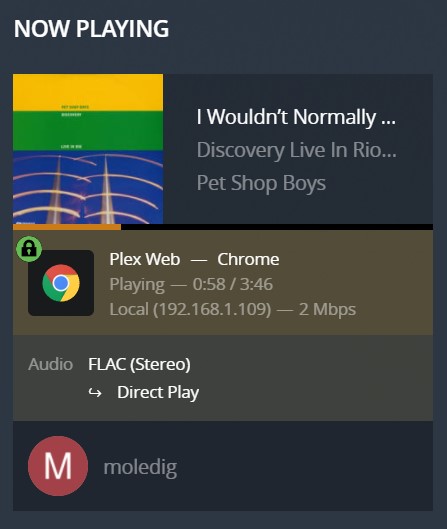
My music is all FLAC and works fine playing back in the Plex web browser, on our phones, Fire Stick, and Smart TV Plex apps.
Plex Media Player, and Plexamp also work just fine on the same desktop.
It really feels like something broke in the last version of Plex for Windows.
You could try playing the file in Internet Explorer or Edge and see if you get the same problem.
I don’t have any FLAC content to test I cant realistically reproduce the fault.
You are talking about Plex for Windows, but your screenshot of the Dashboard is showing that you are using Plex Web and not Plex for Windows.
Which is it?
Also, please inspect the Plex media info
of affected tracks and look out for anything unusual about them,
like sample rates above 44.1 kHz,
or bit depths above or below 16 bit,
or channel number anything other than 2.0 (stereo).
If it is indeed Plex for Windows you are using, take a look in the settings.
Is there a particular audio output selected or is it still on “auto”?
Is the “exclusive audio” checkbox ticked?
If the selected audio output is a HDMI or optical device, are there any of the format checkboxes for “audio passthrough” selected?
I just grabbed the screen shot from Plex Web to show the file type. 
So I tested Plex for Windows on two other computers and it worked fine still so I knew it had to be something on this desktop.
“Is the “exclusive audio” checkbox ticked?” 
The box was checked, unchecking it made things work again on this system. (light bulb moment) I was working on something and had told Windows to not allow “exclusive audio”… totally forgot about it.
That was the issue.
Thanks!!
This topic was automatically closed 90 days after the last reply. New replies are no longer allowed.
