Server Version#: 1.40.0.7998
Player Version#: 1.86.1.4076
<If providing server logs please do NOT turn on verbose logging, only debug logging should be enabled>
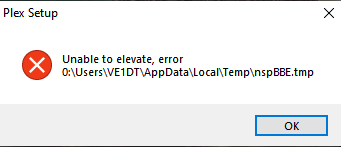
“unable to elevate error” twice and then installer exits. Windows 10 PC.
Appears to be pointing to incorrect drive identifier. Should be C: not 0:
Got the same error as well, both from within the auto-update when starting Plex for Windows and when trying a manual update with the .exe downloaded from plex.tv.
I had to uninstall (clean temp) and reinstall from version Plex 1.86.1.4076 once I did that I was back up and working.
Also key note if you extract the Plex 1.87.1.75 package and run it, it does launch with the new version, the first time. The secound time you try and run it it will error out with the temp issue, until you run it as admin.
Becareful doing this, once you do this you will need to uninstall (clean temp) and reinstall to the old version if you do not want the temp folder error repeated.
Trying to install the Plex 1.87.1.75 version you will get the temp folder issue regardless if it is a clean install or upgrade.
Seems like there is an issue with the newest installer for Plex where I believe someone hard-coded something in incorrect, because when you try to update, it says unable to elevate o:\ (or maybe it is zero instead of an Oh) and will not update. It obviously should be C:\Users, not O:
I then uninstalled completely and tried to install newest from the website, and get same error.
Moderator Edit: Moved your post to this existing thread.