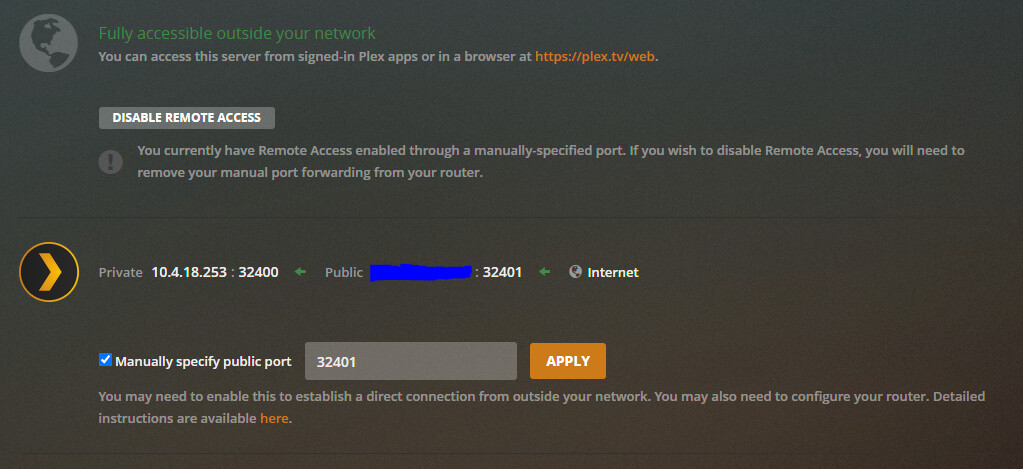
Server Version#: 1.22.3.4392 (on TrueNAS)
Player Version#: various
So my Settings say “Fully accessible outside your network” and everything works normally at home (inside the network). I haven’t made any changes to anything on the network that I can think of, but the server is completely inaccessible to anything outside the network. Roku, Android app, web browser - all show it offline.
Tried running it without a manually-set port and with (was configured “with” before and did work as recently as a few weeks ago.) Tried disabling and re-enabling the remote access. No improvement. Been running it on TrueNAS for a few months now (was on a WD NAS before that).
That fails as well. Doesn’t the Plex server’s display in the example I provided indicate that it performs a similar check and passes? Because I’ve seen other posts where people have their servers configured the same way but they show errors in the second section.
It seems like the green arrows should be proof that the service is available at that IP/port combination - the test should fail if it’s not. But canyouseeme.org says the service isn’t available. Not that I’d be particularly shocked if some aspect of the Plex server wasn’t working properly…
I haven’t changed anything in the firewall in quite a while, and this was working fine the first week of May (I was streaming from the hotel while working on site in a different state).
I checked and there was no port forwarding rules set up on the gateway, so I added this one:
Did you just create this port forwarding? If yes, can you test the connection using the website I sent you again?
What about in your OS, any firewall enabled blocking connections to 32400?
Odd… since you can make a TCP connection locally but not remotely, the problem should be firewall or route. Is your router the default gateway of that container? Is 18.253 the IP of the host or container?
I’m not familiar with Docker stuff, but on Plex Settings > Network there’s an option where you can select the interface where you want the server to listen for new connections. Check if your actual LAN address is there
If you mean the “Preferred network interface” there is only the option for “Any” or the named interface of that container. Both options are the same result.
This one here. I know there a “interface mode” where the container will listen for connections using the host IP. Try changing the interface mode of your container.
I think my theory is similar to @CostaHT’s then - something near the firewall/router/network.
It’s a pretty low-level step - have you tried restarting the router? What is it? Does it have any other settings that might control firewalling? Any other “security” blocks?
It’s been a long time since I’ve needed to restart a FreeNAS/TrueNAS box to address jail networking problems, but that’s rarely a bad thing to try.