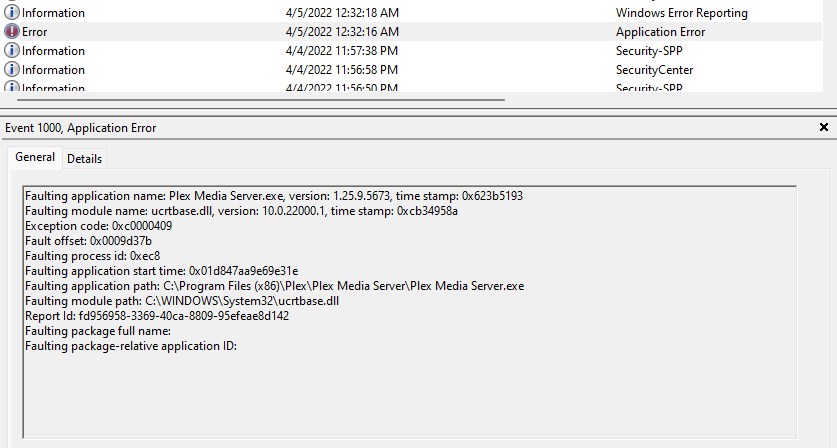
same issue on 2 different machines both with nvidia drivers… crashing daily or more often… how do i tell if i have the erronous x64 version…
it is always in ucrtbase.dll…
when will there be a fix… guess i will try backing up a version taht worked fine.
how do i get on the list for the test version… thanks.
while it looks good, maybe tomorrow when @sa2000 is back
or the new Version will be released.
meanwhile you can try to disable maintainance jobs (daily / 3 days) until the new release is there.
Plex Media Server Logs_2022-04-05_12-30-52.zip (4.7 MB)
Having same issue. Can you let me know where to find the new installation?
Here is my log with last night’s crash. Thank you.
Plex Media Server Logs_2022-04-05_15-16-00.zip (3.4 MB)
Mine has also been crashing. Fortunately not during a stream, yet.
All
I am pleased to say that the fixes in development release 1.26.1.5712 that have fixed the Plex Media Server crashes with 0xc0000409 in ucrtbase.dll have now been ported back into the 1.25.9 beta and the release of 1.25.9.5721 made available yesterday has these fixes
Release Notes:
- Fix for Window related EventSource crashes (#13437)
Another 503 crash yesterday 
Concern has been persistent for months. Hope there is a fix someday.
the last version, fixed a few crashes, but maybe not all.
for me it’s fixed for now.
no log, no fix
Olli,
Appreciate this feedback. I performed a reboot and restarted the server. I will monitor and see how long it holds until the next 503 error.
I have been working with @sa2000 regarding this and have been sending him logs / dmp files. I will see if I get another reoccurrence.
Thank you again.
Fixed crashing in my case. Thank you.
I am getting absolutely fed up now of this plex hanging and crashing and annoying my end users. I am finding that if I transfer large files and then the scan, metadata does its thing. This is when it will lock up and freeze and then I am SOL… I am running a Ryzen 9 5950X with 64GB RAM and just getting fed up of this walking on eggshells routine not knowing when it will cease up on me. Is there some rule that you can’t do X because Y will happen? And with a powerful CPU and Nvidia GPU to manage the transcodes. I just don’t understand what’s up? I have NVME drives for my Plex Directories etc…Help!!!
Lets progress your issues in this forum topic Server not accessible - Error 503 - Plex Media Server - Plex Forum
If there is a problem getting /connections list - we could just start with the process dump and logs - but switch to the other topic because this is not a crash but a deadlocked server leading to the 503’s
Plex crashes every 1 to 2 days. Please provide support how I can resolve this issue.
My System:
| Device name | Malflix |
|---|---|
| Processor | AMD Ryzen Threadripper 3960X 24-Core Processor 3.90 GHz |
| Installed RAM | 32.0 GB (31.9 GB usable) |
| Device Imod edit: deleted | |
| Product ID | mod edit: deleted |
| System type | 64-bit operating system, x64-based processor |
| Pen and touch | No pen or touch input is available for this display |
| Edition | Windows 11 Pro |
|---|---|
| Version | 21H2 |
| Installed on | 12/12/2021 |
| OS build | 22000.588 |
| Experience | Windows Feature Experience Pack 1000.22000.588.0 |
Plex Version: Version 1.26.1.5772
The database contains at present: 38239 movies, 3601 TV shows (124243 episodes)
The storage is a mixture of 5 TB, 6 TB and 10 TB drives via USB 3.1.
The Libraries are: Movies 76.6 TB, TV Shoes 147 TB.
I have organized my libraries as per the support section: Naming and organizing your Movie files.
Can you please advise what further information your require.
Thank you,
Have you tried to get a crashdump and PM it sa2000?
see here:
I have made the registry adjustment. Hopefully this will provide more info to help resolve the issue. Are there any logs I can send or info I can send right now which will provide info to help now?
Yes
With debug logging enabled - the server logs zip captured on restart after a crash
That will determine if the crash is related to memory issue or other crash
There are a few known issues relating to memory usage
Plex Media Server Logs_2022-05-05_15-50-33.zip (8.6 MB)
Plex crashed again today. If you can have a look at the logs to see if you can find the reason why this is occuring.
thank you for your time.
Thank You. The logs were taken a long time after the crash so they do not cover the time of the crash. The crash was at or before 09:06 am on the 5th May - the logs were captured at 3:50 pm and they cover only 2:32 pm to 3:50pm
I can see that from the crash upload logs that there was an error 400 on the attempt to upload - this normally arises when the dump files are empty which tends to happen when the crashes are due to very high memory usage.
We copy the dump files to the %Temp% directory and you can see if the last crash file was in fact empty - ir would have got copied to Temp as file
4423c97d-dd59-4f8b-be8b-ec3bc0df3e6b
The temp directory path
C:\Users\Malcolm\AppData\Local\Temp
Could you look at the WIndows Application Event Log using Event Viewer and see what application errors / application exceptions were logged at around 09:06 am on the 5th May.
Also as these crashes may be to do with memory usage, could you enable logging of memory use by adding the setting “LogMemoryUse” and give it a value of 1 - see this support article Advanced, Hidden Server Settings | Plex Support
On next crash - please restart the server and then capture the logs
Also look in %TEMP% for any files created round the time of the crash - with filenames similar to the one mentione for the 5th May crash
Thanks
