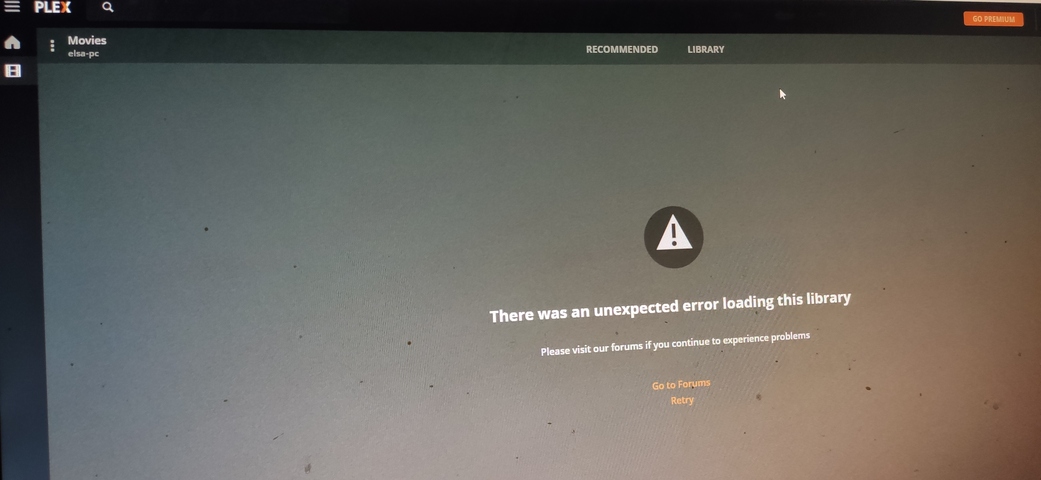
Hi, I have a problem with my movies library on plex.
My library is from google drive mounted on my pc with rclone. The source for plex are 4 different folders on my mounted gdrive.
Everything was ok, plex matched all the movies correctly and play them perfectly.
The problem is that when I tried to see the movies that are on a specific folder (I checked the “Folders” instead of the “Movies”) I got an error that plex can’t load the library. From then I can’t see any option to check back the “Movies” so now I can’t see my library at all.
What it’s interesting is that on home screen, I still see “continue watching” and “recently added movies” and I even can watch any movie of them, so the problem is that I can’t see my library, but my library is there.
In the web client, navigate to Settings -> (Plex Web) General and de-select “Remember selected tab.” You can do the same in Plex Media Player. When you navigate back to your movie library it will default you back to the Recommended tab. From there, if you select the Library tab, it should be back at its default “Movies” view.
You should be able to re-enable “Remember selected tab” again at this point.
Not that this explains how it got into this state to begin with.
I tried it but it doesn’t work. I also tried reset sidebar customisation, but it doesn’t work either.
If I click on the recently added, all the movies are there and play.
Also when I use the android app, it’s all good. The problem is the plex web only. Any other ideas? How can I fully reset it?
If you want to completely reset the web client configuration, navigate to Settings -> (Plex Web) Debug and select Restore Defaults. That completely resets the web client to defaults; it leaves the server settings alone, of course.
No, you won’t have to rebuild your library. You will just have to go through the initial client configuration again: Pick your default server (if you have more than one), pin your libraries to the side bar. Your server configuration remains entirely intact. This affects only the client.
Sorry that I ask again , but why is this happening, I mean why plex can’t load the movies from specific folder? Has to do that the source is mounted google drive?
I’m not sure, that works properly on my system. Maybe it has something to do with the way your folders are remotely mounted? You could test by making a small local library to see if you are able to view by folder that way.
Not sure why having a mounted drive would cause that. PMS doesn’t actually look at the folder to generate that view. There probably something else going on.
Can you provide the URL shown when you do that? (remove your token at the end). And provide your PMS log.
I analyzed some movies that weren’t anlyzed before and this fixed it, but now there is another another problem. I can now click on folders and the library shows up, but I can’t select which folder, it just loads up all the movies.