Server Version#:1.23.0.4482
Player Version#:Doesn’t matter
Hey all, I’m really pissed because I’ve been using PMS for at least 4 or 5 years now and until last week, I’ve never had a major issue. Last week after a server update, my plex stopped matching any of my tv shows and movies. After unsuccessfully trying to repair the program, I came onto here to find some help. What kind of service doesn’t have an easy contact option for people who use and pay for their products? Anyway, I’ve tried everything short of uninstalling the program and starting over. Of the 24 tv shows that I’ve added in the last week, only 12 have actually matched correctly. The rest are just blank, but none of them are new, and they’re in a folder named for the show and listed by “show name - season# and episode#”. I’ve also added 7 movies and none of them have matched properly.
So today after a week of frustration and being unable to find any answers, I decided to uninstall then reinstall the Plex Server program as I read that it would completely erase all settings and reset everything back to day 1. Well, after uninstalling it then reinstalling with the newly released server edition, the same issue is here. Not only did my programming not reset back to day 1, but it didn’t change anything. I thought I did something wrong in the uninstalling, so I did it again. This time after the uninstall was complete, I went to the folder in which it was installed and found that there was still some remnants of the program in a still existing Plex folder. so I deleted the folder, then restarted the computer. After the restart, I proceeded to reinstall Plex Media Server. Upon completion and launching the server, guess what … nothing had changed. As of this moment in time, I’m at my wit’s end and have no idea how to fix this issue. and it’s 100% nerve wracking. Can someone please help me resolve this issue?
Works for me and many others. The Files must be named correctly
Also check for database corruption.
That’s the issue I forgot to mention earlier. I have no access to my server settings. Everything from the Settings heading on down displays the same message; “Server settings are unavailable.” At this point I no longer care if I have to start over, I just need a way to correct these problems. All this time I’ve built a pretty extensive list of shows and movies. But as I start to run out of my programmed shows, I’ll soon be left with finding the shows by name and episode number, which is mainly why I needed the Plex to keep track of. Before that I was using iTunes, which was more time consuming and I had to fill in the info for each and every episode of every show or movie. The Plex Server has been a great help with that and now it’s no longer working. The worst part is finding out that uninstalling and reinstalling the program has absolutely no effect.
Log files location:
If you do want to start over:
-
Make sure your files are named according to Plex requirements. Filebot can help if you’ve a large number of files.
-
Completely remove Plex Media Server from your system.
-
Remove the Plex server from the list of authorized devices.
-
Reboot. Re-install.
Thanks for your help, but whatever is going on in my system is not allowing PMS to be fully removed from my system. After doing the uninstall, and removing the registry key as it says in step 2, step 3 becomes impossible to complete. So I continued with the reboot and reinstall. After reinstalling and hitting the Launch button, Plex starts up with my usual Select User screen, which I automatically assume is a sign of failure. But after entering my PIN it goes to a How Plex Works screen which gave me some ray of hope. But that hope is immediately dashed after clicking on the Got It button which takes me to the Server Setup screen which after a few seconds shows me “A problem has been detected with a core component of Plex Medis Server.” Then is adds Please visit the forums (which is a highlighted link) and provide your logs, as described here (which is also a highlighted link.) So I click on the here link and get a support link telling me how to access my logs. So I go back to the main screen and try to manually complete the server setup. I go through the server name, then it sees my entire library as it was, and then I get to where it says finish and I click on done and … nothing! It won’t connect, still doesn’t allow me into the server settings and now I have nothing. No Plex that not working properly and no Plex renewed, refreshed, back to it’s original condition. What am I doing wrong, or is my time with Plex Media Server just over?
Do you mean removing %LOCALAPPDATA%\Plex Media Server?
That is C:\Users\your_user_name\AppData\Local\Plex Media Server (unless you’ve moved it to another location).
AppData is hidden by default. In Windows File Explorer, View Tab, check the box for Hidden Items in the Show/hide area. AppData should then be visible.
No, I didn’t mean that because that was a second part of 2. The third step was removing the Plex sever from the list of authorized devices. Where exactly am I supposed to do that if I’ve already removed everything else. My Appdata was a full 1 million plus files and folders at little over 45gb. So it took the computer over an hour to delete those files, Once I removed that, there was no place else to go find Plex server files. So I moved on to the reboot and reinstall phase. Once launched it still recognizes the various sign ins to which I am the only Admin. Going to the How Plex Works page is simple enough. But upon arriving at the Server Setup page, I still get the error message of “A problem has been detected with a core component of Plex Media Server.” That automatically tells me that whatever I do from this step forward, I will not have access to any server controls or tweaks. but now as I try to manually complete the server setup, it’s only showing me Music and Photos in the library. So I click on next and then done and it opens up into the home page, It shows me the standard setup of Live TV, Movies & Shows, Podcasts, and Music under Home, and a MORE button. When I click on the more it opens to show me my current server and 3 others of the same name. Only the top one has my letter next to it as the others all have exclamation marks. So I move my mouse cursor over the one I’m currently logged into and it gives me the option to add to the library. I click the add sign and the Add Library box opens, but anything I select, no matter what i rename it to, it won’t light up the Next button to allow me to select anything else. This is as far as I can get now. And I’m sitting on well over 10k movies, tv shows, and video files. Not including my music and photo collections, that I can no longer access with Plex.
While you have people on this forum saying you are doing something wrong, I too am having the same issue. The Fix match button is gone, and it now just says “match”. When I go to that link, it is just a dead end. It sits there and stares at me, and when I hit “Search options”, it blinks the screen and goes back to same screen. This is a new problem. I can’t say how long, as I haven’t had to use this too often, but when I do, it is quite helpful. FYI, my server is on QNAP.
Same here. Something went wonky with one of the last updates.
Empty.
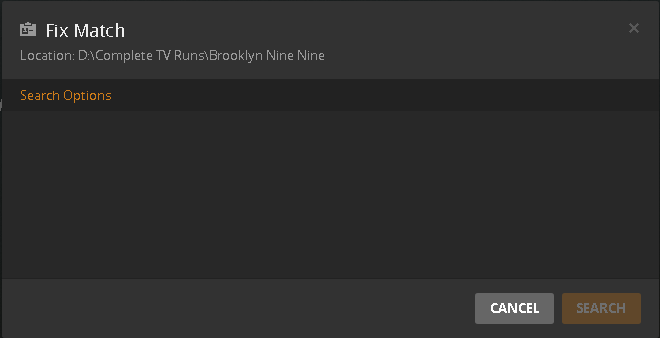
I have that exact same problem. Plex server will not match any new shows and the “Fix Match” dialog is empty (and “Search Options” does not bring anything on the dialog). If I manually restarts the Plex server software (running on Windows), then “Fix Match” will work again until the next time I reboot.
Well at yours works some times. Mine didn’t work at all. And now since I’ve tried to erase everything and start anew with Plex, I can’t even do that. Before I even attempted to uninstall Plex, I was unable to access any of my settings for some unknown reason. That’s why I figured something got corrupted in there and it was necessary to start over from the beginning. I had been running Plex for 5 or 6 years without any major issue. But boy, when it comes, it hits you like a ton of bricks. So even after doing a full removal and reinstall, I can still not get back or create a new library. The setting are still unavailable and I’ve come to my wits end. My only next step is to build a whole new system from scratch, transfer the HDDs with the current movies, music, videos, and tv shows into that system and the try installing Plex again. Because obviously there is something that will not allow me to put a working server back on the current system.
I have the same problem, the plex agent just stops working, my family uses Plex and I pay for four accounts currently. PLEX listen up, your about to loose me as a customer permanently unless you fix this problem. THE PLEX AGENT stops working, for those of you who have this problem, I have got it to work a few times, but entirely rebooting my NAS server isn’t an option anymore to get things going, at all. This isn’t a naming issue or anything else, Its simply some ■■■■ broke on the the server becuase mine has worked perfectly for the past year or so. PLEX PLEASE FIX THIS!!!
If it stopped recently why not roll back till it’s fixed.
