Hello!
I’ve been having some issues recently and don’t really know what to do. During the last 3 years I had my media server running without any issues. During this last week it suddendly became inaccessible outside the host desktop. After trying to check what wasn’t working the server became completely inaccessible even through the Setup Plex file on the computer. After some uninstalls, reinstalls and a computer wipe it started to work for a day or so and then I became locked out of the server once more. I gave up for two or three days on using plex until, after an uninstall and a reinstall it started working again but without remote access. I couldn’t even open my server through the task tray icon, which says that I am not authorized to enter my server. Today I opened Plex again, through the Setup Plex file, and it says that remote access is fine, despite, when opening through the tray icon, it gives the same not authorized message. Nothing seems out of order but this

When I click the please install manually link it takes me to the media server downloads but with an error saying that the Plex list of apps is not available at this time. Does anyone have a solution to this?
I followed the 2.2 Method and currently the server is stuck on an infinite loading even if I open it with the Setup plex file
Make sure not to use a web browser which specializes in disabling parts of a website.
If you are using a standard browser, disable any add-ins.
If you haven’t already, switch the “DNS server” (either in your router’s settings or in the properties of the Windows network connection) to the known working 1.1.1.1 or 8.8.8.8
The above method for claiming will only work on Windows 10/11. If you use a Windows Server edition, use Plex install fix for Windows Server (Claim issue) instead.
I switched to Edge from Opera gx (which was the browser that I used for the past 2 years without any issues), switched the DNS server in the properties since I currently don’t have access to router settings and tried the windows server edition fix just for the sake of it and neither worked. Still stuck on infinite loading.
Is this a local machine or remote accessed?
Stop the server using the task tray icon.
Then fetch the server logs manually: https://support.plex.tv/articles/200250417-plex-media-server-log-files/
It’s local! Here’s the logs
Logs.zip (1.7 MB)
Are you using a custom DNS resolver, or a filter app (e.g. pi-hole) in your network?
Are you trying to enforce “Secure DNS”?
I think not. At least I didn’t setup anything like that. The only changes regarding internet connection I made was switching from a powerline to be directly connected to the router.
Are you behind a corporate firewall which tries to perform deep packet inspection?
Or do you use a 3rd-party firewall or anti virus software which tries to do the same?
Your log contains messages that a security certificate and the domain plex.tv do not belong together. Which is usually a sign that some software is trying to perform deep packet inspection – or a man-in-the-middle attack.
May 12, 2024 15:35:16.822 [16616] DEBUG - [Req#114/HCl#65] HTTP requesting POST https://plex.tv/api/v2/pins?strong=true
May 12, 2024 15:35:16.822 [16564] DEBUG - Completed: [127.0.0.1:52220] 200 GET /myplex/launch (6 live) #114 GZIP 0ms 3489 bytes (pipelined: 73)
May 12, 2024 15:35:16.949 [3948] WARN - [HttpClient/HCl#65] HTTP error requesting POST https://plex.tv/api/v2/pins?strong=true (60, SSL peer certificate or SSH remote key was not OK) (SSL: no alternative certificate subject name matches target host name 'plex.tv')
May 12, 2024 15:35:16.949 [16616] ERROR - [Req#114] MyPlex: Failed to retrieve PIN: -60
No. I don’t even have any other antivirus than windows defender. In opera gx I have the adblock and tracker block active but I’ve been using plex with this browser set up like this for 2/3 years and I tried using Edge, that hasn’t any extension installed and the problem is still there
Is there anything special about your internet connection?
Is the router under your control?
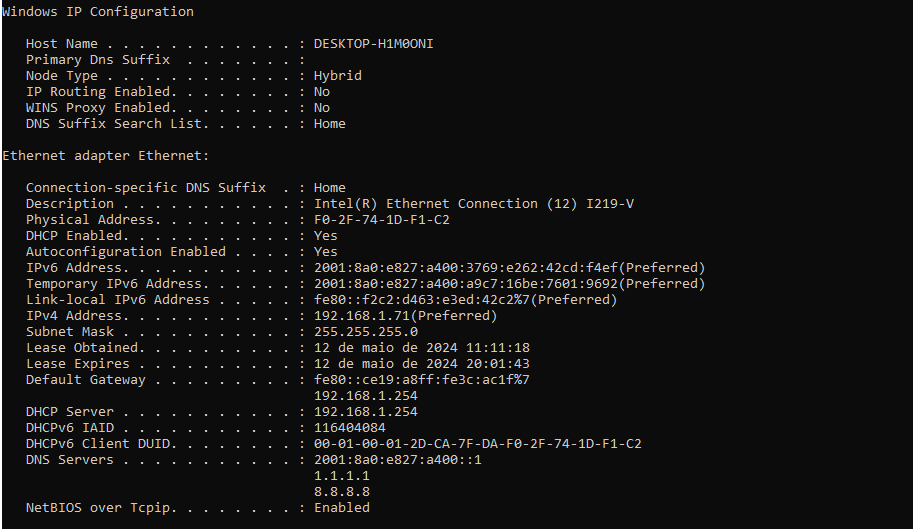
I currently don’t have access to router settings because I misplaced the papers with that info. If it helps I took a screenshot of ipconfig /all.
The logs indicate that something has been inserted into the communication between you and the systems at plex.tv.
Something that decrypts the data packets, then inspects (and potentially alters) them, then re-encrypts them again. But since it doesn’t have access to the original cryptographic certificate, it uses its own. This is detected by Plex and the data packet is thrown away, because it cannot be assumed anymore that the data are secure and safe.
If you are certain that you don’t use anything like that, there is only one culprit left: your ISP.
Ask them if they use a proxy server for encrypted content, and when they started doing so. That day might correlate with the start of your troubles.
Thank you! I have asked that to the ISP. I’ve received the access data for the router and I’ll add some screen captures to see if any of this causes any problem. I don’t really know what I’m looking at.

These settings are showing port forwardings which have been automatically created by Plex server. They have not really to do with the issue at hand.
The rest is only showing information about your local network, which all look ordinary.
I assume you see nothing out of the ordinary if you point your web browser to plex.tv, right?
If you know your way around the command line, could you try curl to fetch from plex.tv and post the output here.
I’m still waiting on a response by the ISP. When I open plex.tv everything works fine. Is this screen capture the information that you need?
Could you repeat it with the added parameter -i please?
curl -i http://plex.tv
(there is no need to make a screen shot. You can mark and copy text from the cmd window as well.)
Here’s the results
C:\WINDOWS\system32>curl -i http://plex.tv
HTTP/1.1 301 Moved Permanently
Server: awselb/2.0
Date: Mon, 13 May 2024 13:52:40 GMT
Content-Type: text/html
Content-Length: 134
Connection: keep-alive
Location: https://plex.tv:443/

<html>
<head><title>301 Moved Permanently</title></head>
<body>
<center><h1>301 Moved Permanently</h1></center>
</body>
</html>