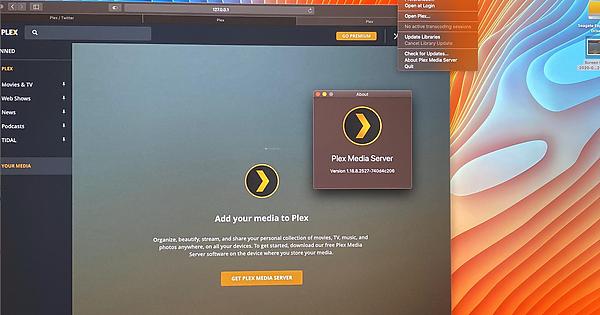
I have installed the last version of PMS , and When I go to “Your Media” ask me to install PSM … I already uninstall and fresh install with the same result !
Here is an screenshot of the MESS !
I contact PLEX and they told me to post a post here !
Great Support but the way !
Plex version; 4.28.3
Same as windows; All of my devices can not connect to my server, there was no problem 3 days ago, this morning I tried to connect my server from my i pad, server was looking offline but it was online and I tried sony tv and apple tv , server was looking offline. I rebooted my router and I reinstall plex media server, I reset my plex library , change all library name and server name but no solution. I couldn’t find out to myself. My devices shows server name but don’t show my library and files. I need someone help.
Try this …
From this page, go to your Icon>YourName > Preference > and in the Account, and there is Option " Recently Used Devices" and “Log Out All” .
I just did that log out all, and my PMS works again.