Server Version#: 1.41.3.9292
Player Version#: 1.105.1.257-3bc35ab9
Tuner Make/Model: HDHomerun Flex-4K & Extended.. xTeVe - HDHomerun Virtual Tuner
Using XMLTV?: YES
Channel number/Name: TVEverywhere Channels
Reader’s Note: Respectfully, I want all to know that PLEX Media Server is the best on the planet. I have used Plex many years and I have found nothing that compares. The question of does Plex work with TVEverywhere has come up on many chat-boards like Reddit. From reading these posts I have noticed one thing that comes out strong and clear. No one would give up their Plex system for love or money. I agree!
Yes, Plex works with TV Everywhere… In a Left-handed way. Lucky for you I’m left handed… lol
I’m not going to get into the fine details of how each piece of software is setup and configured. There are great docs on Github to handle those questions. Let me give up the 50,000 ft view of how the process works…
You will need these pieces of software:
(1) ChannelsDVR - Will collect TVEverywhere data for passing to Plex as M3U/XMLTV files.
(2) xTeVe - Will allow Plex to use the TVEverywhere data in M3U/XMLTV format as a virtual TV Tuner for Plex.
(3) Plex - Configured to use M3U/XML will answer your wish to use TVEverywhere data in Plex.
Step #1 - Setup ChannelsDVR to work with TVEverywhere.
After you have completed this step:
-
go to the Settings screen.
-
go to the Source tab under the Settings screen.
-
(One big Guide) on this tab you will find next to the “+ Add Source” button a “Wheel” button - Press the wheel button. -or- (individual EPG per Tuner) under the above tab you will find a “Manage” across from each tuner..
-
On this pull down you will see at the bottom “Copy M3U URL” and “Copy EPG URL”. Copy and save these links for later (paste them to notepad)…
Step #2 - Setup xTeVe
After you have completed this step. Run xTeVe from the command line or as a batch then:
-
Use browser to go to "127.0.0.1:34400/web/ " (xTeVe command GUI)
-
Under the Playlist tab create a new M3U link using M3U URL you copied earlier.
-
Under the XMLTV tab create a new XML EPG link using the XML URL you copied earlier.
-
Under the Mapping tab marry up the channels to the guide…
-
Under the Setting tab set EPG Source to “XEPG”
Step #3 - Setup Plex
-
Starting from scratch (That means delete your DVR and rebuilt it for EPG, XML with xTeVe running). Note: Any change in the channel list from ChannelsDVR will require repeat of this step and restart of all software (reboot /clean start is best)…!!!
-
Make sure when starting to rebuilt the Plex DVR that you select the EPG/XML option.
-
You should now notice a new xTeVe Tuner… SAY “Hot Dam!!! it Works”
-
Marry the Channels to the Guide within Plex as normal… If you have done the steps correctly above this population should be automatic. Use the EPG URL from each ‘real’ tuner as your EPG address in Plex.
Please note: after you get all of this configured for the 1st time you may need to reboot the box and start all of this in the proper order listed above.
If you have done everything correctly and have luck on your side you now have Plex showing not only the TVEverywhere listings but the HDHomerun Listings too… Whatever sources are set in ChannelsDVR; Plex should use then just like it was one big HDhomerun Tuner attached to the network..
I am running Channels, Plex & xTeVe on a Windows 11 Pro, AMD Ryzen 7 processor, 32G memory, Nvidia Series 3000 GPU box with a 100T raid 5 drive (which is massive over-kill). I have over 10,000+ movies and 45,000+ TV Episodes.
I am loading YouTubeTV’s 133 basic plan channels plus my 43 local HDhomerun tuner channels (see YouTubeTV doc on TVEverywhere for a full list) as individual sources in ChannelsDVR. Under Plex I get all by using the Playlist & TV Guide URL’s as one large virtual tuner (or individual tuners if you went that route) with every channel from every ChannelsDVR source.
My final note: Your Plex Guide is going to be a whole lot bigger than when you started (6 times bigger in my case)_. Please make sure that you raise database cache size under the “Wrench” - “Library” tab in Plex…
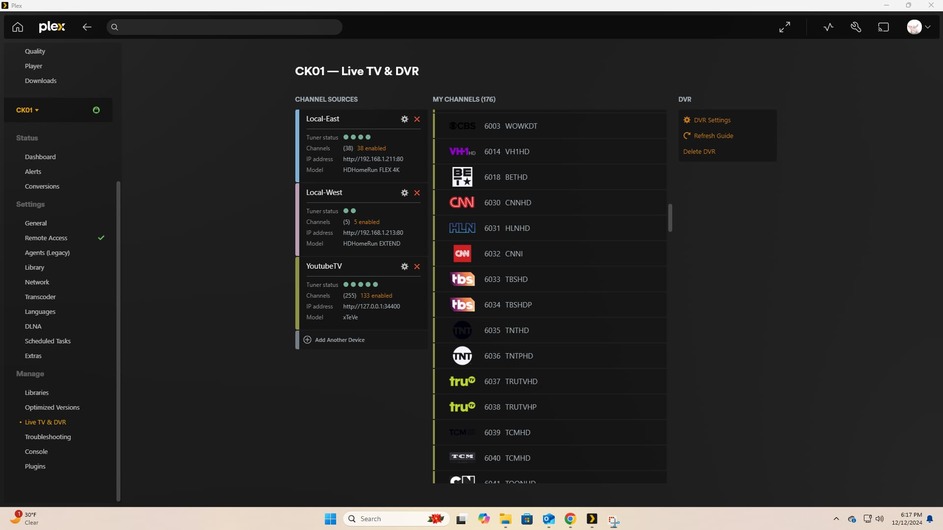
I have successfully completed setup with the Basic Offering from YoutubeTV… I have an open ticket with YoutubeTV and we will workout the fix for the ADD-ONs like HBO/MAX… Just give us a few weeks and we will get it done. If you have success (or don’t) loading the ADD-ONs let me know (Please pass along the OS and the TVEverywhere software used)…
– Enjoy and Merry X-mas from CampKiser!!!
