Server Version#: 1.17.0.1841
Player Version#:
Hi,
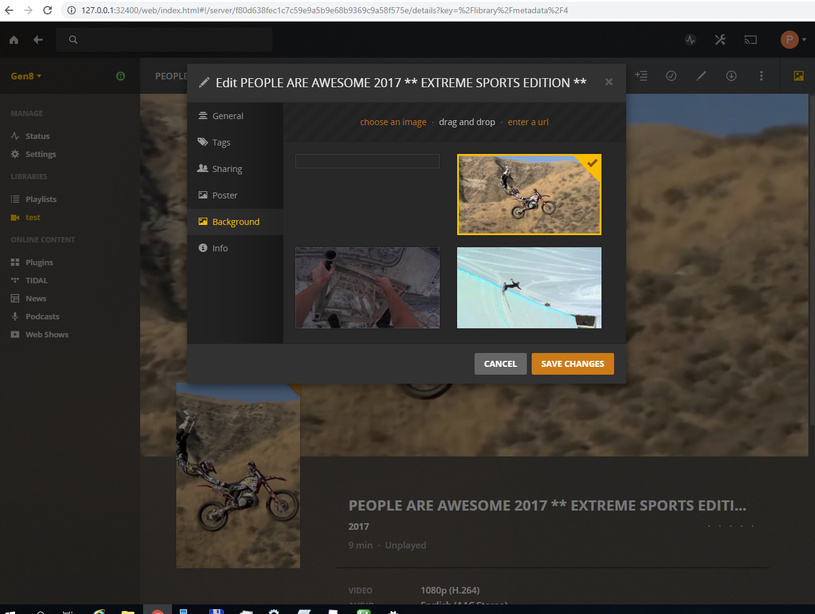
I am upgrading from Windows Server 2012 R2 to 2019. Everything works correctly on WS2012 but I struggle to load my own artwork from folders on WS2019. In log it says it is loading artwork picture and if I edit artwork manually there is empty picture available instead of artwork as you can see on attached picture.
Did anyone came across this problem and found the solution?
Thank you in advance for ideas or solution.
Peter
Plex Media Scanner Analysis.zip (2.2 KB) Plex Media Scanner.zip (5.0 KB)com.plexapp.agents.localmedia.zip (14.5 KB)
Can you click that info button? Looks like you got 2 files that are being treated as the same video. This is messing up the local media agent in finding the correct artwork.
Thank you for your reply. Yes I can click on that info button.
Unfortunately it is happening even when there is only one file in library. If I add the poster into folder it would create that strange empty image bar too. Exact the same folder added to WS2012 plex is processed correctly. I suspect it is something with credentials, which is strange because Plex Scanner has no problem to add backgrounds and poster which it created only the ones the it is loading from folder.
I’ve resolved this issue. Problem is described here https://support.plex.tv/articles/201424327-why-do-i-get-metadata-but-no-images-for-my-library-items/
Basically the issue was that my HDD had ReFS file system which doesn’t support Symlinks/Hardlinks.
Now I’ve formatted HDD in NTFS and all works fine.