Server Version#:
Player Version#:
wont launch
Mind sharing some more details?
- I suppose you’re not attempting to run it on a Windows NT 3.5 machine… but is it Windows 7, 8, 10…?
- Did it work before?
- What version of the Plex Media Server do you have installed?
- … or is it the install that’s failing?!
Sooo many questions 
Windows 10 no first time i have installed 1.19.3.2793
So… if you run the server app, you should see a small icon in the task tray.
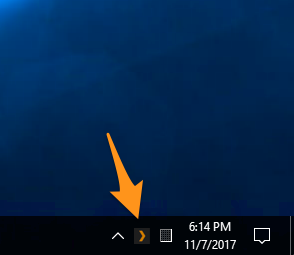
You can open Plex in your browser… for the first run, use http://127.0.0.1:32400/web if you’re opening Plex from the same machine where the server is running (http://[ip address of the PMS]:32400/web if it’s on another machine on your local network).
This should get you to finish the basic setup wizard where you can e.g. create your first libraries and define a name for your server.
ive followed your instructions but its still the same, it wont run
Sometimes… when I’m in a super cynical mood I’d love for the forum to accept posts as short as “yes” to match the flow of information coming my way in that response
Let’s share some more details.
What about…
- what are you doing to start the Plex Media Server in the first place?
- does the Plex icon show in your task tray?
- do you get some error message? if so… what’s that message?
- when you open the URL from above (…:32400/web) in your browser… what does the browser show? any error messages?
- is there a process showing in your task manager that’s named like
Plex...?
click on icon in task tray no error messages when ive run the plex media program it seems to install ok then a small box appears with a button saying launch but when pressed nothing happens
Keep it coming…
- you have a Plex installed and the icon in the system tray is showing
- there were no error messages during the installation
next is question #4, focusing do you get when you open http://127.0.0.1:32400/web in your browser?
I get the Plex home screen
Great… that’s it.
Here you can now start adding your libraries and link them to folders in your file system to scan for files, download related metadata and artwork/posters…
If you have questions on how to do that, you could check out the respective support articles for Plex Media Server (e.g. Creating Libraries, Editing Libraries…).
https://support.plex.tv/articles/categories/plex-media-server/
I strongly recommend to have a look at your files before starting this to ensure they’re named in a way Plex will recognize.
See e.g.
