Plex Network Issue - Client Bandwidth "Request"

Server Version#: 1.18.2.2058
Player Version#: Plex-Windows, Plex-Browser

So Ive been observing a weird plex issues with my server or more like my clients.

First of all some information about the environment :

Server:

  • Hetzner Auction Server Ubuntu 18.04
  • 2x HDD SATA 3,0 TB Enterprise
  • 4x RAM 8192 MB DDR3 ECC
  • NIC 1 Gbit Intel 82574L
  • Plex Server running in Docker (Official Image) Version 1.18.2.2058
  • HW Encoding enabled (Transcoding is working without a hickup very fast and no crazy cpu usage)

Client:

  • Wired Windows 10 Computer 100 down 30 up
  • Either Plex Windows App or Plex in browser (Chrome/Firefox)
  • Also happens on Android Smartphones and Fire TVs

The Issue:

Essentially i start a stream e.g. 1080p direct play or Transcode happens on both. And if i check the bandwidth on the dashboard it goes up to a maximum of like 5mpbs but mostly below.

Then i restart w/e client im using and resume the stream, sometimes i have to do it twice sometimes three times. Suddenly it works and the client is able to request the proper bandwith and on the dashboard it shows around 15mbps. Basically enough so the stream works without issue.

I attached the log from the Console there seems to be one line reappearing.
log.txt (47.9 KB)

The Line in Question :

Dec 09, 2019 21:21:49.741 [0x7ff938ff9700] Fehler — Unable to find client profile for device; platform=windows, platformVersion=10, device=, model=standalone

This comment:

Says its no issue but im not sure this seems really weird.

I’m confused. What is the issue? File transfer form PMS to your remote client only goes at 5 Mbps? We’ll need to see your PMS logs.

That is a false positive. There is no profile for the new Plex for Windows, because it doesn’t need it. The profile is only required when the client can’t determine on it’s own if it can direct play a file or needs to transcode. Plex for Windows can do that so it’s not needed.

Alright let me clarify the issue:

Client wants to stream 1080p 8mbps - His Network is more than sufficient for this bandwidth on a wired connection. I am talking about a remote session here. And everything on the server is set to allow the maximum supply of bitrate.

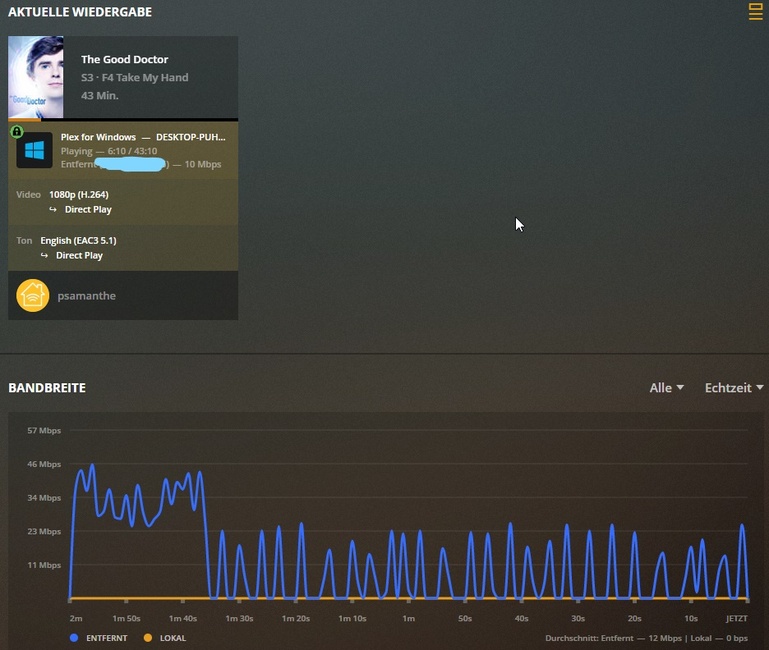
After starting the Stream the playback stops every 2 seconds. If i check the dashboard the Outgoing Bandwidth on the Server does not go above 5mbps or is mostly hovering around 2mbps. This is obviously not enough for a 1080p 8mbps Stream.

If i then restart the client several times or stop the stream completely and then put it back on. After a few tries the stream starts working flawlessly. The Dashboard Bandwidth now shows a sufficient bandwidth supply of 12 - 17 mbps.

So what im getting at is that the server and client fail to properly negotiate the bandwidth needed for the stream even tho, there is more than enough available.

I attached the logs below, there is about 3 - 4 days worth of logs in there.

Plex Media Server Logs_2019-12-09_20-47-51.zip (4.7 MB)

To actualy describe the issue better this is a picture of the situation, Client wants to stream with 10mbps but the bandwidth is not supplying that.

019-12-10 18:11:55,945 (7fc8517fa700) :  DEBUG (runtime:717) - Handling request GET /system/agents/media/get?guid=com%2Eplexapp%2Eagents%2Ethetvdb%3A%2F%2F266189%3Flang%3Den&mediaType=2&url=metadata%3A%2F%2Fart%2Fcom%2Eplexapp%2Eagents%2Ethetvdb_d0167990386bdca11a2d0043b8ecf2e63f02bce9
2019-12-10 18:11:55,947 (7fc8517fa700) :  DEBUG (runtime:814) - Found route matching /system/agents/media/get
2019-12-10 18:11:55,947 (7fc8517fa700) :  DEBUG (agentservice:1078) - Returning stored data for metadata://art/com.plexapp.agents.thetvdb_d0167990386bdca11a2d0043b8ecf2e63f02bce9 (in com.plexapp.agents.thetvdb)
2019-12-10 18:11:55,948 (7fc8517fa700) :  DEBUG (runtime:924) - Response: [200] str, 497785 bytes
2019-12-10 18:11:59,942 (7fc8517fa700) :  DEBUG (runtime:717) - Handling request GET /system/:/prefs
2019-12-10 18:11:59,944 (7fc8517fa700) :  DEBUG (runtime:814) - Found route matching /system/:/prefs
2019-12-10 18:11:59,947 (7fc8517fa700) :  DEBUG (runtime:88) - Sending packed state data (99 bytes)
2019-12-10 18:11:59,948 (7fc8517fa700) :  DEBUG (runtime:924) - Response: [200] MediaContainer, 418 bytes
2019-12-10 18:32:28,718 (7fc8517fa700) :  DEBUG (runtime:717) - Handling request GET /system/:/prefs
2019-12-10 18:32:28,721 (7fc8517fa700) :  DEBUG (runtime:814) - Found route matching /system/:/prefs
2019-12-10 18:32:28,724 (7fc8517fa700) :  DEBUG (runtime:88) - Sending packed state data (99 bytes)
2019-12-10 18:32:28,724 (7fc8517fa700) :  DEBUG (runtime:924) - Response: [200] MediaContainer, 418 bytes
2019-12-10 18:34:53,709 (7fc8517fa700) :  DEBUG (runtime:717) - Handling request GET /system/:/prefs
2019-12-10 18:34:53,710 (7fc8517fa700) :  DEBUG (runtime:814) - Found route matching /system/:/prefs
2019-12-10 18:34:53,712 (7fc8517fa700) :  DEBUG (runtime:88) - Sending packed state data (99 bytes)
2019-12-10 18:34:53,712 (7fc8517fa700) :  DEBUG (runtime:924) - Response: [200] MediaContainer, 418 bytes
2019-12-10 18:39:56,030 (7fc8517fa700) :  DEBUG (runtime:717) - Handling request GET /system/:/prefs
2019-12-10 18:39:56,032 (7fc8517fa700) :  DEBUG (runtime:814) - Found route matching /system/:/prefs
2019-12-10 18:39:56,035 (7fc8517fa700) :  DEBUG (runtime:88) - Sending packed state data (99 bytes)
2019-12-10 18:39:56,036 (7fc8517fa700) :  DEBUG (runtime:924) - Response: [200] MediaContainer, 418 bytes
2019-12-10 18:40:24,898 (7fc8517fa700) :  DEBUG (runtime:717) - Handling request GET /system/:/prefs
2019-12-10 18:40:24,901 (7fc8517fa700) :  DEBUG (runtime:814) - Found route matching /system/:/prefs
2019-12-10 18:40:24,904 (7fc8517fa700) :  DEBUG (runtime:88) - Sending packed state data (99 bytes)
2019-12-10 18:40:24,904 (7fc8517fa700) :  DEBUG (runtime:924) - Response: [200] MediaContainer, 418 bytes

18:11 i streamed something worked without a hiccup but looking at the lines below starting at 18:32 the hiccup on a new episode start. To me it seems like the connection is breaking up or something like that what could be causing that ?

I attach the complete rare file below so u can take another look to all issues revolving around this time.

Plex Media Server Logs_2019-12-10_18-40-28.zip (1.9 MB)

Edit:

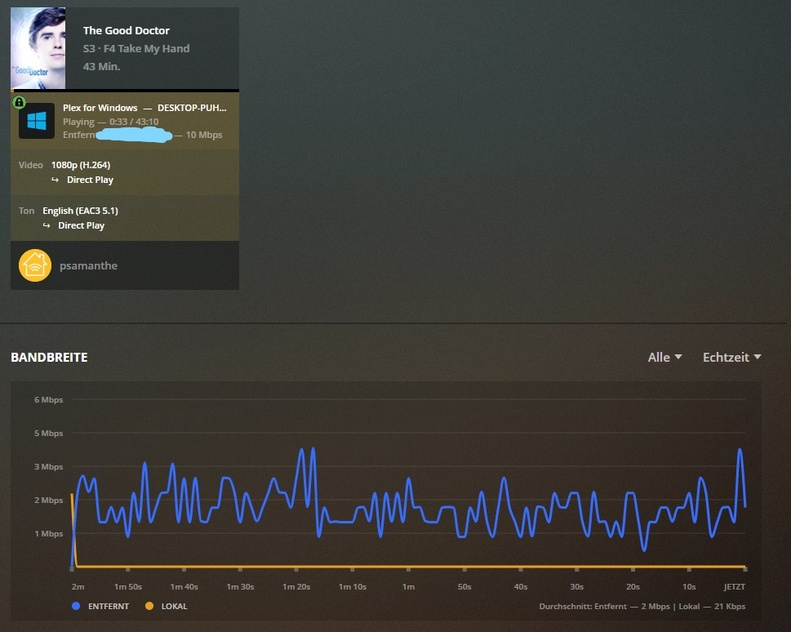
Now i waited about 10 mins and as u can see on the picture below its workig perfectly fine this included restarting the client 3 times.

I once again included the logs with the information of the current working stream.

Plex Media Server Logs_2019-12-10_18-57-52.zip (2.0 MB)

If there is anything else i can do or information i could supply you with please let me know.
Does this mean you’ve set a limit just very high or you have this disabled? These are 2 different things.

I’m not sure exactly whats going on but something on your server is pinging PMS every 5 seconds or so.

I’m also seeing some odd IP addresses. It appears your local network is on the 172 range, but I’m seeing 172.19 and 172.21. It also looks like your server is on 172.40, but that’s not a private local address. I can’t say for certain, but maybe you’ve got some network issues going on. I would suggest checking your network setup.

172…40 was a monitoring solution that i killed off and put a typo in the subnet.

172…19 is a nginx reverse proxy that plays reverse for 32400 but that is just for the interface

172.21 is tautulli

The only thing that would come to mind is the reverse proxy fidgeting with the plex bandwidth negotiation. I will go ahead and disable the reverse for :32400 and see if it helps. Is there anything else you could come up with ?

Because as i thought about it those “2mbps” u can see on the first picture are the default value that is set in a client “720p 2 mbps” when you use it for the first time.

And the bitrate limit is set to “No Limit”

Edit:

Ok i dont wanna get too happy but it seems u mentioning 172.19 just made it click. I will test it sporadically for the next 2 days or so and i will report if its not working again.

Man i really gotta get one of those rubberduckys. :smiley: I appreciate what youve done so far :slight_smile:

I’m not very familiar with reverse proxies so I have no suggestion son how to check if this is impacting the issue.

True, but it’s a file bitrate limit, so it would cause PMS to transcode the file, not throttle the transfer.

I also see that something at 172.19.0.2 is constantly pinging your PMS. I don’t know what it is. It’s asking for something that PMS doesn’t understand so nothing happens. It’s taking almost no time, but since this is constantly going, it could potentially slow down PMS and the machine as a whole.

That is actually a different monitoring solution that is basically just pinging stuff should probably change the interval. Cheers.

This topic was automatically closed 90 days after the last reply. New replies are no longer allowed.