I run it from an app on my phone, also from an app in my server a Plex app that is. Also I have run it just going to plex.com and signing in. All three ways works just fine. Plex is seeing my server now but it’s a second server that’s shown the one with all my data on is not available. They’re both from the same source but one says available one says not available and says off-line is where all my playlists are and my library
Ok. Did you reinstall the server or just a player app on your computer. I took a look at your account and it appears you are running the server on a QNAP brand nas. Is that correct?
I sounds like your account still has info about he initial server install. Then you UNinstalled server ( but your account does not know you did) then you reinstalled server fresh which makes it think you have a brand new server. why you see two with the same name.
Issue is I think you may have removed the database and such from initial server install but not sure. Would need to know the steps you did to uninstall. And have a look at the DB files to see if the original database is still there. i understand you are not home right now to do this.
Thank you. You might be onto something. The drive went bad on my server. I did not reinstall the server. Qnap also said that taking out that drive and putting in a new one to rebuild would not affect us. It never has affected anything before when this happened. I did have to have a system check on that server and reboot it. That should not have any effect. When I do go into Plex from the app on my server I can see the library and it just has errors next to it next to each category the triangle the yellow triangle which means unavailable. I believe the library is someplace but I can’t access it. I will be home in about two hours. Thank you for

Here is a screenshot which illustrates my problem. If you look to the left at the “Qnap3” in the middle, that is the server that has all my info. The one above just started showing up and is the same server without my data. The data you see on there is what I just loaded today. I stopped because I cannot take a chance of losing all the work I put in making my playlists. I could spend 2 hours going through a particular artists albums listening to all there songs and putting the ones i like on a playlist. This is 2 hours just for one artist. I don’t even listen to the entire song. These playlists took 4 years to compile. I just need Plex to recognize the Qnap3 that is listed in the middle of the left side of the screenshot.
Here is a screenshot which illustrates my problem. If you look to the left at the “Qnap3” in the middle, that is the server that has all my info. The one above just started showing up and is the same server without my data. The data you see on there is what I just loaded today. I stopped because I cannot take a chance of losing all the work I put in making my playlists. I could spend 2 hours going through a particular artists albums listening to all there songs and putting the ones i like on a playlist. This is 2 hours just for one artist. I don’t even listen to the entire song. These playlists took 4 years to compile. I just need Plex to recognize the Qnap3 that is listed in the middle of the left side of the screenshot. The 2nd picture is from opening another Plex shortcut showing the one server Qnap and all my data but is says unavailable. I am not sure if I could get this to show up again. It may now show up as the first picture showing the same server twice with the one on top on the left side showing up just today and the one in the middle which is not available has my info.
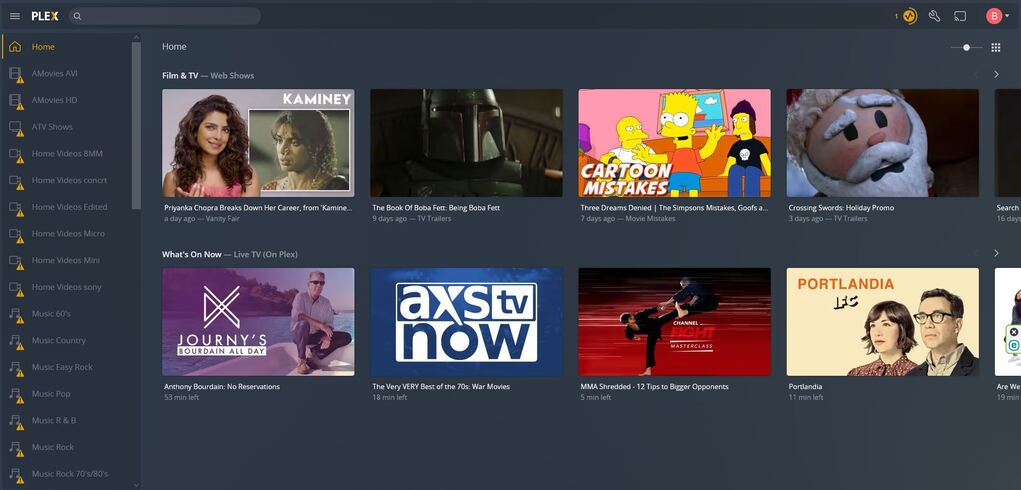
Did you always have two QNAP3 servers show up in Plex?
The QNAP3 server that appears on top, does it by chance have same music as the missing one?
What you see there with the unavailable libraries is just a list. that the browser remembers that there was one but it cannot reach the same server Database and preference files on your QNAP.
- Think of the list of libraries you see like a paper list of names of maps.
- The database is the map to where your media files are, and things like the configuration of playlists you made.
- Then there is the actual media files on your QNAP
The issue I think is when your drive went bad something happened to the database so even though you have the list of libraries still in the browser. the database with the info about how to find your files and your configuration of playlist is missing or badly corrupted. and when you reinstalled the server is created a new one.
I don’t know how badly your drive got messed up but what we need to see is if there are any database backups that you may still have from your original install. So to try to recover the database we first need to see if you still have a database backup from before have the issue with your drive failing.
Info on the location of your Plex Media Server data folder on your QNAP can be found here. Where is the Plex Media Server data directory located? | Plex Support. In that folder the location of the Database will be in the plugin-support/Databases folder. and will be named something like…
com.plexapp.plugins.library.db-2019-06-01
where the end part is the date the backup was made. So you need to check if there is one previous to the the day your drive failed. If you can find one then you can use this info on how to restore the database. Restore a Database Backed Up via 'Scheduled Tasks' | Plex Support
Yes. It is the exact same server with the same name.
I very much appreciate your help however I don’t quite understand where the back up is. It says “On Windows, the content is located inside of the user directory.” Where is the user directory. I went into my programs in local and copied the Plex Media Server and copied it someplace else. Is it in there someplace?
Your server is on your QNAP, not your windows computer.
I think I found it on my computer but i don’t know where to get it on the Qnap.
com.plexapp.plugins.library.blobs.db-2022-01-07
com.plexapp.plugins.library.db-2022-01-07
I found these in appdata - local - Plex Media Server on my c drive on my desktop I would be happy if i could restore back to the 7th of January.
These might be it, no?
Yes. It is the exact same server.
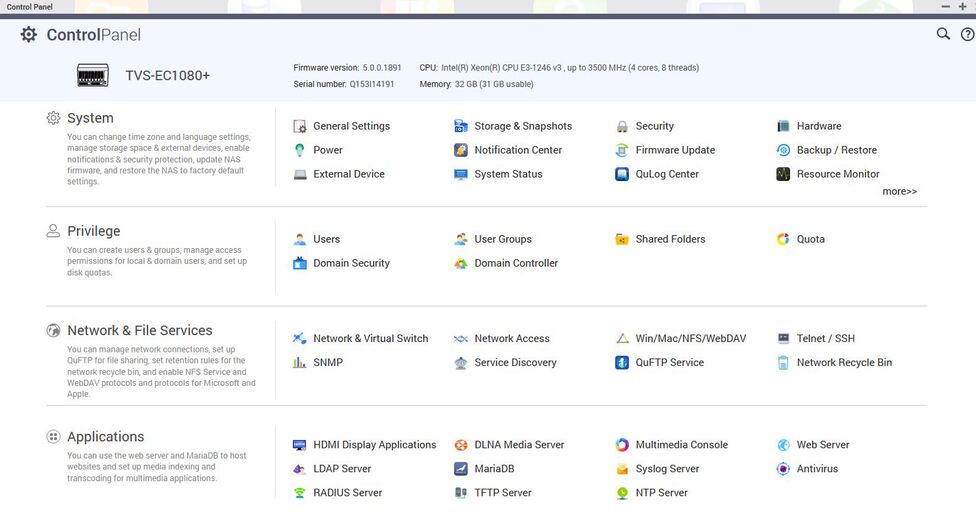
ok First click on Shared Folder in the Privilege area
then in the Shared Folder interface click on Create then shared folder
Give the folder a name like Plex Data then choose Enter Path Manually in that field enter /.qpkg/PlexMediaServer then hit the create button
after that close Control Panel app and open the File Station app on your QNAP to see the Plex Data folder you just made. In that you should see a Library folder then another Plex Media Server folder which you should then see the plugin-support folder I referenced earlier.
Check that you have the database backups in there.
Before you start changing filenames based on the restore document make sure that the server is stopped running in App Center

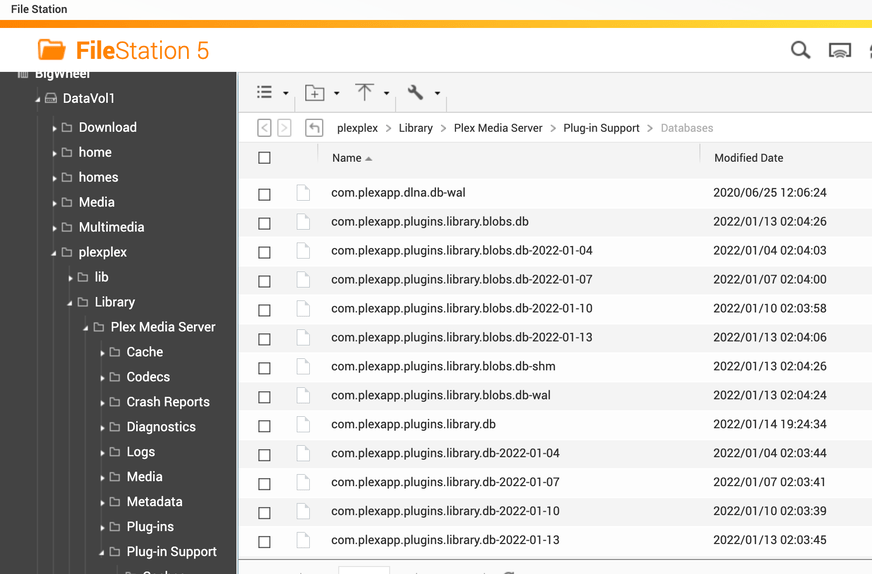

I don’t see the file I just made is “File Station”
I got it. I saw the file the second time I did it. I am now trying to follow the rest of this.

I opened the Plex media server and then the plugin and saw the backups. They look current though from today and yesterday only. I don’t believe that these have my original data. What about the backups in my application data local. That has a back up from Jan 7th which has to be the original data. Can I use that?
