Server Version#: 1.20.2
Player Version#:
Hi Community,
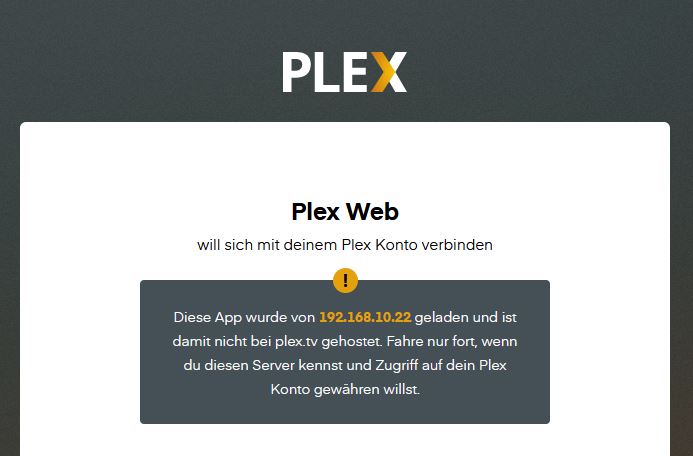
my Plex Server is not avaiable anymore inside my local network, but via Plex.tv it is reachable. Any idea why this could be? So far I remember I did not change any settings.
Server Version#: 1.20.2
Player Version#:
Hi Community,
my Plex Server is not avaiable anymore inside my local network, but via Plex.tv it is reachable. Any idea why this could be? So far I remember I did not change any settings.
How do you try to access it from within your home network?
Can you access it from a browser using http://127.0.0.1:32400/web (if you’re on the same machine as your server) or http://[local PMS IP address]:32400/web?
local PMS IP address, as this is standard if you click on open in QNAP App store PMS icon
Do you get a specific error message in your browser?
Same result if you’re using https instead of http?
But I guess I have a corrupt file system anyway. So I wont get around a backup and a complet new install. 
When I will set up a new Library Plex doesnt show me any share directories on my qnap. Only the mdaRoot, CACHEDEV etc, and with those it is not working. Plex finds the files but is not playing them. The files are ok, thats tested. So somewhere is a mistake in Plex. After a complete new set up it is hopefully gone.
Almost 25TB. This will take ages to backup and to re-copy.
Which PMS version do you have?
Do you have a shared folder named ‘PlexData’ in Control Panel - Shared Folders ?
If so, and you give user admin (or whichever login account you use) permission to access it,
then you can use that share to manually make a ZIP of the “Logs” directory to download then upload here so we can see what’s happening.
Logs(1).zip (4.0 MB) I use the latest 1.20.2 but it was already before the update with 1.20.1
I was hoping an update will resolve it, but I was proofen wrong!
There are no errors in your logs.
What is the IP address you are attempting to connect from?
Is the server properly associated with your account ?
The server address is 192.168.10.22
As said before i click on the PMS symbol in QNAP App Center. The browser opens and the error message posted before appears.
I go to plex.tv sign in and voila the server is there.
I suppose this has to do with the change of hdd and renaming of folders I did. O guess the QTS has some problems as well.
I do a backup and setup everything again from scratch. Takes me most probably weeks but might be the best solution.
Don’t do that just yet.
Most of these situations are easy to clear.
I have created the PlexData share for cases just like this. We can get into the server’s data files directly through FileStation . The task is much easier.
We first need figure out what’s wrong.
The error from your brower…
Antivirus software can also cause this.
Can you help me understand what other things might have been updated which could contribute to or cause this?
Hi ChuckPa,
thanks for that tipp. Yes thats true I usually use Firefox in Privat Mode. I dont know why I mes this up. Usually to nervous when my Qnap is failing.
But still if I want to add a new library this is what Plex is showing me in folder structure.
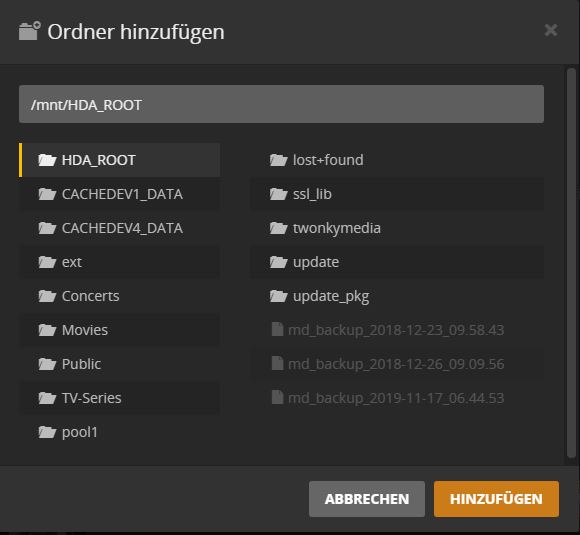
When I setup my library first it appeared different. /share/…
If I know go into CACHEDEV1_DATA and further intothe targeted folder, Plex is scanning and finding, but not playing the files due to error message.
Last time I had this situation the QNAP filesystem was currupt.
Please make sure you have DEBUG logging on and VERBOSE off…
Now attempt to play something.
Let it fail.
After it fails, download the LOGS (ZIP) and attach that ZIP here.
The logs will contain the error information so we can figure out what’s wrong.
What is VERBOSE and where can I find it?
Edit:
Think I foud it.
Will now delete the Library and scan it again.
Then zip the logs and post them.
I see the structure you have for music.
That structure is very difficult to use in Plex.
Let’s set that aside for a moment.
Are you able to play any movies or television series episodes ?
With the amount of Music there is not really any other usfficient way to sort on HDD.
Movies and TV-Series are running without any Problem. Also the Music. Just If I want to add this Folder with my own mixes its getting weired.
But this is only after I changed the HDD in the QNAP.
What I did. I put in an empty slot a new HDD 8TB. I setup folders as it was on my old HDD with 4TB but with an 1 at the end as you will get trouble otherwise.
After everything was copied to the new HDD I removed the old HDD and renamed the Folders back to the original name. Afterwards I figured also out, that Folder name and Pathname are 2 different things, but this was also solved.
Since this day I have the trouble with only that 1 library with own mixes.
So I delted it and wanted to scan it new. And from there I got this problem with the path and that Plex is not playing the items listed.
Plex also does not really delete the Library which I just found out. See the picture.

If it is of any help,
I have 3 shared folders for my TV series – series age based (/share/tv, /share/tv2, and /share/tv3).
I list all 3 of them in PMS. It doesn’t care that they are disparate. It only cares that I have <Root Folder>/Series Name/Season x/Episode.
You can do the same for your music and it will allow you to give PMS what it wants while you separate into what you want.
I have one Music library but actually have 3 shared folders in it. (Flac, MP3-320, Other).
All 3 obey Plex’s structure so it doesn’t care how the upper portion is.
It only cares what is below the starting point (/share/something/anything/more stuff) )