Plex on Fire Stick 4K cannot access server

Server Version#: Synology DSM 7.1.1-42962 Synology Model DS218+
Player Version#: Fire Stick 4K 9.25.0.2374
<If providing server logs please do NOT turn on verbose logging, only debug logging should be enabled>

Plex Media Server installed on Synology DS218+ works just fine. Running Plex for Mac on my MacBook Pro and it works fine. Plex on my iPad and iPhone work just fine. Plex downloaded from my Fire Stick 4K is not working on any of my 5 tv’s. I get an error message on Firestick saying it cannot access the Server. On the applications for the iPad and iPhone there is a place in settings where you Manage Library Access and then Grant Library Access. There is nothing like that on the Fire Stick app. Otherwise I think there wouldn’t be a problem. Any help you can be to get my 5 tv’s working with be greatly appreciated. BTW, all the other apps on the Firesticks work fine.

In the app on fire stick what to you have set for Allow Insecure connections?

That has nothing to do with server connection.

I have it set to never.

before you do below can you get the android tv logs ( you can message them to me if don’t want to post a file here)

can you change it to “on same network” and see if that changes anything.

I tried both of those toggles including “always” and it made no difference.

ok will need to see the android logs then

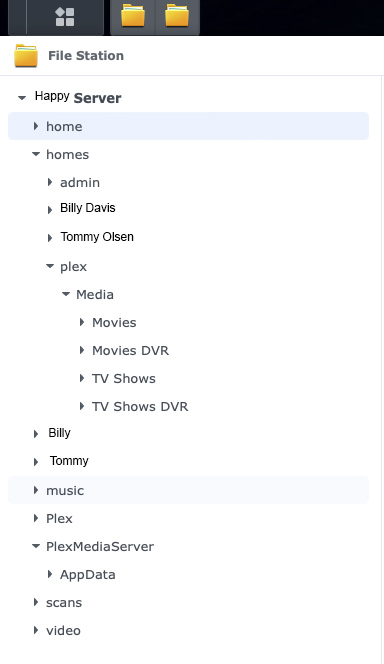
Today, I rebooted my Synology NAS and that did not have any effect on it. I’m wondering if it has something to do with my directory structure on my NAS. In 2021,https://forums.plex.tv/tag/server-synology ChuckPa gave me some help as to file structure. I think he was trying to tell me that I put my media in a folder that I shouldn’t have possibly and the program is having a hard time finding it. I wonder if that’s what is going on with the Fire Stick version of Plex is encountering?

screen

This topic was automatically closed 90 days after the last reply. New replies are no longer allowed.