Synology NAS DS416 (4 off WD40EFRX-68N32N0) (RED) 4TB Drives
DSM Version DSM 7.1.1-42962 Update 4
Contents mainly mp4 /m4v films
Ethernet Cat 6 (gigabit) running on an Archer VR2800 (TP-Link) with 15 wired clients and 4 wireless clients through a
TP-LINK 16-Port Gigabit Desktop Switch
PLEX server runs on the Mac mini
Plex runs to an AppleTV (A1625 32bit) via the ethernet ( I have also tried WiFi)
Issue: Plex frequently acts as though it is decoding or “hanging” although (AFAIK) there are NO decodes being done.
I am certainly no tech wizard and I would dearly love to know why this occurs. Is it because of any bottleneck in the network, the AppleTV, slow drives or the old Mac Mini?
I am hoping to be able to upgrade to the 2023 M2 Mini/512K but is that really likely to fix this issue?
LOGS?
I have no logs for any of this and don’t know how to go about getting them - any suggestions please?
Hello Helpful people - thank you for the insights.
To give you some background - I’m now 80 and thankfully in possession of most of my faculties - but a bit more slow than hitherto!
FYI there is no decoding, I use Handbrake to perform that for producing the m4v files.
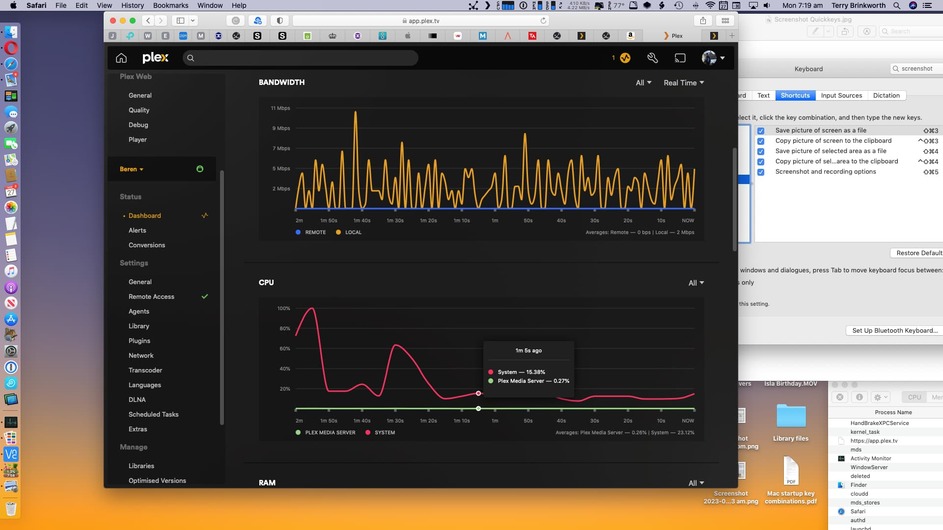
Herewith some screenshots - same movie, still from ATV.
You’re right. The video is directly playing with no transcoding on your server. The other graphs also show that the PMS app is barely busy… that being said it seems Handbrake is giving the machine itself quite some work.
Do you see the same interruption on the Apple TV if you pause the Handbrake encoding job?
Sorry for the confusion there: I always run the Handbrake job well BEFORE viewing the film.
Additionally, I am aware that the Handbrake operation gets up to some fairly high CPU rates, so I try to avoid running those jobs except at ‘slack’ times. 99% of those Handbrake jobs are transcoding films from “EyeTV” outputs so really not very frequent.
The “stutters” when viewing the M4V output via the ATV seem to occur fairly randomly and are certainly frequent and of such duration as to be damnably frustrating!
Hah! So it looks like I’m asking too much of that mini. I’ll try to check what’s going on at the mini when next I’m watching something and it’s giving grief!
TerryB