Just signed up for Plex Pass as I’m going to an “OLD” friend’s house tomorrow to see him fitted for his Natron coating bag in preparation for his mummification - soon (we hope not, but he’s ancient - we all die at some point).
In the meantime, I’d like to be able to provide a free Plex App for his FireTV and add him to my Home so I can deal with his streams a bit better.
Will I be able to do that - by tomorrow at noonish?
So far, my Plex Pass is… missing… that doesn’t bode well for tomorrow, does it?
You can do that right now. for the forums just explicitly log out then back in and it should pick it up. but your Plex account does have it already.
be aware he will be part of the fast user switcher so make sure to put a PIN on your account so he cannot switch to you.
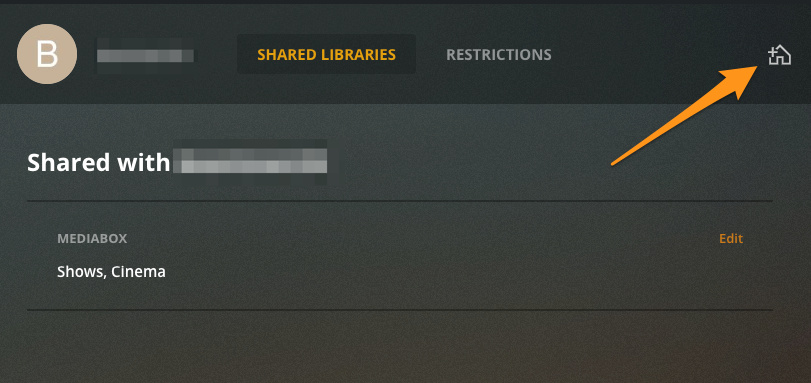
if you are already sharing with him click on his user in the Users & Sharing page then click on the House icon on the top right. then he will have to accept the invite on his account
This will be a surprise (perhaps for both of us). I’d like to walk in get on his pute and sign him up - then connect with my phone to home (his WiFi is a nightmare so I’ll be doing it on my cell data) and get him up and running without him knowing what the F happened to cause all the new amazing stuff…
He does have Internet at the FireTV - as he actually watches Prime stuff, but there are issues with the WiFi otherwise - as I can’t actually connect to it.
I’ll try to get what I can get before I get there - 90 minute drive - then do it all while there.
It’s short notice - but so is my $4.99 a month… HA!
(mark this on your calendar - it’s noteworthy)
I’m not sure he’d live long enough to justify me buying him a Roku… I could take him one of mine…lol
Just kidding, really… the guy is ancient (6 years older than I am), but technically speaking I’d rather have explained to my Dad how to get email on his wrist-watch - and that guy taught me everything I know about electricity, electronics and warp drive - never got an email in his life - nor apparently needed to as he died some time ago not ever having gotten one (Miss ya, Pappy).
I hope it can happen tomorrow - I really don’t want to go again so soon (cough…)…
I wouldn’t presume to think Plex-DVR will surpass Channels DVR/MCEBuddy. Bud and I have been friends for more than a decade and Channels spanked Silicon Dust early in the game. I don’t need Plex for TV. Or Music - apparently.
I’m doing this for:
My friend who keeps asking me to send him flash drives.
Actor Images got moved atop hub noise on my Roku (I reward good behavior - and whack a rolled up newspaper on the nose for bad - lol).
I can pull the plug at any time - and will do so - at any time…when it’s apparent I don’t need a Plex Pass…lol
Head to Settings -> Users & Sharing. Hover your mouse over your user. If there’s a red “X” at the right, you’re in a Home. Click the “X” to leave it. If not, and you want to remove your PIN, click Edit PIN, confirm your existing PIN, and then click Remove (only if there are no other Home Users).
just FYI a pin is not required just recommended due to fast user switching. On app that you know you are the only one to use that device you can have it skip the pin sign in and just log into yourself normally
yeah you are always technically in the home. If you don’t have anyone else in it then you won’t have the X because as admin what that really does is kick everyone else out of it. ( they can still share normally)
( hit edit pin and here should be a remove action like mentioned above)
At no time during the creating of my friend’s account were we asked to create a user name. How would he do that? I can’t find where to create or edit my own actually and can’t recall at what point I game myself a user name.