Server Version#: 1.19.3.2852
Player Version#:8.1.0.17967
Hello,
I am receiving a playblack error when I try to play a certain file within the plex Android app via my TX5Pro Android box.
I have tested some other files with the same type of quality and it plays however, cannot pinpoint it if its related to the actual file but this is happened after I updated the PMS on server and Plex Android app on my Android box.
Also if I play the file directly in the PMS on the server, and error pops up: “Playback Error: This server is not powerful enough to convert video”. But I never play files directly on server and I did a test to play another file and it starts completely fine and plays…
Within the setting where the new Plex player is enabled, it is displaying this error when I play a file: “An error occurred while attempting to play this video. Please try restarting both the Plex Media Server and this app”.
When I disable the new Plex player and use the old one it displays this error: “Playback was not possible not enough CPU for conversion of this item”.
I have restarted the Plex mobile app installed on my Android box as well PMS on server.
I also found a thread which the issue could be related to the new Plex player however, I am unsure but nonetheless I am adding it below.
Also the comment to fix the issue is related to the comment below from @DaveBinM.
[FFmpeg] [ERROR] [tls @ 0x82abd060] The certificate’s owner does not match hostname [plex1.MYDOMAIN.com](http://plex1.mydomain.com/)
Errors like this tend to indicate a custom certificate or a custom URL. Our certificate won’t match a custom URL so that would explain the SSL failure. In the new player as we now validate SSL on playback connections, the old player didn’t validate the certificate/hostname, so seems something isn’t quite right there. We’ll discuss internally how best to handle these while maintaining the best user security we can.
You can also try adding the domain into Custom certificate domain in the Server settings under `Network (you’ll need to enable advanced settings).
That being said if the above statement is the fix for the issue I’m still not technically understanding what I need to do however, I appreciate the help in case.
Hello there. I have the exact same problem (and the exact same versions mentioned above).
It seems the TV Plex Application in v8.1.0.17967 was released on 05-29-2020 and I didn’t encounter any problem before that with my movies.
I tried to continue watching a movie that I started to watch about 5 days ago (probably when I was using the previous version) and resuming didn’t work.
I tried many other films that was working before, and they all end up with the same message :
“An error occurred while attempting to play this video. Please try restarting both the Plex Media Server and this app”
Disabling the new Plex player also produced the same issue :
“Playback was not possible not enough CPU for conversion of this item”
I don’t know if this helps, but all my movies are MKVs multilingual files, and weight approximately 2GB.
It is possible to investigate with that data?
While waiting for a fix, is it possible to install the previous version on my Android TV ?
I’ve tried to completely reinstall the application and reset preferences on my TV, restart my Plex server on my NAS, but still the same issue. I’m currently unable to play movies on my TV :’(
Any help will be greatly appreciated Thanks a lot!
I am cutting some files and will provide the samples shortly. To add a bit context the certain files which I am having issues with are only related to VC-1, VC-3 in MKV containers and my movies are remuxes quality.
@DaveBinM here are few samples of the file I was having issues with. The picture format for these are 1080p 24fps VC-1 Blu-Ray. I have tested the original file as well as these samples. Same error/same issue.
Great. Thanks! I used a ad base website to upload the samples so maybe I’ll use GDrive or Dropbox. Let me know if you run into issues downloading the samples.
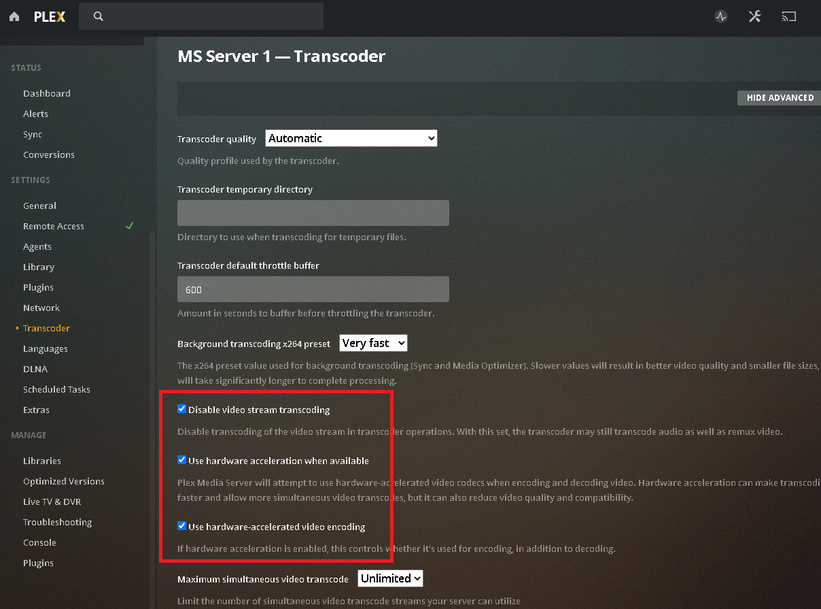
After testing some settings within PMS I have noticed in the Transcoder tab is that if it is not enabled the file plays however, the playback is transcoding it where my CPU on server goes through the ceiling…


 Thanks a lot!
 Thanks! I used a ad base website to upload the samples so maybe I’ll use GDrive or Dropbox. Let me know if you run into issues downloading the samples.