Would really appreciate some help. When I upload programs into Plex from an external drive the files not going into their own program folders on Plex. They’re going into random folders. I have the latest mac mini and a new external drive so the technology is fine. Have checked and re-checked settings.
Would you mind sharing a specific example of where you’re placing the files (preferably incl. file names and folder structure), and how they end up in Plex (maybe with a screenshot, pointing out the disconnect)?
Many thanks for your response.
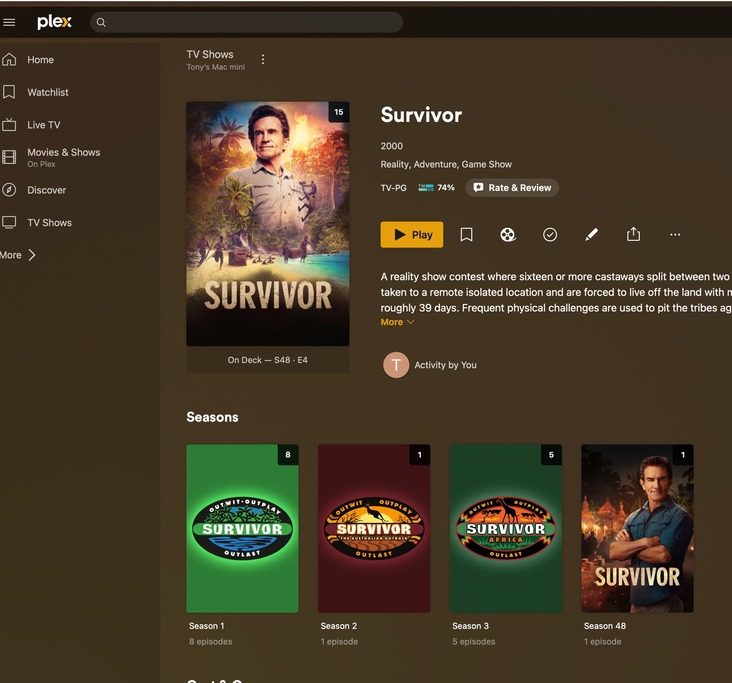
I’m not sure that this will help, but one screen shot shows the downloaded file on my external drive (Found S02E16) and the second, where it appears in Plex (Survivor Season 2). This is symptomatic of most files as the only Survivor episode I have is the one in Season 48. Those appearing in Plex in Survivor Seasons 1 and 3 are also other non-related programs.
I look forward to any advice you may be able to provide.
Regards

You’ll need to fix the organization of those files.
Assuming, your library is linked to /Volumes/Media/TV Shows, the organization should be like this:
TV Shows  <- folder linked to your library
  Found (2023)
    Season 02
      Found (2023) - s02e16 - Missing While Witnessed.mkv
- Don’t drop any folder levels or mix up show/season level folders.
- Having the episode title in the file name is purely optional.
- If you absolutely need the technical mumbo jumbo, place it in a set of square brackets, so it won’t throw Plex off.
https://support.plex.tv/articles/naming-and-organizing-your-tv-show-files/
It is pretty important to understand why following Plex’s organization scheme matters.
When you specify a folder for Plex to monitor, it makes many assumptions about how the media within that folder is organized. In your case, you should have pointed Plex to the folder called /TV Shows/. Next, Plex looks at every single folder under that (such as /TV Shows/DOC.S01/ and /TV Shows/Found.S02/) and guesses that this is a show.
It will try to figure out exactly what show it is based on the name of the folder. This is why it is important to use the proper name of the show itself, possibly even including the year in parenthesis (it absolutely helps to include the year, but can work without in rare cases).
Next, it drills down into each show’s folder and looks for episode files and/or Season folders. In my experience, these season folders aren’t as important to include, especially if there is only one season, but as soon as you have 2 seasons, I would start using folders.
At this point, Plex now ignores filenames, and looks for episode numbering information. So it looks for Exx or SxxExx or the like (seen in the “naming your TV Shows files” article linked by Tom80H), and sets those as episodes of the tv show of the folder they are in.
Where you went wrong:
If you deviate from the folder format, Plex’s algorithm starts to go a bit haywire. Since you don’t have any show folders that LOOK like show folders, I think Plex falls back on an alternate scheme where it assumes all folders within the main folder are “SEASONS” of a single show. It tries to determine which show they are, ans seems to have latched onto the “Survivor” folder as the best guess. It then assumes every other folder here is part of the same show and ignores their names. It then looks at the video files, and also ignores their names. At this point, all it looks for is Exx or SxxExx info, and marks those as episodes of the above TV Show.
Alternatively, this situation can also happen if you point Plex at a folder one level too high. If you have your media as seen in your screenshot, but you have a folder one level higher that Plex looks at such as /media/TV Shows/xxxxx, Plex does the same thing as what I stated before. It sees the TV Shows folder and assumes that it is a show, but cannot find a tv show called *TV Shows. It will go into it and find folders/files with names to guess which show its a part of (in this case survivor), then mark all other folders as part of this show.
I believe that all you need to do currently, is correct your folder names to be the proper name of the show, IF you are using the correct folder for your library.
Many thanks. I will try this and see if it works.
