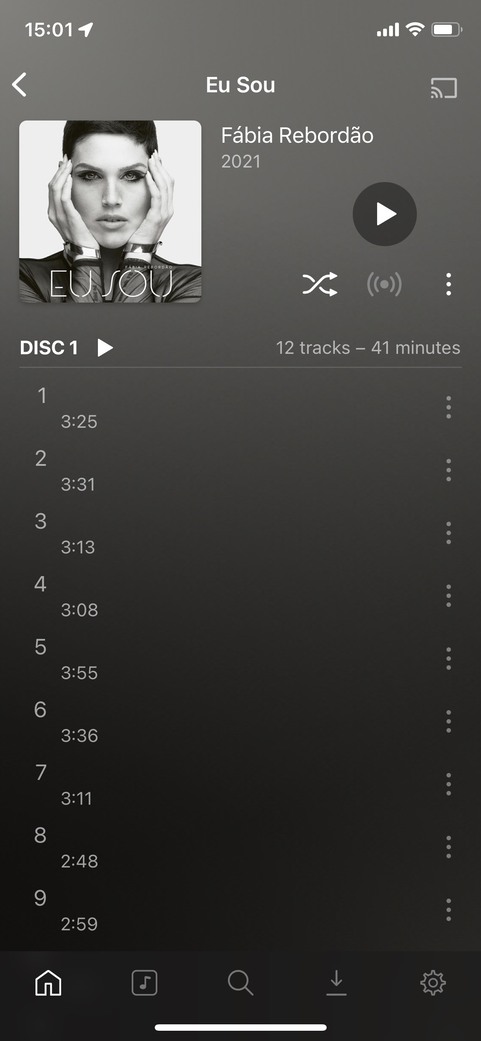
Synology DS218+ NAS DSM7 Server Version#: 1.26.1.5798
Player Version#: Plexamp 4.2.1
iPhone 11 Pro, iOS 15.4
I ripped this CD using iTunes and obtained .m4a files lossless (ALAC).
Unfortunately iOS apps don’t seem to be able to retrieve the embedded song names.
The Plex web player does not have any problems, only the iOS apps.
@madeirakny Make sure you have updated PMS and perform a “Refresh Metadata” on just this album.
The issue is that although the track titles show up in the Plex App or Plex Web, the track titles are not being set properly by the the scanning engine. You can confirm this by editing the track properties. You’ll see that the “Title” field is empty. I have no idea how Plex Web/App is able to display the Track Title information properly when the Track “Title” field is empty.
You can confirm that you are experiencing this behavior by simply filling in the track “Title” field yourself. The track title(s) should appear in PlexAmp. Hopefully the Metadata refresh will work for you like it did for me.