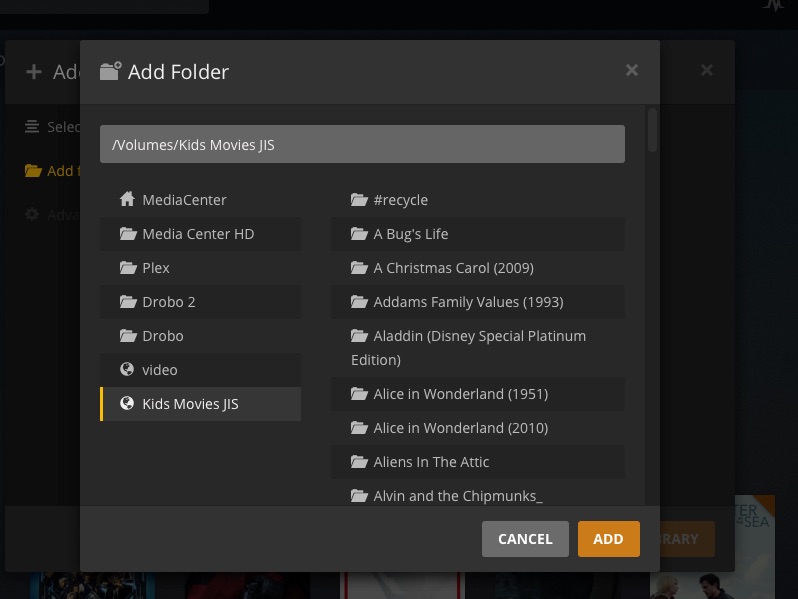
Hi I wonder if anyone could please help with an issue that I am having.
Im running Plex Media Server on a Mac Mini with an external HD attached. Also on the network I have a Synology NAS on my network. I have using 3 libraries (Kids movies, movies and TV) all running from the external HD. I am trying to move the Kids Movies library to the Synology NAS but when I add it as a new library to Plex it pulls not just from the Synology NAS but the external HD as well giving me a library with everything I own.
I would be very grateful of any help.
any chance there’s an overlap (e.g. regular “videos” folder included in the “Kids Movies JIS” folder) or your regular movies gotten stuck in the “#recycle” folder?
No luck. I just did a double check and all that is in the kids movies folder is kids movies. The only place where the other moves that are being pulled from are an external HD called Plex. I have been using Plex for years and never had this issue. This is the first time I have tried to link a folder that Is on a network drive. It seems to make no sense. Thank you again for trying
I just tried adding again and it seems that it starts off fine by adding the “kids movies” from the correct folder on the Synology NAS. Then it scans the HD of the MacMini that is running PMS and finds the movie folder on the external HD attached to the MacMini. I am totally lost
It shows up as “/volumes/kids movies” but I am mounting the folder from the Synology NAS on the MacMini. Sorry for being dumb but should I be mounting it a different way ?
Thank you for taking the time to reply to this. I have no extra folders listed but it seems that Plex is adding the external HD to the scan after and adding the files in other folders. Im guessing it may be the way I have the NAS mounted
I have attached a couple of screen grabs. Thank you agin for your help
Unfortunately as the folder is pulling in all media files attached to the MacMini (TV and movies) it is still scanning and adding metadata. Shall I wait ?
Thank you again for your time and detail.
Yes you are correct the :
/Volumes/Kids Movies JIS/TV/_CCC SafetyNet
/Volumes/Kids Movies JIS/the.simpsons.s01e01
/Volumes/Kids Movies JIS/britains.got.talent.s07e06.hdtv.x264-c4tv
should not be there. opps They are duplicates from the TV folder. The TV folder is set up correctly but I did notice something
Volumes/Kids Movies JIS/TV/_CCC SafetyNet
If you look after kids Movies JIS you can see TV added and that (along with the movie folder) is where the other files are. Can I stop Plex doing that ? If not do I have to just go in and delete all the extras ?
Sorry I should have said the TV and Movie folders are on an external HD (named plex) and the kids movies are on a different NAS. Will that make a difference ?