Server Version#: 4.69.1
Player Version#:
-
Every now and then (especially ~month or so of inactivity) Whenever I launch Plex on my browser (served from Synology NAS) to update my movie collection, I’m greeted with the “Plex web setup - Customize your media” page where I have to reselect all the pinned sources. Is this intended functionality?
-
I notice some of my movies become unmatched and the metadata is missing. I am now editing my movie filenames to include the (date). Hopefully that helps. I have all my .mkvs in one folder. Not sure if it makes a difference to have them in separate folders.
-
Is there any way to lock a specific movie poster? I set the cover manually but then some of them reset to another poster art.
-
It seems today that almost ALL of my movies were marked as unwatched. Why would this happen?
Thank you
I agree! The randomly changing movie covers are driving me nuts! How does one stop that?
Using local assets is the only sure way. You store them with your media. See Local Media Assets - Movies | Plex Support for details and then ensure use local assets is enabled on your libraries advanced settings.
If you don’t use local assets then plex scrapes the posters from sites like TMDB or TVDB and depending on changes (additions, deletes & ratings) at their sites they will propagate to plex changing the default ones it picks.
Oh man, that’s a real bummer. Do you know of a quick way to download the cover art so I don’t have to manually crop to aspect?
I’ve local assets for everything, poster and fanart for both movies and tv. It does take a while to setup but the randomness of art changing upon a refresh drove me crazy so I needed to fix it.
I use The Poster DB (https://theposterdb.com) and FanArt (https://fanart.tv) for posters, shows and background as my primary source and then fall back to TMDB (https://www.themoviedb.org) if there is nothing on the other two I like.
I realized that I will need to put my movies in separate folders. I’m assuming that if I select the “Choose an image” option when editing the coverart and using an image I downloaded from posterdb, that would get changed during a refresh too?
You definitely want the movies in their own folders, it helps with performance among other things. Having everything in a flat structure while it may work could cause you issues into the future.
You could use the choose an image as you say but I’ve not have good experience myself with it. Using pure local assets is best IMO.
Lets take Aliens as an example. This is how I have my files including the local art within the movie folder called Aliens (1986) {tmdb-679} The stuff in { } is used for matching exactly against tmdb so plex does not need to guess. This is optional but powerful.
plex@dokuro:/data/MediaServer/14b-Movies/Movies/Aliens (1986) {tmdb-679}$ find . -type f
./Aliens (1986).mp4
./poster.jpg
./fanart.jpg
plex@dokuro:/data/MediaServer/14b-Movies/Movies/Aliens (1986) {tmdb-679}$
Then just make sure Use local assets is enabled on your libraries advanced settings.
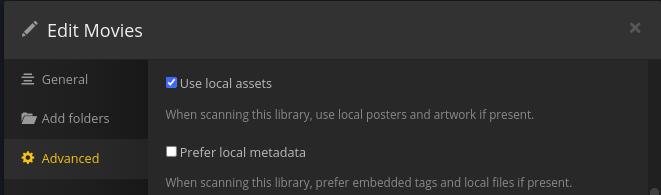
Plex will then always use these for the artwork. If you update the artwork in those folder plex will then update it but will never pick anything else.
Only hiccup might happen if you manually selected some artwork in the past as plex may see that as a edit and lock the field. Anyhow, if you are setting up new this won’t be an issue.
