more people report the exact same problem (see above)
NOTHING in my network changed for months. Same router, same modem, same firmware’s and settings. Even factory reset my hardware for Troubleshooting. But somehow suddenly in November the issue started. And you are telling me its my network?
As someone working in High-Level Tech support myself my customers and my manager would be really mad at me for saying such a thing, based on these facts.
I‘m not here to fight with you. You‘re reporting a mixed setup of UPnP and manual port forwarding with accessibility dropping after some time.
The argument „I haven’t changed anything“ is of little value if there’s other players involved, e.g. your ISP (beyond your own statement that you were going back-and-forth with your network settings when attempting to troubleshoot those remote access issues).
I can only recommend you do the basic remote access troubleshooting:
Disable UPnP
Establish a port forward, pointing to the machine hosting your Plex Media Server and tell Plex about that manually specified port
Check if the port is accessible/visible from outside your home network (e.g. using a service like canyouseeme.org)
Yes, there’s always a few users reporting remote access issues. Many claiming it only started after a specific server or client update… in the end the vast majority comes down to some misconfiguration or a backen change by their ISP.
That’s no guarantee Plex won’t get something messed up… but it makes me fairly confident of my feedback.
OK so to clear it up and condense the infos a bit:
UPnP is enabled in my network and works for any other service
Only plex loses Online access, Game servers, VPN works
What I did not test yet is Public IP:Port access from extern if the issue is present, might try that
The manual port forwarding is technically obsolete and it works without it as well if the external port for plex is set to 32400
If I disable manual port assignment and plex picks itself, then it does not matter if I have UPnP enabled or not or if I use manual forwarding or not. Sometimes it works for a few days and sometimes it Disconnects after minutes.
My External IP is static and never changes. My Provider does not do regular disconnects or connection refreshes.
To your questions:
I already answered above
and 3. Will test that now and should have a quick result if the disconnect happens fast again
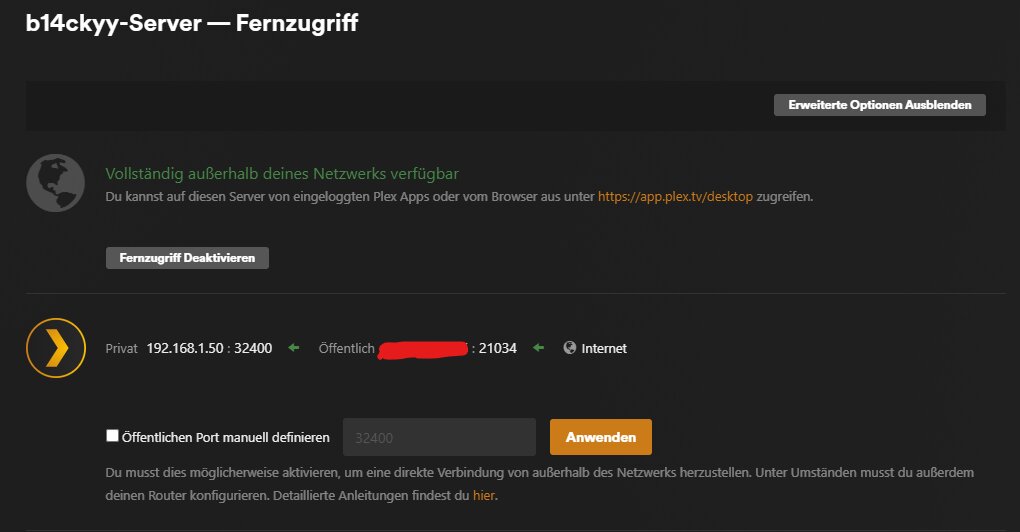
Shortly after it showed no OP address at all, no internal and no external. I have down and up the docker container and now I see the IPs but it showed no connection possible:
How is me speculating an issue at Plex different from you speculating a new restriction from my ISP or issue with my setup? Lol. I did test my port forwarding, hence the speculation. Anyways, just as mysteriously as these issues came along with zero changes to my configuration, they have disappeared (with zero changes to my configuration).
I have theoretically a double NAT as there is no other option to not have the ISP router manage my network.
BUT: The Fritz Box that comes from my ISP has the LAN port to my main Router (an Asus) set to Exposed host. ALL NAT functions are disabled. Any bit of traffic, no matter the port, that comes from external and is not explicitly routed by that FritzBox will be forwarded to my Asus and handled there.
The double NAT can be ruled out entirely since that is the part that I control and that part has not changed for the past 3 years and before that, it was just a different FritzBox Model for 7 years. The only reason why plex knows that I have a double NAT is, because my Asus goes out to another widely used private IP and not directly to a public IP.
Does the Asus show a private IP for the WAN connection?
Plex expects a basic home Internet connection with one router performing NAT to RFC-1918 addresses (10.x.x.x, 172.16.x.x-172.31.x.x, 192.168.x.x). The router also provides port forwarding for remote access whether via UPnP or manual configuration.
You’ve clearly a different setup.
Just trying to understand all the pieces and figure out if Plex remote access can work with it.
Plex remote access worked for 1.5 years with it since I set up my first server.
But for understanding.
Internet → Public IP 46.253.xxx.xxx → ISP Router (KVM FritzBox) → Private IP Gateway 192.168.178.1 → Exposed Host (All Incoming Traffic Forwarded) → ASUS Router WAN IP 192.168.178.10 → ASUS NAT with UPnP and/or Port Forwarding → Private IP Gateway of the ASUS Router 192.168.1.1 → OpenMediaVault Server with Physical IP 192.168.1.50 → Plex in Docker Container in HOST mode
I did some more testing earlier and I have a feeling. Why does canyouseeme.org not get a successful port reply when I use anything else than 32400. When the issue started to happen around November I had disconnects every few days no matter if I used 32400 or any auto assigned external port. But in both ways it worked for 2-3 days before each disconnect and then I had to restart my ISP Router to get it working again.
CURRENT state is… I can ONLY use 32400 as the public port and no other port is getting a connection at all. But 32400 seems to be stable now for at least 2-3 weeks I would say.
So I have a feeling that there was/is actually an issue with the Plex DynDNS service (Was for me, is for others still). But at the same time with all my testing and experimenting, I broke something here that does not allow me to use other ports.
And I think I might know what the issue is.
If I have no port defined in my compose file, Plex would expect any request that arrives at the LAN port of my server to address port 32400 no matter what the public port is, correct? But what I do right now is, when using a different custom port, I forward the public port unchanged to my intranet. But instead I have to make the public port into 32400 in the intranet instead.
That in return means, that UPnP is not working as that should do that automatically. I will try that right now.
One mistery solved. The NON-Working automatic port was indeed user error by me.
I forwarded 21034 public to 21034 intranet. That cannot work of course. I removed the manual port forwarding entirely. No manual port open for plex anymore. Now UPnP has taken over again and that works. And i have acces over internet again as well.
I will now leave it like that for a few days and report back if its all good now. So you where right my manual port forwarding did screw something up additionally and blocked UPnP.
That does not explain the disconnects after a few days that I experienced from November till January though. Maybe it was a quirk of the ISP, maybe an issue with plex servers. I don’t know. But an ISP issue affecting only a very specific port and service seems unlikely to me.
The automatic Port Opening via UPnP does not seem to last. I got a disconnect again. So I checked the port log in my asus router logs and the automatic opened port was not listed anymore. Plex showed the Double NAT warning again.
So I added a manually opened port again by hand, this time with the correct external and internal port and the Plex Server reconnected immediately with no Double NAT warning anymore like above.
Other Applications don’t have this problem in my network and automatic port opening works and is stable. Even Steam in a Windows VM through a VLAN on the Debian Host is able to open ports and run game servers without interruption.
So is there maybe a port opening refresh necessary that the Plex server is not doing so my Router is closing the ports after some time?
That also explains, why Restarting my ISP Modem Router or Switching between Manual defined and automatic port, always fixed the issue temporarily as it re-triggers the automatic port opening. But then always just for 1 day or 2 until the ASUS decides its not neded anymore.
Alright I think it works now. No issues since my last post with manual port forwarding.
I would still like to know why UPnP is not working anymore since it seemed to work in the past. It was clearly when the port was auto-opened, that it then stops working within a few hours or at most a day.
But with correctly manually opened port it seems to be stable now.
Just went through this over a separate issue and got remote access fixed as a bonus. Packet capture showed that my streaming devices were redirected to reach plex via my public ip. That’s where I got “unreachable destination”. Realized that the port forwarding rules handle external/ingress connections and not internal/egress. So created Destination Nat rule to have destinations to port 32400 point to the plex sever and port. After that, all streaming devices were able to reach plex locally, without login and remote access stayed green. Seems that when plex server checks remote access it egresses out to your public ip @ prt 32400 to get back to itself, and port forwards won’t handle that connection, but a DNAT will.
The functionality of remote access is tested from the outside of your local network (by hosts which are part of the Plex cloud).
Only then it can be called a realistic test.
The results are then forwarded to your server. That’s why the status indicator for remote access is updated after a few seconds.
For what its worth, over the years, I’ve found connection to be on and off at will, not based on any steps I take. When its ‘not accessible’ the connection is “indirect” but a stream still is available, just at a lower Q.
Sometimes switching between the auto default port and a manual port seems to give it a nudge, but in the end I always end up back at the default 32400.
cheers CD
EDIT - UPDATE to what I mentioned above.
Sometimes I still get full access streaming at the original bitrate on 4K, even though Plex reports the stream is NOT available outside my network. Without making any changes to any settings.
I am having exactly the same issue and have been for a while, i am now at the point of ditching plex altogether and going with an emby media server as it seems to just work
Having this problem after doing a reinstall of plex on a new Raspberry Pi install.
"Not available outside your network
Your server is signed in to Plex, but is not reachable from outside your network.Learn more
You currently have Remote Access enabled through a manually-specified port. If you wish to disable Remote Access, you will need to remove your manual port forwarding from your router."
Turned off UPnP.
Have manually specified port 25354 in Plex.
Server Version 1.43.2.10687
Have a manual port forward on the router 192.168.0.__:32400 → wan: 25354
Open port checker says it can see it.
I can access the plex server settings from another pc on the internal network but not the media library.
I can access my media library directly from the server.
I have also tried turning off the manual port, the manual forwarding on the router, and re-enabling UPnp with the same results.